Exit
  • Global community
    • Language:
      • Deutsch
      • English
      • Español
      • Français
      • Português
  • 日本語コミュニティ
  • 한국 커뮤니티
0

icml issue, can't edit file, how can I undo?

New Here ,
Apr 03, 2021 Apr 03, 2021

I was trying to save the text from a file, and created a bunch of .icml files (even though I hit cancel a bunch of times). Later, I threw away the icml files, since I found a way to just save the text as rtf.  BUT now I can't edit the file. Is there a way to revert the file to something that I can edit? When I try to edit it it says "Unable to check out this file. It may be in use by someone else". It still has the normal .indd ending ... 


Thank you!!

TOPICS
Bug , How to , Performance , Type
660
Translate
Report
Community guidelines
Be kind and respectful, give credit to the original source of content, and search for duplicates before posting. Learn more
community guidelines

correct answers 2 Correct answers

Community Expert , Apr 03, 2021 Apr 03, 2021

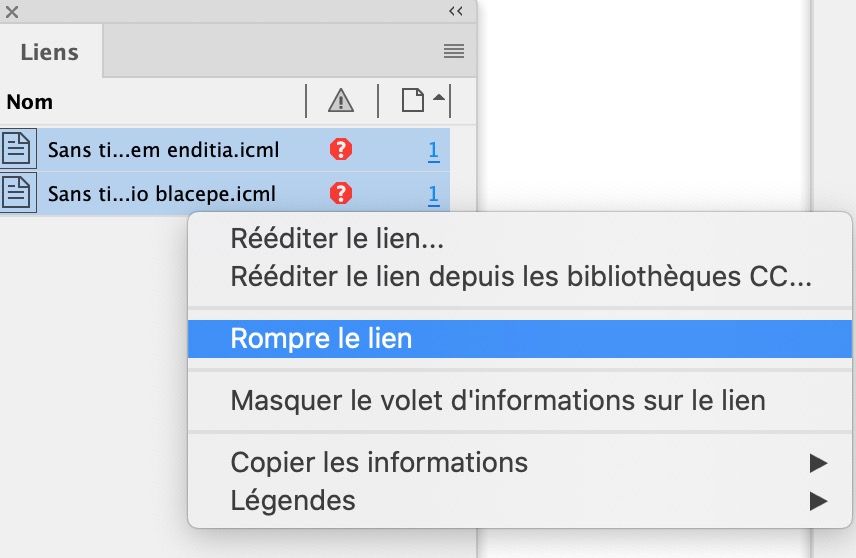
In the Links panel, select the icml files and right click > Break link (or something equivalent, I have a French version)Capture d’écran 2021-04-03 à 19.51.47.jpg

Translate
Community Expert , Apr 03, 2021 Apr 03, 2021

Or,..from the assignments panel, select them all and delete them.

Translate
Community Expert ,
Apr 03, 2021 Apr 03, 2021

In the Links panel, select the icml files and right click > Break link (or something equivalent, I have a French version)Capture d’écran 2021-04-03 à 19.51.47.jpg

Translate
Report
Community guidelines
Be kind and respectful, give credit to the original source of content, and search for duplicates before posting. Learn more
community guidelines
Community Expert ,
Apr 03, 2021 Apr 03, 2021
LATEST

Or,..from the assignments panel, select them all and delete them.

Translate
Report
Community guidelines
Be kind and respectful, give credit to the original source of content, and search for duplicates before posting. Learn more
community guidelines