
Participant
October 29, 2021
Answered

ID 2022 - Content Grabber visual missing?

  • October 29, 2021
  • 3 replies
  • 3319 views

Hello,

I just found out the transparent bagel or whatever, in images is called the "Content Grabber". I'm in the 'love it' crowd, but when I updated to the 2022 version the actual bagle has disappeared. The only way I can tell I'm hovering over that spot now is the change from pointer to grabber hand, and it's too subtle when moving images for me to avoid now. I use both features (changing bounding box and moving the content) enough where it would be a major hassle to go hide/show the content grabber all the time.


I have tried hiding and showing the content grabber, hoping that the visual would come back, but no.

Am I missing a setting that changed with the update?


Running on Mac OS 11.6.

InDesign 2022 v17.0


Thanks!
Correct answer Barb Binder

HI @Stevie5E80:


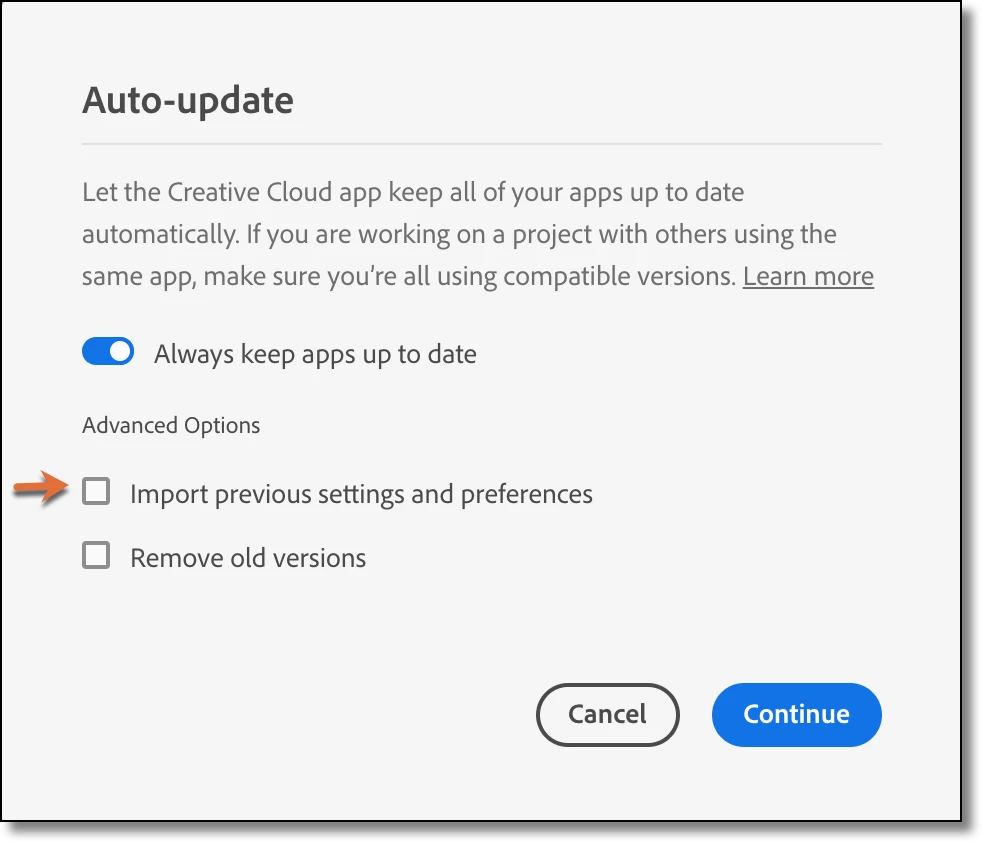
When you install an InDesign upgrade, the default is to port over your preferences from the previous version. This process can cause issues. I encountered enough problems with it over the years so at this point, I just turn it off. (I also keep the old version in case the new one has issues.)

You are past this now, but you might find that rebuilding the cache/preferences now will restore the normal display of the Content Grabber. 

https://www.rockymountaintraining.com/adobe-indesign-rebuilding-preferences-cache/


~Barb

3 replies

Barb Binder
Community Expert
Community Expert
October 29, 2021

Hi @Stevie5E80:


I know, I feel the same way. I just aside time to reset my preferences and manually copy my scripts, find/change queries and style mapping presets over. I can get it done in about 15 minutes.


~Barb

~Barb at Rocky Mountain Training
Barb Binder
Community Expert
Barb BinderCommunity ExpertCorrect answer
Community Expert
October 29, 2021

HI @Stevie5E80:


When you install an InDesign upgrade, the default is to port over your preferences from the previous version. This process can cause issues. I encountered enough problems with it over the years so at this point, I just turn it off. (I also keep the old version in case the new one has issues.)

You are past this now, but you might find that rebuilding the cache/preferences now will restore the normal display of the Content Grabber. 

https://www.rockymountaintraining.com/adobe-indesign-rebuilding-preferences-cache/


~Barb

~Barb at Rocky Mountain Training
Participant
October 29, 2021

Yes this was it. I can see the visual for the content grabber again. Disappointing that it messes stuff up so much to keep preferences.


Thank you!

Bevi Chagnon - PubCom.com
Legend
October 29, 2021

It's turned off by default.

Turn it back on at View / Extras / Show Content Grabber.


|    Bevi Chagnon   |  Designer, Trainer, & Technologist for Accessible Documents ||    PubCom |    Classes & Books for Accessible InDesign, PDFs & MS Office |
Participant
October 29, 2021

No. I have it on. The menu item says "Hide Content Grabber", and I've clicked it a few times...nothing changes. I still can't see the disk 😞