
MarcelV
Participating Frequently
October 28, 2021
Answered

Illustrator and InDesign crashing on launch on Windows 10

  • October 28, 2021
  • 5 replies
  • 6471 views

I cannot start Illustrator and Indesign anymore.
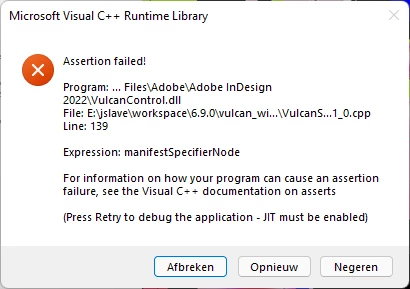
Illustrator just stops launching and crashes and Indesign gives a popup.

I tried re-installing both apps without previous setting but no result.


Please help!


{Renamed by MOD}

This topic has been closed for replies.
Correct answer Srishti Bali

Hi Marcel,


We're glad that the issue is resolved by the suggestion shared by Eugene. We would need to a few more details to get to the root cause of this issue:

  • Exact version of Windows.
  • Just in case you see this crash again, please submit the crash report by following these steps (https://helpx.adobe.com/in/indesign/kb/submit-crash-reports.html ). 
  • Do you remember uninstalling or disabling any third-party extension that works with InDesign 2022 (version 17.0) after which it has started crashing? If yes, which extension/ plugin? 


Looking forward to your response!


Regards,

Srishti

5 replies

Inspiring
January 26, 2023

At work we found a good work-a-round.
1. Click the magnifying glass icon on your taskbar.
2. Type Indesign.
3. Right-mouse botton click the InDesign icon and click "Run as Admin...".
This usually works for Win10.

Srishti Bali
Community Manager
Srishti BaliCommunity ManagerCorrect answer
Community Manager
October 28, 2021

Hi Marcel,


We're glad that the issue is resolved by the suggestion shared by Eugene. We would need to a few more details to get to the root cause of this issue:

  • Exact version of Windows.
  • Just in case you see this crash again, please submit the crash report by following these steps (https://helpx.adobe.com/in/indesign/kb/submit-crash-reports.html ). 
  • Do you remember uninstalling or disabling any third-party extension that works with InDesign 2022 (version 17.0) after which it has started crashing? If yes, which extension/ plugin? 


Looking forward to your response!


Regards,

Srishti

MarcelV
MarcelVAuthor
Participating Frequently
October 29, 2021

Hi Sristi,


My OS is Windows 11 Pro 21H2 Build 22000.282 (Dutch version). 

I do not use any third-party extension or plugins.


Kind regards,

Marcel

Inspiring
October 28, 2021

Gettting this error while trying to open new updated Indesign 2022 application in windows.

Please find the attached crash report.xml also.


Thanks

BobLevine
Community Expert
Community Expert
October 28, 2021

When you installed, did you choose to migrate prefs? If so, that's been known to cause problems for some users. First, try trashing them and if that doesn't work, uninstall / reinstall.

Inspiring
October 28, 2021

Yes. Have checked migrate preferences. during installation. Uninstalled and installed again and its working fine now.

Thank you.

BobLevine
Community Expert
Community Expert
October 28, 2021

Can't help with Illy but what version of InDesign and what version of Windows? 

MarcelV
MarcelVAuthor
Participating Frequently
October 28, 2021

Hi Bob,


I use Windows 11 Pro with the latest updates.

The Adobe Creative Cloud also has all the latest updates.

Problem occuers only with Illustrator & Indesign, not with the other apps i use like Photoshap and XD.

BobLevine
Community Expert
Community Expert
October 28, 2021

I'm running Windows 11 here, too with zero issues. Have you tried trashing your preferences? If not, you may want to try the uninstall / re-install routine but note that InDesign 2020 will no longer be available via CC.


If this is happening with InDesign 2022, when you installed, did you choose to migrate prefs and settings? If so, that's been known to cause issues for some users so if trashing prefs doesn't work, then uninstall / reinstall probably should.

Community Expert
October 28, 2021

Try resetting your preferences:
The easiest way to reset everything is to delete the InDesign preferences: as soon as InDesign starts to boot hold down Shift, Alt, Ctrl (and Apple/Cmd if working on a Macintosh). A dialog will appear asking to delete the InDesign Preferences, select 'Yes' on this dialog.
Further info and instructions here if needed:
https://helpx.adobe.com/in/indesign/kb/indesign-preferences-support-file-locations.html


Same goes for Illustrator


====

You can always try the creative cloud cleaner tool https://helpx.adobe.com/creative-cloud/kb/cc-cleaner-tool-installation-problems.html


MarcelV
MarcelVAuthor
Participating Frequently
October 28, 2021

Hi Eugene,


The preferences cleanup didn't work but the CC cleaner tool did the job!

After using the cleaner app and reïnstalling both apps everything seems to work fine rght now.


Thanks for your help!