Exit
  • Global community
    • Language:
      • Deutsch
      • English
      • Español
      • Français
      • Português
  • 日本語コミュニティ
  • 한국 커뮤니티
1

Image rendering issues on InDesign 2019, Windows 10

Explorer ,
Jun 18, 2019 Jun 18, 2019

Hello InDesign gurus,

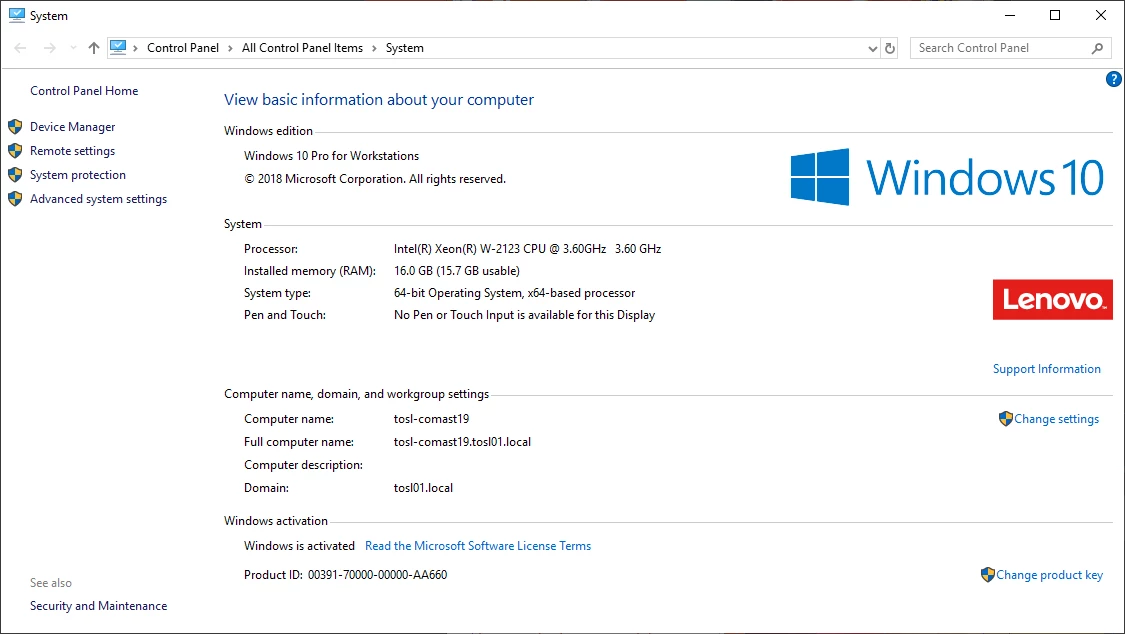
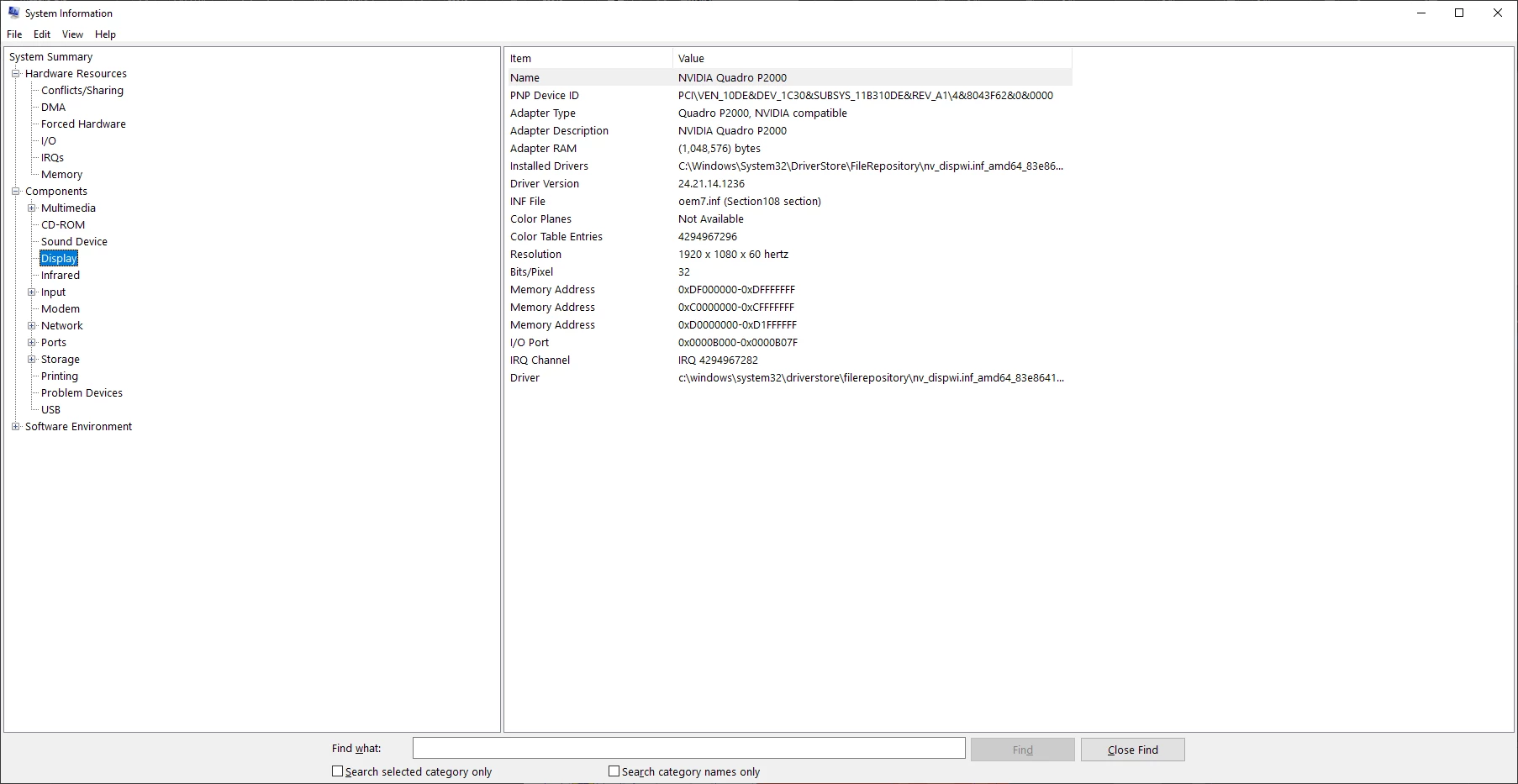
I have a brand new computer, and quite often the screen does not refresh until I scroll or change the zoom. This happens both while I am working and sometimes right when I open a file. The files are not large in size and I don't have much open on my computer. I followed Adobe's specs for building a machine that meets Premiere Pro's minimum standards, but it seems that it can't handle even the most basic tasks without this problem. I've found lots of articles to help Mac users with this problem (clicking the rocketship icon) but none to help with PC. See below for my computer specs. I've been on support with Nvidia and I have the most updated driver, according to their support anyways.
Help!!! This is really irritating, and with a brand new machine with good specs I don't think I should be having this problem. It occurs with far less complex tasks too. For example, a 6" x 6" file with no photography, only a placed tiny .eps and text with a solid colour block. I don't think I should have to use fast display performance on such tiny files.

{Renamed by MOD}

4.3K
Translate
Report
Community guidelines
Be kind and respectful, give credit to the original source of content, and search for duplicates before posting. Learn more
community guidelines

correct answers 1 Correct answer

Explorer , Jun 27, 2019 Jun 27, 2019

Ok, I think that I have it figured out. I was on support with Nvidia, and the problem was that my crappy onboard graphics was being used instead of my Quadro p2000. Followed these steps to force the motherboard to always use the P2000:

First make sure latest driver is installed. Here's what Nvidia said:

1) Right click on the desktop and launch Nvidia Control Panel, under Manage 3D settings - Global Settings - Power Management Mode - set this to Prefer Maximum Performance. Also set cuda - gpus and

...
Translate
Adobe Employee ,
Jun 21, 2019 Jun 21, 2019

Hi Crystal,

Thanks for reaching out. I understand that waiting while the file is rendering could be frustrating. That is why InDesign has various options under Display performance in order to gain a performance boost.

InDesign has three options for how images/graphics are displayed, which you can access via View > Display Performance.

  • Fast: Displays a gray box and you won’t see the image at all
  • Typical: Shows a low-resolution proxy
  • High Quality: Shows a high-resolution proxy

Viewing images at high-resolution (High Quality Display) forces InDesign to constantly re-draw elements as you move around the document, increase the CPU usage. Setting the default to Typical (InDesign/Edit > Preferences > Display Performance) renders the images at a screen-friendly resolution.

Please try "Typical Display" and let us know if it makes the rendering better.

Regards,

Srishti

Translate
Report
Community guidelines
Be kind and respectful, give credit to the original source of content, and search for duplicates before posting. Learn more
community guidelines
Explorer ,
Jun 21, 2019 Jun 21, 2019

I've changed my view settings before, and it didn't seem to help, but I'll try it again for the sake of the process of elimination. Another detail is that all of my files are on a windows network drive, could that cause the problems if there are network issues or just a slow network? 

It seems strange on a tiny file, especially with the specifications of my computer. I don't typically work on massive files. If I've purchased a computer according to the minimum Premiere Pro requirements (Adobe Premiere Pro System Requirements), why can't I edit a simple document with very few placed items without degrading my view quality?

I'll work for a while on typical display setting and then report back to you.

Translate
Report
Community guidelines
Be kind and respectful, give credit to the original source of content, and search for duplicates before posting. Learn more
community guidelines
Adobe Employee ,
Jun 25, 2019 Jun 25, 2019

I hope InDesign is performing better on the typical display mode. Do let us know if you have any further queries.

Thanks!

Translate
Report
Community guidelines
Be kind and respectful, give credit to the original source of content, and search for duplicates before posting. Learn more
community guidelines
Explorer ,
Jun 26, 2019 Jun 26, 2019

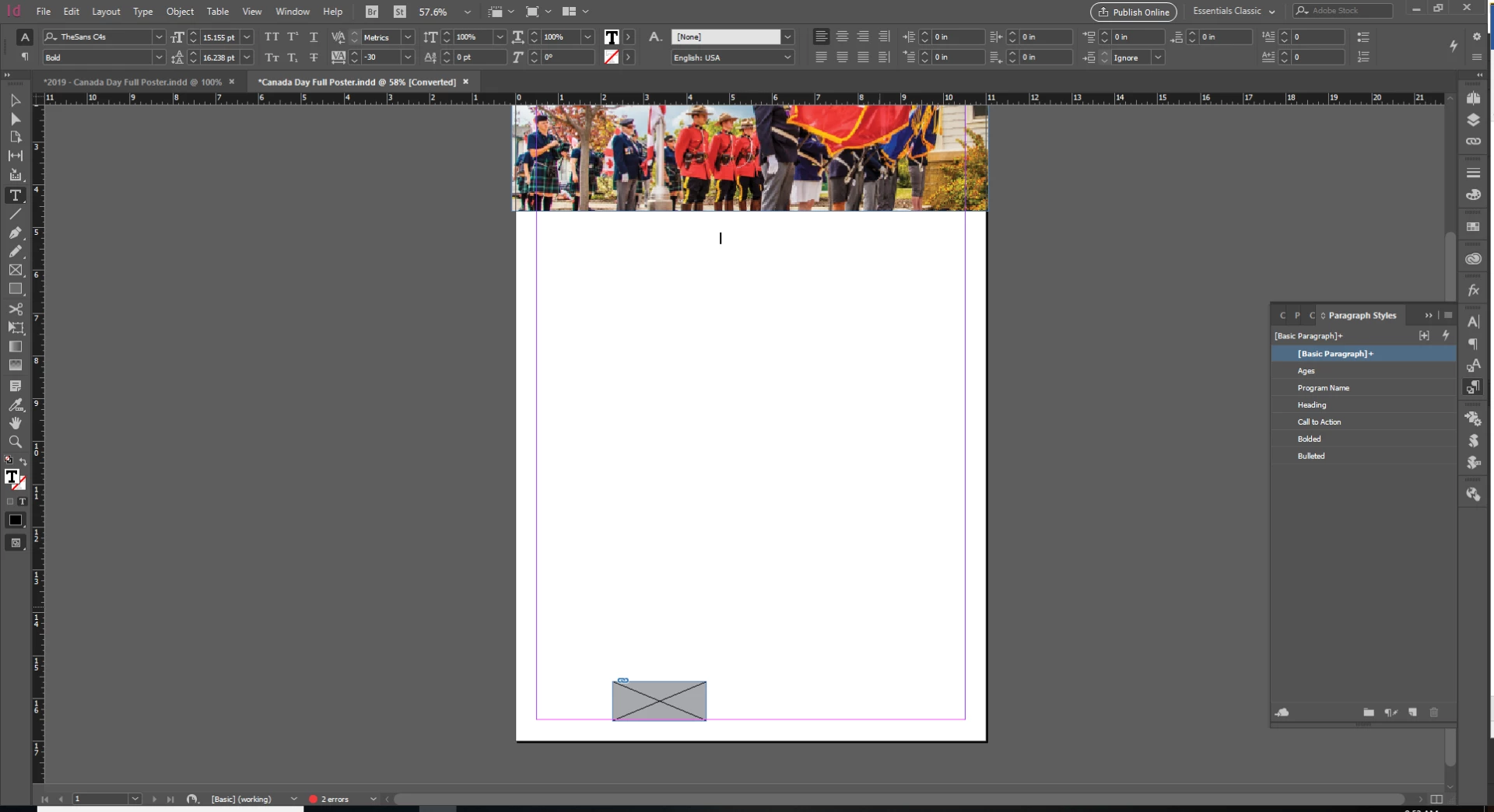
It is still behaving strangely. You can see below that some text is rendering smoothly, and some text is rendering in a thick, blocky, manner that looks like it has no smoothing. For example the paragraph in the left hand spread is blocky and strangely bold:

Drop In Core & Abs | Ages: 14+

Let’s get hard core! Build core muscle groups while improving posture, strength, stability, and cardio through a variety of exercises that strengthen the abdomen and back. Participants under the age of 18 must have a waiver signed by their Parent/Guardian.  *NexSource Centre rates apply.

While on the right hand spread, the text is rendering fine in all paragraphs.

On another spread, the text is also rendering perfectly.

The same paragraph styles (I don't use character styles here) are used in the poorly rendered text and the properly rendered text:

It seems I've traded one rendering problem for another, but I haven't had the "missing" section error happen since I lowered my display level. As you can see, this is a four page document, and graphics are all linked. Why would these problems continue on such a small document? It doesn't seem to matter whether I open a large or small document. I reboot my computer daily, Do I need to uninstall and reinstall Indesign? Dump preferences maybe?

Translate
Report
Community guidelines
Be kind and respectful, give credit to the original source of content, and search for duplicates before posting. Learn more
community guidelines
Explorer ,
Jun 26, 2019 Jun 26, 2019

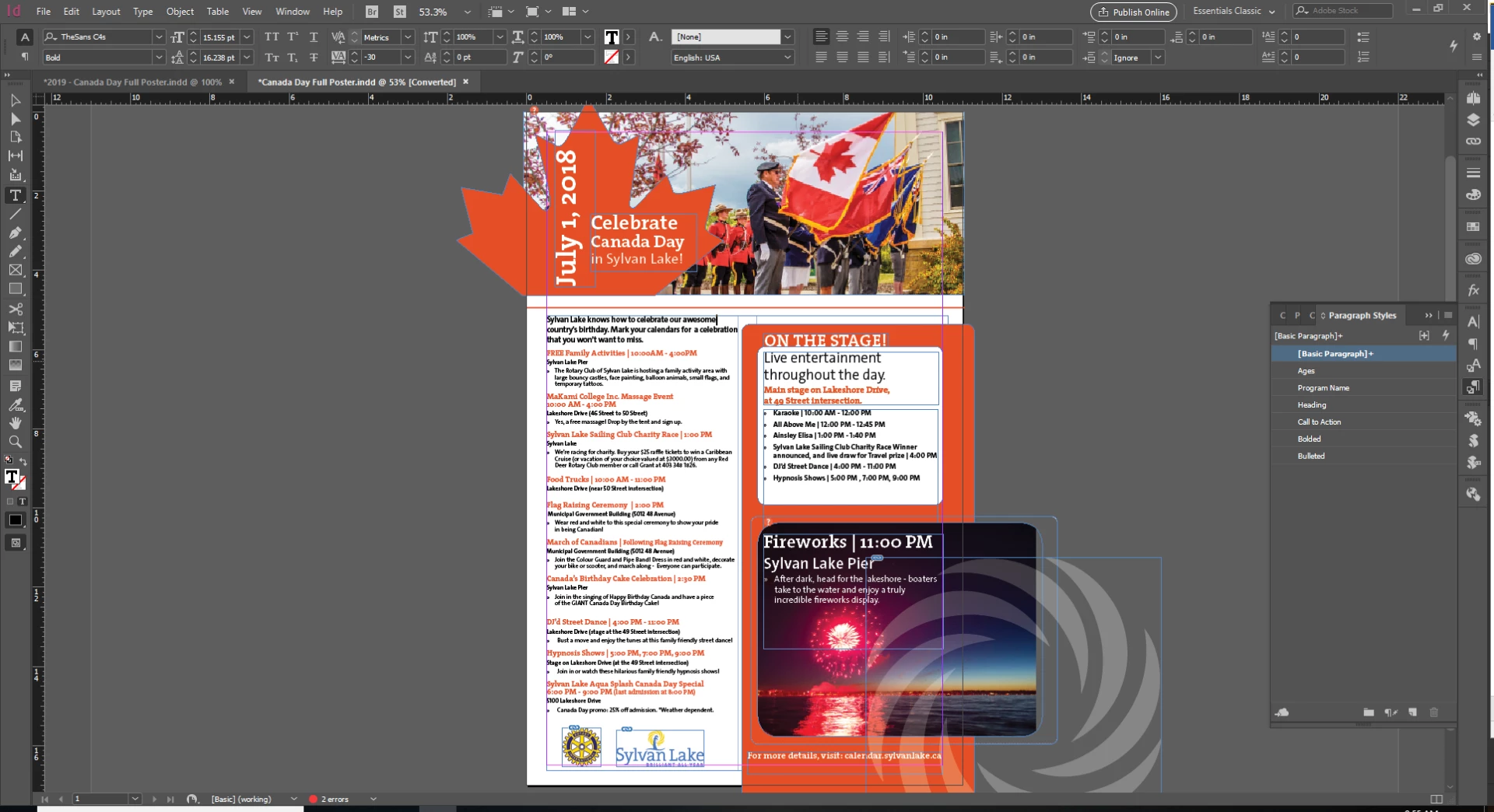
I've also noticed refresh / redraw problems in Illustrator. I know this isn't the correct forum for this, but it may help to clarify the problem lies outside of InDesign? You can see the chunk missing from the spiral in the upper left of the centre artboard. This was a result of my dragging the middle spiral to a lower position. There are no placed files, what you can see is a tiny illustrator file with just the elements you can see below. There shouldn't be refresh issues.

Translate
Report
Community guidelines
Be kind and respectful, give credit to the original source of content, and search for duplicates before posting. Learn more
community guidelines
Explorer ,
Jun 27, 2019 Jun 27, 2019

Ok, I think that I have it figured out. I was on support with Nvidia, and the problem was that my crappy onboard graphics was being used instead of my Quadro p2000. Followed these steps to force the motherboard to always use the P2000:

First make sure latest driver is installed. Here's what Nvidia said:

1) Right click on the desktop and launch Nvidia Control Panel, under Manage 3D settings - Global Settings - Power Management Mode - set this to Prefer Maximum Performance. Also set cuda - gpus and opengl rendering gpu to the graphics card: quadro p2000

2) Once again under Nvidia Control Panel - 3D settings , click on 'Set Physx Configuration' option and under preferred processor change it from 'auto select' to Nvidia GPU.

3) Right click on the desktop and launch NVIDIA Control Panel --> Manage 3D settings. > Go to Program Settings tab.
a) Add the file you launch the application, from by clicking on Add button. (NOTE: If you are unable to locate the .exe file, you can right click on shortcut and go to properties. Select Open File location.
http://imgur.com/XImZOj9
b) In the Program Setting window,
   > Power management mode – prefer maximum performance
   > Threaded optimization – off
   > Triple buffering – off
   > Vertical sync – off
   > Maximum pre rendered frames- 3

I had no idea that a motherboard could ignore the graphics card. Now I know. Seems to have improved and solved my problems in both Indesign and Illustrator, and they both are seeming to run faster, although not sure if I'm imagining that or not. I did set the application settings in Nvidia control panel for both InDesign and Illustrator.

I've also turned my display settings back to High Quality in Indesign, and it is chugging through my small files no problem.


Translate
Report
Community guidelines
Be kind and respectful, give credit to the original source of content, and search for duplicates before posting. Learn more
community guidelines
Adobe Employee ,
Jun 27, 2019 Jun 27, 2019

Thanks for the heads up and sharing the steps here. Please keep us updated if you see this issue again or if you have any further information.

Regards!

Translate
Report
Community guidelines
Be kind and respectful, give credit to the original source of content, and search for duplicates before posting. Learn more
community guidelines
Engaged ,
Aug 12, 2019 Aug 12, 2019

Hello,

This method doesn't seem to be available when using an external monitor via a USB docking station -- it won't let me open the NVIDIA control panel and it give me a message like, "You are not using a display attached to an NVIDIA GPU".  I'm having exactly the same issues with graphics, after placing them on the page, or modifying their size or location, being partially displayed or even completely disappearing from the screen until I switch screen mode from either Normal to Preview, or vice versa (either direction seems to work).

Translate
Report
Community guidelines
Be kind and respectful, give credit to the original source of content, and search for duplicates before posting. Learn more
community guidelines
Explorer ,
Aug 12, 2019 Aug 12, 2019

NVIDIA support was fairly helpful with the basics for me, you can try to contact them about the control panel,

Support Home Page | NVIDIA

Translate
Report
Community guidelines
Be kind and respectful, give credit to the original source of content, and search for duplicates before posting. Learn more
community guidelines
Adobe Employee ,
Aug 13, 2019 Aug 13, 2019
LATEST

Hi there,

Thanks for reaching out. I understand you are facing issues with image rendering. I would request if you can share a few more details like:

  • OS (exact version of Windows/MAC)
  • Version of InDesign
  • Screenshots of the issue.
  • Is the issue related to a specific document(s)/asset(s)? If yes, could you please share the document(s)/asset(s) with us? You can upload it to the creative cloud and share the download link.
  • When did this start happening? Are there any recent changes made to your system? For example, any antivirus, system updates or web extensions installed recently.

Looking forward to your response!

Regards,

Srishti

Translate
Report
Community guidelines
Be kind and respectful, give credit to the original source of content, and search for duplicates before posting. Learn more
community guidelines