OzPhotoMan
Inspiring
November 20, 2022
Answered

Images in a color managed workflow PDF come out dark

  • November 20, 2022
  • 2 replies
  • 2005 views

Hi all,

My printer has given me specs for a pdf document as required to print. The original document has images that were saved as CMYK in Photoshop as per my printer's request. I have followed his instructions for exporting to PDF from InDesign.

However, images in his proof copy, printed on non coated paper come out slightly darker than what I see on my screen or what is printed on my inkjet printer.


I am going to talk to the printer about this, but as I have followed his instructions to the letter, I am not sure what the result will be. 

My monitor is profiled with a high end calibrator.

Any ideas?


Regards,

Steve


This topic has been closed for replies.
Correct answer rob day

OK,

My current plan is to replace all images with Adobe RGB profiled ones. That will also enable me to output to any color space I want without having to redo the images.


Then make sure the document's current profiles are set to AdobeRGB so there is no issue when exporting to PDF as CMYK.

My printer has told me the reason for the dark prints is because I am using an RGB monitor. True, but there is no such thing as a CMYK monitor, you can only simluate via soft proof.

Funny thing is, when I soft proof, the onscreen images go lighter.

I think my only option is to make the images lighter in the document. I could of course make my cdm2 in calibration lower, but I am not sure that is the best approach. It is currently at 100cdm2.

Regards,

Steve


My printer has told me the reason for the dark prints is because I am using an RGB monitor.


Your printer clearly doesn‘t understand how the Adobe color management system works. The assigned CMYK profile affects the soft proof of CMYK values, and the CMYK values of an RGB to CMYK conversion.


Funny thing is, when I soft proof, the onscreen images go lighter.


What profile are you choosing for Proof Setup? Try setting the Proof Setup to US Sheetfed Coated with Preserve CMYK Numbers checked, and the soft proof of your US Web Coated SWOP images should darken. This proofs the document CMYK numbers as they would print on a US Sheetfed Coated press:
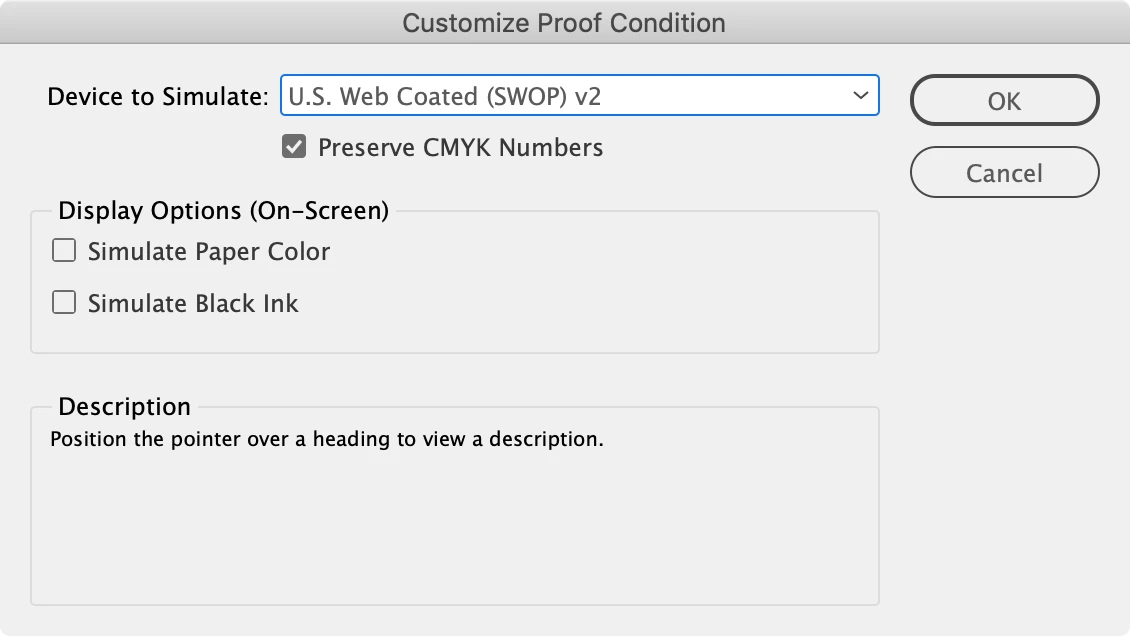



2 replies

rob day
Community Expert
Community Expert
November 20, 2022

Hi @OzPhotoMan , did the printer suggest which destination CMYK Profile to use for the conversion, and was it used for the conversion and is it assigned to your InDesign Document via Edit>Assign Profiles? The monitor profile that is generated by your calibration affects the screen soft proof, but so does the CMYK destination profile, they work together to produce the  InDesign Overprint/Separation Preview soft proof. 


Also the CMYK destination profile would be for the press not the proofing device, so it is possible the proof isn’t exactly simulating the press. Ask your printer if they expect to match the proofs on press.

Frans v.d. Geest
Community Expert
Community Expert
November 20, 2022
quote

Hi @OzPhotoMan , did the printer suggest which destination CMYK Profile to use for the conversion, and was it used for the conversion and is it assigned to your InDesign Document via Edit>Assign Profiles? The monitor profile that is generated by your calibration affects the screen soft proof, but so does the CMYK destination profile, they work together to produce the  InDesign Overprint/Separation Preview soft proof. 


Also the CMYK destination profile would be for the press not the proofing device, so it is possible the proof isn’t exactly simulating the press. Ask your printer if they expect to match the proofs on press.


By @rob day


Very, very valid point: keep your images RGB in InDesign, remember that on export to PDF from InDesign ONLY RGB images are converted to the CMYK profile you got from your printer. CMYK to CMYK management is not recomended from InDesign because of process 100% K getting converted to CMYK black. So turn that off (as is the standard setting)

Converting them in Photoshop should be done with Convert to Profile and saved with that profile, that way they are 'untouched; in InDesign (with CMYK>CMYK off as mentioned above).

OzPhotoMan
Inspiring
November 21, 2022

Hi all.

To answer all questions. First, I am familiar with problems of double profiling.

I asked my printer what CMYK profile to use but he was a bit vague, basically said any one, so I used SWOP. 

Original images were PSD, Adobe RGB profile, I used convert to profile in PS to convert to CMYK, then PLACED them in the InDesign document. ATM I am not at home so can't be sure, but I think I used export in InDesign with no profile assigned, assuming the images would retain the CMYK profile as defined in PS. Won't have access to the document now until next Sunday. I have asked the printer for his thoughts. 

My monitor is calibrated with an xrite I 1 pro. I probably should ask the printer for a profile file for his machine, as I do when sending prints to a high end lab.


Regards

Steve

Community Expert
November 20, 2022

Is your monitor calibrated to their output device?

What high end calibration? Can you be more specific about this? 


What you see on screen is not what you see in print unless it's calibrated to the output device. 

Your printer could give you test sheets to pick from. 


Converting to CMYK in photoshop first is erroneous you can export to PDF and convert to CMYK from InDesign - it uses the exact same conversion process as photoshop.


What could be happening is you're converting to a CMYK profile that's different to your output settings in InDesign - which is forcing your already created CMYK images through antoher profile destination colour profile - once again converting your already converted CMYK images.


Can you talk us through your CMYK conversion in Photoshop and your InDesing Colour Settings and also your InDesign PDF output options for the PDF?


rob day
Community Expert
Community Expert
November 20, 2022

Is your monitor calibrated to their output device?


Hi Eugene, A monitor calibration produces a monitor profile, which profiles the calibrated display not an output device. It is an important part of the CM system, otherwise you would have to be constantly changing your display depending on the output.


Once you have made the conversion to CMYK as @OzPhotoMan  has done, the assigned CMYK Profile affects the soft proof. For example if you make a conversion to the default US Web Coated SWOP, and then Edit>Assign US Sheetfed Coated, the soft proof would get darker because the US Sheetfed profile expects more dot gain. The CMYK soft proof is a conversion of the profiled CMYK color into the Monitor profile, which was produced by the calibration.

Community Expert
November 20, 2022

Thanks for that correction. I often see people say they calibrated their monitor and I always wonder what it's calibrated to... How have they calibrated it and things like that. 


Of course, as always your explanations are far clearer and better than mine. Thanks again.