Participant
October 2, 2020
Answered

Images look darker in inDesign than Photoshop

  • October 2, 2020
  • 2 replies
  • 6777 views

Hi - Does anyone know why an image might look darker in InDesign than in Photoshop?

I've synced my color profiles in Bridge and both documents are seyt up as CMYK.


Left = Orignal Jpeg   
Right = How it appears in Indesign + Pdf from InDesign.


Please someone help me! :'(

This topic has been closed for replies.
Correct answer rob day

Thanks Rob, I see what you mean.


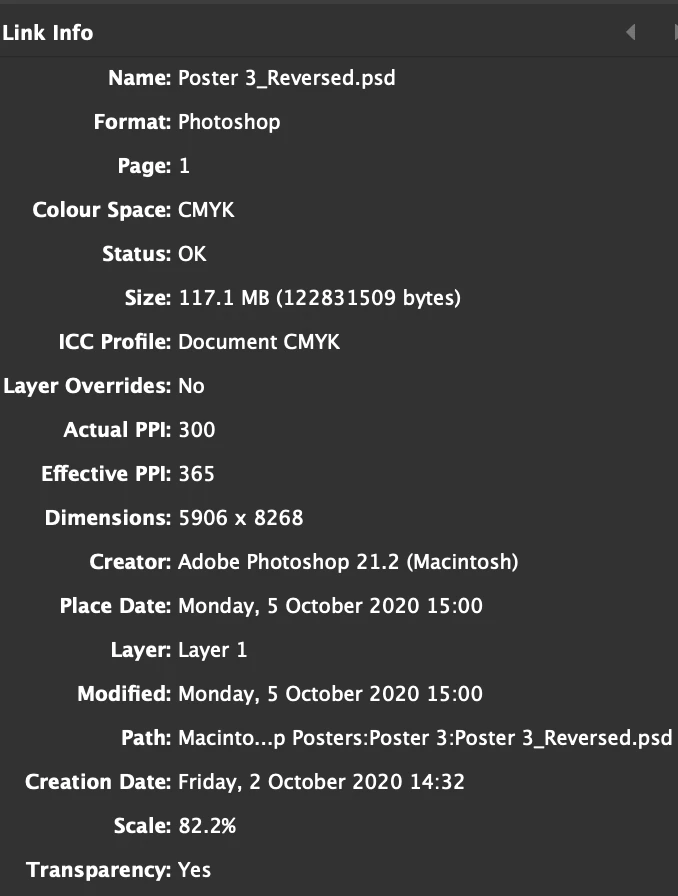
The Link info is still saying 'Document CMYK' when I've gone through in PS + ID and chosen 'FOGRA39..' as much as possible.


Is there something else that could be overriding it?


Thanks again 🙂


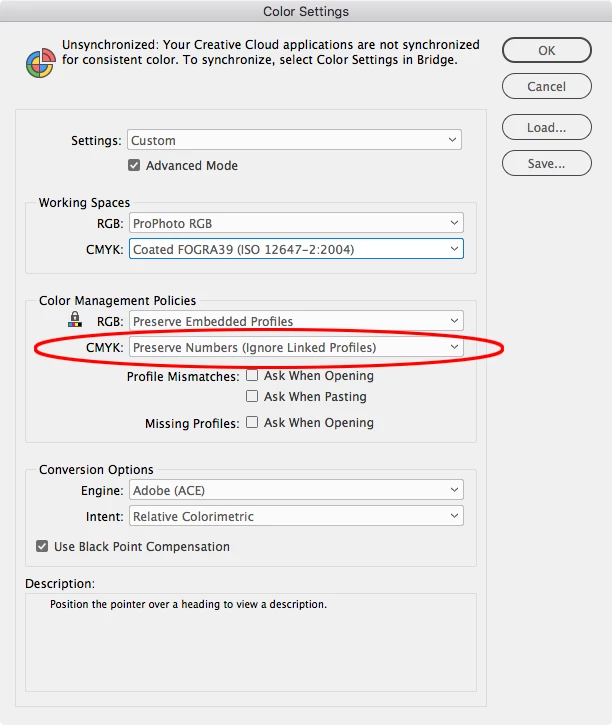
When you create a document, the color management policies you have set in Color Settings get saved with the document. The CMYK Policy Preserve Numbers (Ignore Linked Profiles) will ignore embedded profiles and use your document’s assigned CMYK profile instead—set in Edit>Assign Profiles...


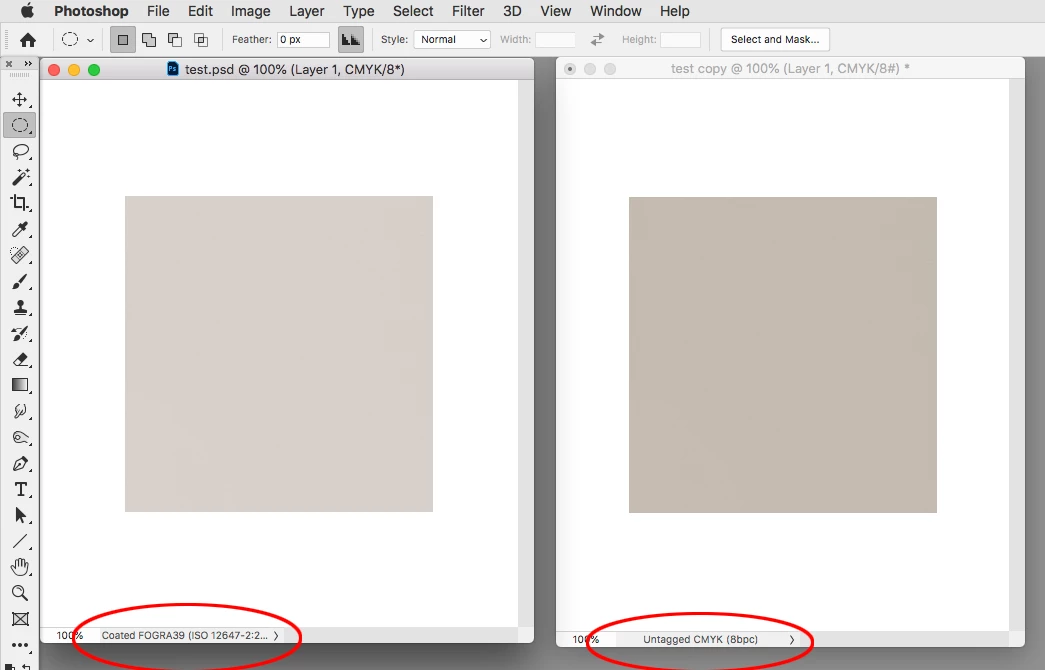
If you have indeed assigned FOGRA 39 in Edit>Assign Profiles... and still have a mismatch, that tells me there is not a profile embedded with the image. When there is no profile assigned to the image, Photoshop falls back to its Color Settings Working Space for the profile and color preview, which could be anything.


Here you can see the copy on the right has no profile assignment, so it is falling back to my Color Settings’ profile which happens to be US Sheetfed Coated.

 

2 replies

Dave Creamer of IDEAS
Community Expert
Community Expert
October 5, 2020

After you sync'd the settings, did you double-check that the View>Proof Setup is set to Working CMYK or Document CMYK--and then did you turn on Proof Colors?

David Creamer: Community Expert (ACI and ACE 1995-2023)
Participant
October 5, 2020

It was set to "Working CMYK - Coated FOGRA39..."


I didnt have Proof Colours ticked, but have now done this 🙂


Thanks!

rob day
Community Expert
Community Expert
October 5, 2020

Just to clarify, you can but don’t have to use Proof Setup unless you wanted to see how the document would print to a different device—something other than a press running to the FOGRA39 standard. Simply turning on Overprint or Separation Preview soft proofs all document color (RGB, Lab, or CMYK) in the document’s assigned CMYK profile space.

rob day
Community Expert
Community Expert
October 2, 2020

I've synced my color profiles in Bridge and both documents are seyt up as CMYK.


Sync’ing Color Settings with Bridge wouldn’t necessarily have an affect on existing documents. Documents are color managed by their assigned profiles (Edit>Assign Profiles not Color Settings).


Also InDesign doesn’t have a document color space. Native colors and placed objects can be a mix of RGB, CMYK, Lab, and placed objects can have their own embedded profiles that affect the preview of that placed object.


You can select the JPEG and check its profile in the Links Info panel. To get a match the JPEG’s Photoshop assignment should show in the Link Info. If it is listed as Document CMYK that means the InDesign document’s assigned CMYK profile is being used.


Participant
October 5, 2020

Thanks so much for helping with this Rob 🙂


I had already assigned the profile from the image (Forgra39 ISO etc..) to the document in InDesign, but the issue still happens.


Is there anything I could be missing?


Thanks again


rob day
Community Expert
Community Expert
October 5, 2020

Can you select the image and show a screen capture of your Link Info panel? like this