


Import .eps file script?
Hi all,
I am using InDesign CS6 and need help with a script (JavaScript)
I'm doing the exact same thing as this previous discussion below, Exporting MathType equations from Word as EPS files and then trying to place them into my indesign file.
Batch importing eps equations into Indesign
Since this discussion, is there a better script or method to import .eps files? (see screenshot below)
I placed my Word file into InDesign. What I think this script is supposed to do is replace all the @Equ021.eps@ file names with those images in the file path on line 23.
Below is the script I am using and apparently all I needed to do was save my script after I entered the path name on line 23. (The person who gave me this no longer works with me so I am on my own)
When I try to save, I receive the error:
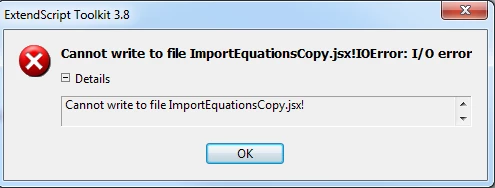
I'm very new to scripting so what does this error below mean, and what do I need to do to fix it?
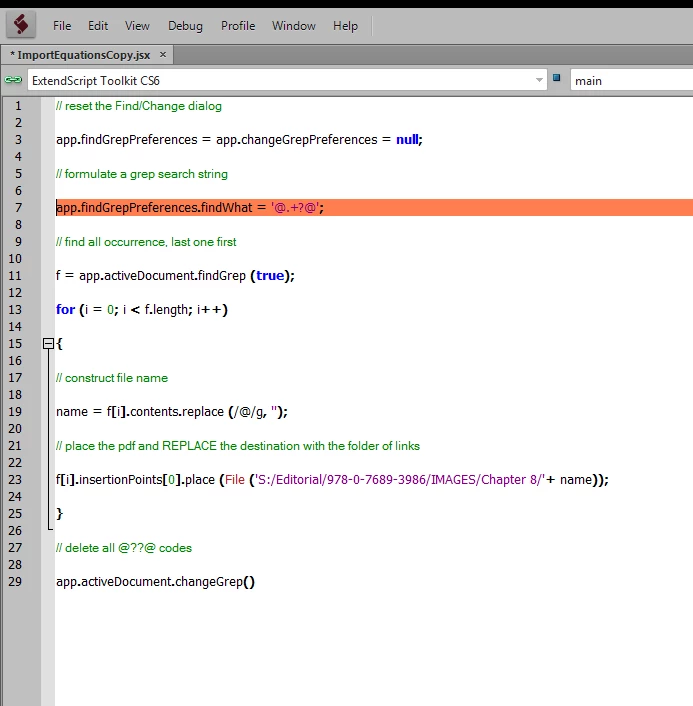
Thanks for any help! I have thousands of these equations and would hate to import them one by one.
 AdChoices