
Participant
May 7, 2021
Answered

Import pdf into indesign and edit

  • May 7, 2021
  • 2 replies
  • 20326 views

I place a multipage pdf to indesgin.  Now I want to edit it?  Is it possible to edit this document in indesign, or do I have to edit it somewhere else?  As you can see I have no Idea how to use indesign.  I am tasked with modifying our companies technical manual.  Can someone point me in the right direction?  thanks much! 
Correct answer SJRiegel

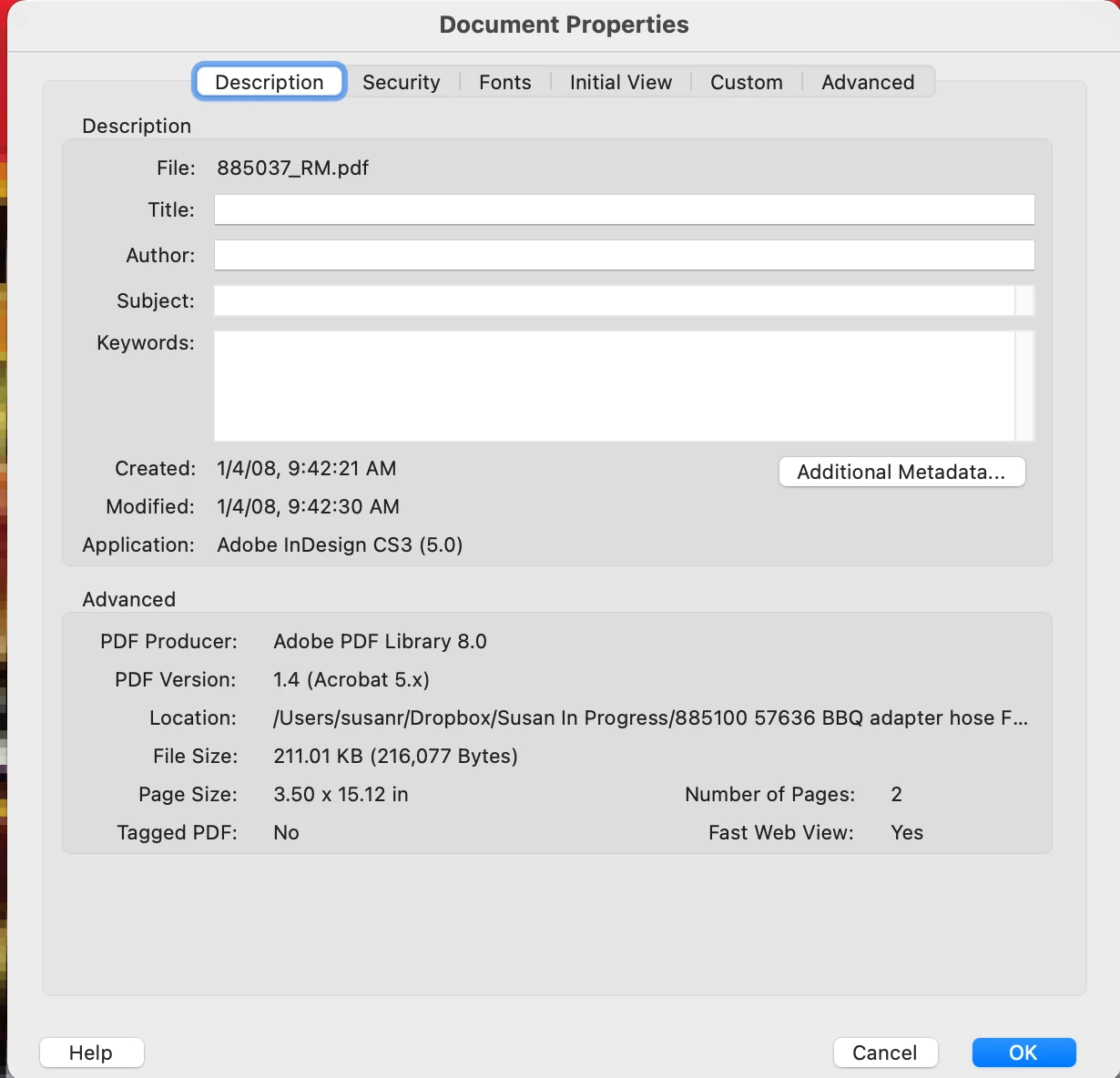
PDF is a final delivery format, and is not intended for major editing. Someone in your company should have the original work files for these technical manuals - they may have been done in InDesign, but there is a chance that they were done in some other program, such as Microsoft Word. If you open the PDF in Acrobat and look under File > Properties at the Description tab, it should show what program the PDF was generated from.

(In this example, it was Adobe InDesign CS3)

2 replies

SJRiegelCorrect answer
Legend
May 7, 2021

PDF is a final delivery format, and is not intended for major editing. Someone in your company should have the original work files for these technical manuals - they may have been done in InDesign, but there is a chance that they were done in some other program, such as Microsoft Word. If you open the PDF in Acrobat and look under File > Properties at the Description tab, it should show what program the PDF was generated from.

(In this example, it was Adobe InDesign CS3)

barley1Author
Participant
May 8, 2021

Thank you for replying.  I do have the document in Word.  I used word to create the PDF.  Am thinking that InDesign is not the application I need to write a technical user manual?  Seems that converting a word document to Indesign is also a terrible process?  Since I am not making brochurs, creating magazine ads, etc.  Shoule I move on to something else?  What would you do if you had a 100 page technical manual written in Word that you need to update?  Before trying Adobe I was going to use LateX to do this.  Any ideas? 

BarbLovesInDesign
Inspiring
December 17, 2022

In relation to this topic, I routinely make quick changes to a compiled PDF document.  Meaning, I combine many PDF documents to assemble one complete scientific type report for my clients.   So if I have to go back and change a date in the introduction of the document or the address was 677 not 644, as an example.   I choose tools>edit pdf text >then make my changes.  


Or in a proposal, where the client wants a service removed but I have already combined the proposal , the company qualification's, the licenses etc, into the final document, and I delete a couple line items and change the total cost of the estimate so that I do not have to go back and reformat and compile everything again.  

Are you saying that this is not an appropriate way to use adobe dc pro?


It would make sense as I have had nothing but issues with my edits and have been embarrassed more than once when sending  the edited version of the document to a client, and then receive a call saying the document makes no sense and I didn't change or include the discussed changes in the revised document.,  

So my issues exist when changes are made to the PDF edit i originally created,  revert back to the original document when sent to the client via email.


Has anyone else had issues with editing PDF documents where you had made changes to the document , even basic changes, and also the changes are shown on the document while making them,  the changes are not  maintained once it is saved or emailed.  Any thought or recommendation.? 


Do you just save over the current pdf or do you save as to a new one?  You might find a way to test that and see if it makes a difference. It may not.  OR there may be someothing about some of the source documents that affects the way the 'final' pdf works, especially if they are not all created in the same program/app.

Steve Werner
Community Expert
Community Expert
May 7, 2021

InDesign by itself is not capable of editing a PDF file (single page or multipage). There are third party products which can translate a PDF file into editable InDesign objects.


Check out PDF2ID at recosoft.com:


https://www.recosoft.com


Or PDF2DTP at markzware.com:


https://markzware.com