
Participant
October 10, 2020
Answered

Import txt file and make the containing of the textbox on page 1 and a copy of it on page 7 and 10?

  • October 10, 2020
  • 1 reply
  • 259 views

Hi there,


I'm sitting and trying to make a template for my study-project, and hoping that, some cool lats can help me?


As the topic says, I'm looking for away, where InDesign automatic import the containing of the file 01.txt in a specific textbox, when I opening the template-file. Is it posible and if, can you tell me how to do it?


My other question - Is it posible to set InDesign up, so the textbox with containing the 01.txt file - Like if the textbox's name in InDesign is called tx1 on page 1, and for example set up a copy of the tx1 at page 7 and page 10. If - how will do it?


The very best regards,

Tannhauser


This topic has been closed for replies.
Correct answer Dave Creamer of IDEAS

Yes--but "semi-" automatically.


Turn on link to text and spreadsheets under the File Handling preferences. 

Place your text file.

Save the ID file.

You can turn off the link preference if you want.


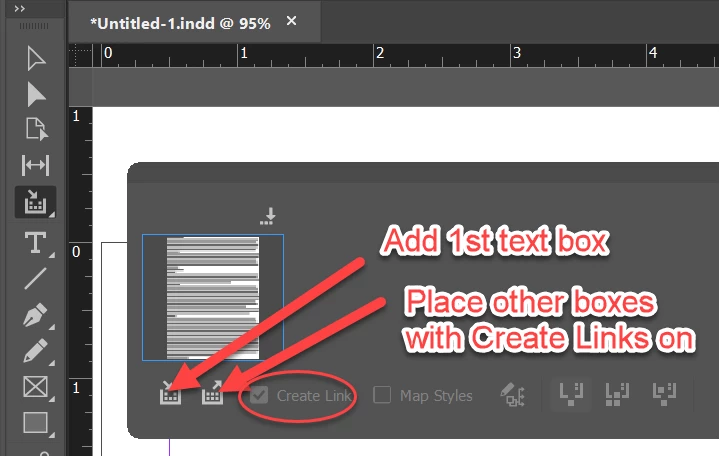
To "dupe" the text object, use the Content Collector tool to add the text box to the Collect panel. 

Place other copies of the text box with the Create Links option selected.


If the original text file changes, ID will ask you if you want to update modified links. You need to click OK or update later in the Links panel. (That's the semi-automatic part.)

1 reply

Dave Creamer of IDEAS
Community Expert
Dave Creamer of IDEASCommunity ExpertCorrect answer
Community Expert
October 10, 2020

Yes--but "semi-" automatically.


Turn on link to text and spreadsheets under the File Handling preferences. 

Place your text file.

Save the ID file.

You can turn off the link preference if you want.


To "dupe" the text object, use the Content Collector tool to add the text box to the Collect panel. 

Place other copies of the text box with the Create Links option selected.


If the original text file changes, ID will ask you if you want to update modified links. You need to click OK or update later in the Links panel. (That's the semi-automatic part.)

David Creamer: Community Expert (ACI and ACE 1995-2023)
Dave Creamer of IDEAS
Community Expert
Community Expert
October 10, 2020

Addendum

You can link to a Word file too. You can either do the formatting in Word or match up styles in ID. Use the "Show Import Options" when placing the file.


Note that when you updated the linked text files (.txt or Word), you will lose any manually applied formatting and any edits made in ID. Do all your editing in the original file.

David Creamer: Community Expert (ACI and ACE 1995-2023)