Participant
March 8, 2025
Answered

Imported paragraph styles come in as style+

  • March 8, 2025
  • 3 replies
  • 398 views

Hi all: my manuscript is in Google Docs.  I am downloading in .docx format and then placing that file in InDesign.  In GDocs I used several heading styles in the hope that I could map those to InDesign paragraph styles upon import.  So, for example, on the Import dialog> Style mapping> I'm telling InDesign that "Heading 2" should map to the paragraph style called "Section Title".  But when InDesign brings in the text, Heading 2 does not display as Section Title.  Instead it comes in as Section Title+.  Do I have to go through the whole document, manually select all Section Title text and click "Clear overrides"?  Or is there a quicker way to do it?  For example, is there a way to select all Section Title text in the whole document and clear all overrides with one click?
Correct answer Robert at ID-Tasker

@nishnabotna 


Before:

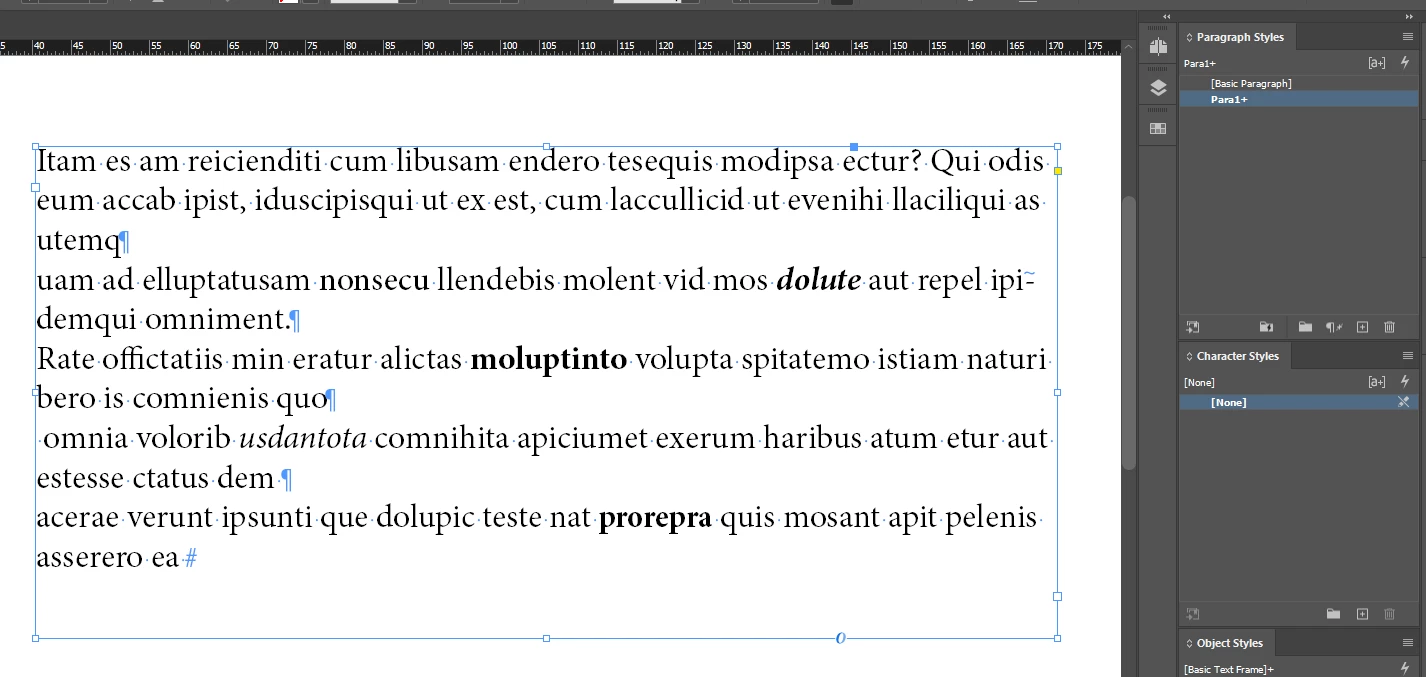
The whole text is styled with "Para1" - with local overrides - bold, italic, etc. - so there is "+" after "Para1".


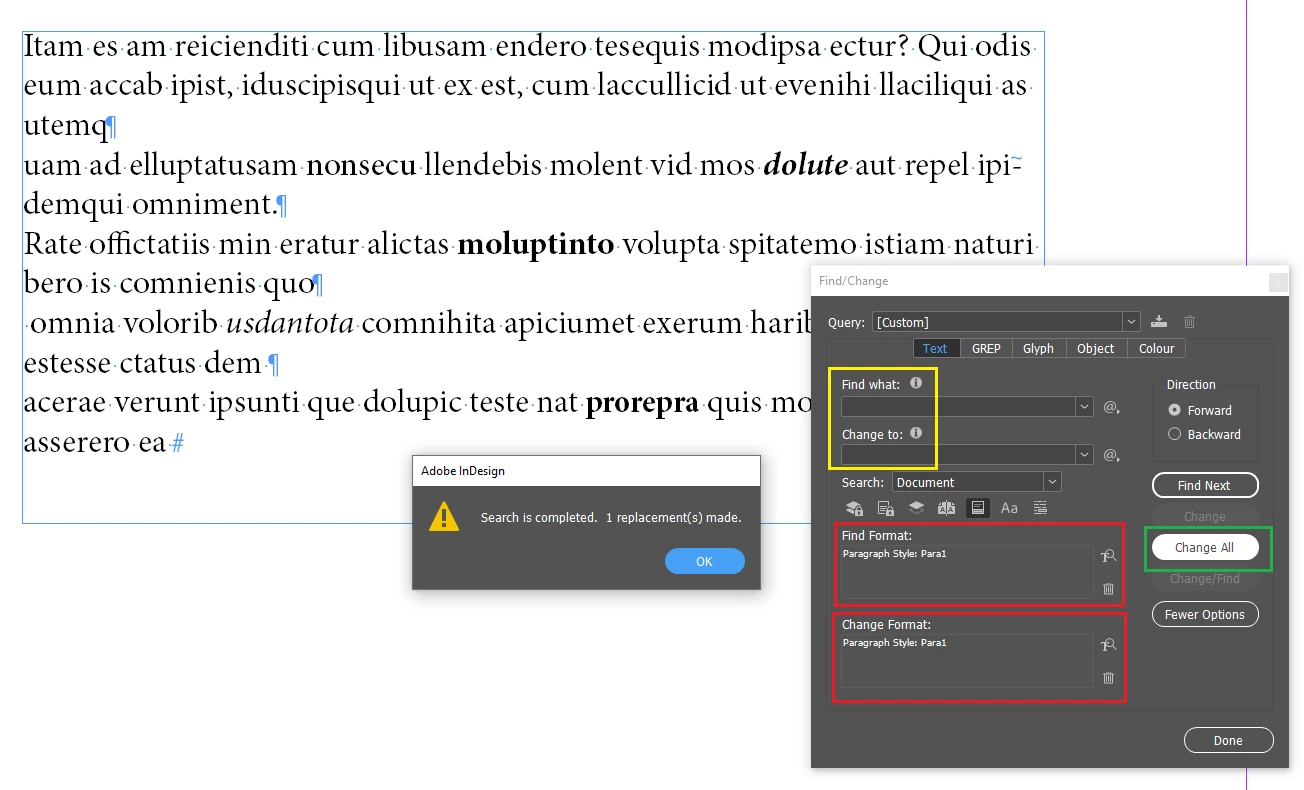
Marked in Yellow - both are empty.

Marked in Red - you need to select your ParaStyle that you want to "refresh". 

Then click CHANGE ALL - Green.

It shows that only 1x change has been made - because this is one block of text with the same ParaStyle applied - if there would be different styles splitting this block - there would be more than 1 reported.


And the effect:


3 replies

Robert at ID-Tasker
Legend
March 8, 2025

@nishnabotna


As @Dave Creamer of IDEAS mentioned - do you have anything that should be converted to Character Styles?

Like Bold, Italic, Underline, Sub/Super Script and combos? 


Dave Creamer of IDEAS
Community Expert
Community Expert
March 8, 2025

This is a common "glitch" with imported MS Word docs. No matter how clean the style usage is and the mapping is, there are always overrides. Unfortunately, Google Docs does not support Character Styles like MS Word does. 

As @Robert at ID-Tasker said, you will lose all local formatting that way. To fix that, BEFORE you remove local formatting, create the Character styles in InDesign, use Find/Change to search for your local formatting and apply the appropriate character style. Then remove all overrides. 


David Creamer: Community Expert (ACI and ACE 1995-2023)
Dave Creamer of IDEAS
Community Expert
Community Expert
March 8, 2025

Here is a script that might be of use depending on your budget:

https://www.id-extras.com/products/auto-character-styles/


David Creamer: Community Expert (ACI and ACE 1995-2023)
Robert at ID-Tasker
Legend
March 8, 2025

If you've everything as one long Story - then you could select it as a whole and Clear ALL local overrides... 


But you'll then lose ALL local formatting - so you need to be sure. 


Or you can do Find&Change - replace each style on itself - with empty Find / Change fields. 


Participant
March 9, 2025

     If you've everything as one long Story - then you could select it as a whole and Clear ALL local overrides... 

Right, I tried that first, but the cure was worse than the disease, because as you said...

     ...you'll then lose ALL local formatting


   Or you can do Find&Change - replace each style on itself - with empty Find / Change fields. 

Can you clarify how I would use Find/Change to do this task?  Thanks for the help, everyone.

Robert at ID-Tasker
Robert at ID-TaskerCorrect answer
Legend
March 9, 2025

@nishnabotna 


Before:

The whole text is styled with "Para1" - with local overrides - bold, italic, etc. - so there is "+" after "Para1".


Marked in Yellow - both are empty.

Marked in Red - you need to select your ParaStyle that you want to "refresh". 

Then click CHANGE ALL - Green.

It shows that only 1x change has been made - because this is one block of text with the same ParaStyle applied - if there would be different styles splitting this block - there would be more than 1 reported.


And the effect: