Exit
  • Global community
    • Language:
      • Deutsch
      • English
      • Español
      • Français
      • Português
  • 日本語コミュニティ
  • 한국 커뮤니티
0

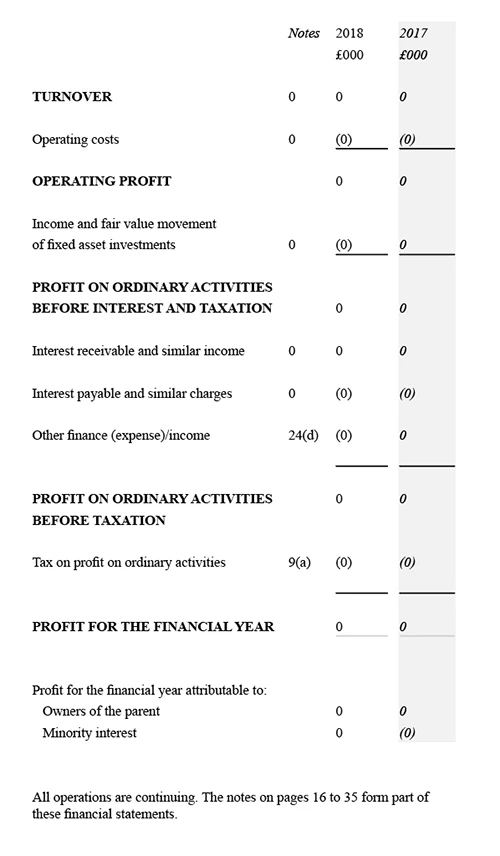
Importing Excel charts into Indesign 2020 turns all values to '0' zero

New Here ,
Nov 07, 2019 Nov 07, 2019

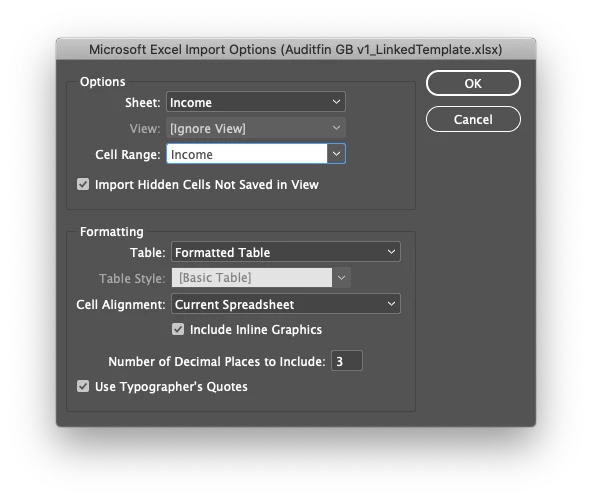
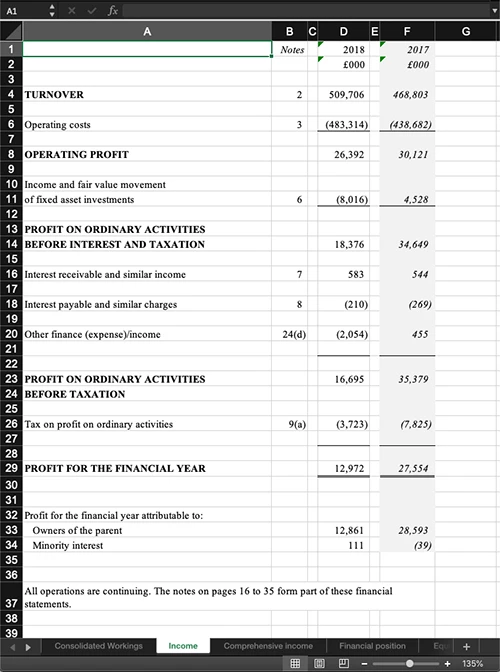
I've been working on bulding a document in Indesign (2019) linking to tables in an Excel (v. 16.30 (19101301)) document which has been working fine. However since updating the Creative Suite to Indesign 2020 the linked tables have started replacing all values with '0'. Editing the Excel doc and resaving has no effect. I've reverted to using an older copy of Indesign for now but if anyone knows a fix or if I've missed anything let me know. Much appreciated.
 

Excel-Example.jpgIndesign-Example.jpgScreenshot 2019-11-07 at 15.10.54.png

TOPICS
Bug , Performance
878
Translate
Report
Community guidelines
Be kind and respectful, give credit to the original source of content, and search for duplicates before posting. Learn more
community guidelines
Community Expert ,
Nov 07, 2019 Nov 07, 2019

Hi Jordana,

what's your operating system?


Hm. Some entries were not set back to 0.

Can you see a difference in the cell's formatting with Excel?

For the cells that did not change like D1 or F1 and the ones that changed?


Regards,
Uwe Laubender

( ACP )


Translate
Report
Community guidelines
Be kind and respectful, give credit to the original source of content, and search for duplicates before posting. Learn more
community guidelines
Valorous Hero ,
Nov 07, 2019 Nov 07, 2019

Chances are the cells that have come through are formatted as text cells. Any cell that is using formulas/pure numbers other than those appear to be the zeroed values.

Translate
Report
Community guidelines
Be kind and respectful, give credit to the original source of content, and search for duplicates before posting. Learn more
community guidelines
Adobe Employee ,
Nov 07, 2019 Nov 07, 2019
LATEST

Please vote for the issue here:  https://indesign.uservoice.com/forums/601180-adobe-indesign-bugs/suggestions/38971090--bug-indesign-...


We are looking into the bug


Thanks

Translate
Report
Community guidelines
Be kind and respectful, give credit to the original source of content, and search for duplicates before posting. Learn more
community guidelines