Inspiring
March 12, 2025
Answered

importing from photoshop to indesign

  • March 12, 2025
  • 3 replies
  • 717 views

which is best to import image from photoshop into indesign as?
 

Correct answer Peter Spier

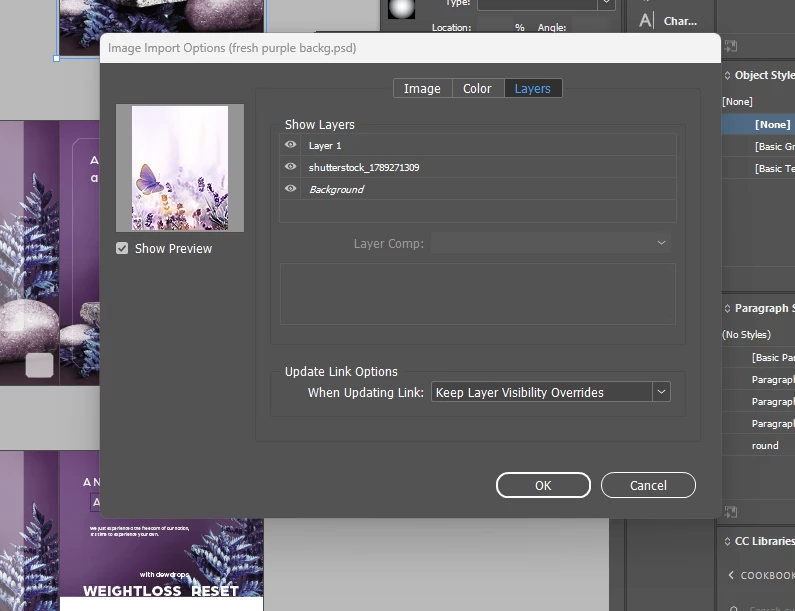
Do your images have multiple layers? Are these layers used to show/hide different content in the images, perhaps so the same image can be used in multiple ways? If you edit the image in Photoshop by adding a new layer, do you want that immediately reflected in the InDesign layout?

Those are the things that are addressed in that dialog, and the answers to those questions will determine how you should set the options. There is no single best way to set this.

In my own work I often have hidden layers in a saved Photoshop file, at the very least because I never edit the original Background layer directly so I can always go back to the original data, but I would normally choose to hide some layers on import (and saving Layer Comps in Photoshop is a good way to streamline this). I suspect that in most cases you would probably want to select to keep Photoshop's layer visibility so that newly added layers are shown or newly hidden layers are not, but there is no correct answer here, and you always have the ability to change the visibility of layers at any time in the InDesign document by right-clicking the image and selecting Object Layer Options...

3 replies

Dave Creamer of IDEAS
Community Expert
Community Expert
March 12, 2025

Photoshop native PSD if fine for most files.

If you have editable text in the Photoshop file, save as Photoshop PDF to keep the text vector (sharp/crisp).


David Creamer: Community Expert (ACI and ACE 1995-2023)
Inspiring
March 13, 2025
My question wasn't about saving, my questions is clearly about
IMPORTING
Did you look at the screenshot attached?
Willi Adelberger
Community Expert
Community Expert
March 13, 2025

You import Photshop files via File > Place …

  • PSD is thebest quality. Consider to use LayerCompositions to secrure correcr updates after changes. 
    PDF or PDP is the best file type if your file has vector or text layers. 
    JPG  is ok if no transparency or layers are used 
  • TIXFF has the same isage as PSD, but has larger file size. But TIFF supports bigger dimensions as PSD does. 

  • you can import RGB imGes and export them later as CMYK PDFs from InDesign 
James Gifford—NitroPress
Legend
March 12, 2025

PSD.


I'd explain why, but it seems irrelevant. Best of luck with the deep complexities that follow using this "best" format.

Peter Spier
Community Expert
Community Expert
March 12, 2025

@hendy_5450 Once again I'm a little confused by some contradicitons between the title of your question and the attached screen shot. I sense that English is not your first language, and you might consider using your native language instead.

In any case, there is no "best" image format for import. InDesign can import almost any standard format, but if you are creating the image yourself in Photoshop I recommend saving in .psd. If your output is intended for the web or screen viewing only, then saving a copy as .jpg or .png would be a good idea as well.

Your screen capture is showing the import options dialog. Again, there is not "best" option here. Those choices should be made on a case-by-case basis depending on your intent.

Inspiring
March 13, 2025
I create ads for print,
what would be the best option?
Peter Spier
Community Expert
Peter SpierCommunity ExpertCorrect answer
Community Expert
March 13, 2025

Do your images have multiple layers? Are these layers used to show/hide different content in the images, perhaps so the same image can be used in multiple ways? If you edit the image in Photoshop by adding a new layer, do you want that immediately reflected in the InDesign layout?

Those are the things that are addressed in that dialog, and the answers to those questions will determine how you should set the options. There is no single best way to set this.

In my own work I often have hidden layers in a saved Photoshop file, at the very least because I never edit the original Background layer directly so I can always go back to the original data, but I would normally choose to hide some layers on import (and saving Layer Comps in Photoshop is a good way to streamline this). I suspect that in most cases you would probably want to select to keep Photoshop's layer visibility so that newly added layers are shown or newly hidden layers are not, but there is no correct answer here, and you always have the ability to change the visibility of layers at any time in the InDesign document by right-clicking the image and selecting Object Layer Options...
