Inspiring
June 29, 2019
Question

Importing multiple page .doc or docx files InDesign 14.02 - OSX

  • June 29, 2019
  • 2 replies
  • 9380 views

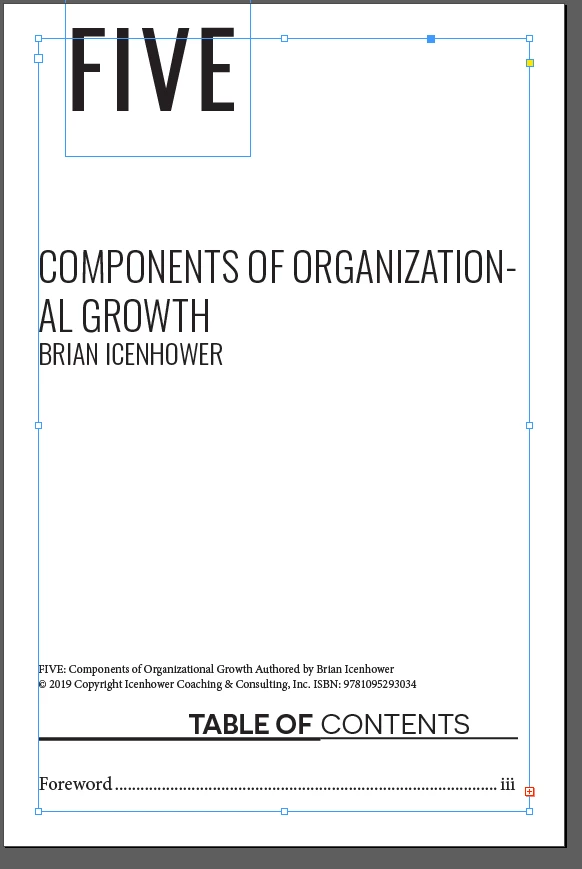
Trying to use the place command to import a doc file with multiple pages into a new.indd file. When I do this I get the red cross on the bottom right. I tried this with placing a .doc and again using a .docx ( I'm on a mac) I have to be doing something wrong as I have not had this trouble on my last project . This .doc is converted from a.pdf file saved both as a .doc and .docx

Figuring it was the file itself I tried to import OTHER .doc files I have and I get the same result.

I'm placing this doc into a new .indd file that has 100 pages, no matter what I tried I cant get the text to flow to the rest of the pages

Pics below are the screenshot of the red cross and the second image is to show I have Smart text Reflow on.

Any help, this is killing me.

MD
    This topic has been closed for replies.

    2 replies

    Bill Silbert
    Community Expert
    Community Expert
    June 29, 2019

    As Jane said enabling Primary Text Frame when you create a document will make this work correctly. To confirm that you have the Primary Text Frame enabled for your document go to the Master Page that you are using. See if when you select the text frame you will be flowing text into the icon appears as highlighted below. If it does not have the vertical and horizontal arrows showing click on it and they will appear making the frame a Primary Text Frame. You can have one Primary Text Frame per Master Page.

    jane-e
    Community Expert
    Community Expert
    June 29, 2019

    Hi Matthew,

    There are two ways to do this:

    1. Press and hold Shift before you click to place the file to enable Autoflow.
    2. Enable Primary Text Frame in the New dialog box.

    ~ Jane

    jane-e
    Community Expert
    Community Expert
    June 29, 2019

    Also, what you are showing is Preferences for how text flow works once it is enabled.

    It can also be enabled in by editing the Master Pages.

    Thread text among frames in Adobe InDesign > “Use Smart Text Reflow” and also “Flow Text Automatically”

    ~ Jane

    Inspiring
    July 2, 2019

    Maybe it's time to trash your preferences and see if this behavior still happens when the program is reset to defaults.

    To do so on a Mac:

    The User Library folder in which InDesign’s preferences are stored is hidden by default on most Macintoshes. To access it make sure that InDesign is closed and click on the desktop to launch a Finder Window (Command-N). With this window in column view follow the path User>Home folder (it’s the folder with an icon that looks like a house—it may have the user’s name rather than “Home”) and click on the Home folder. With the Option Key pressed choose Library from the Finder Go Menu. “Library” will now appear within the Home folder. Within the Library folder find the folder called Preferences and within it find the folder called “Adobe InDesign” and the file called “com.adobe.InDesign.plist” and delete both that folder and that file. When InDesign is next launched it will create new preference files and the program will be restored to its defaults.

    The advantage of manually deleting preference files in this manner is that after you’ve reset up the program (make sure that no document window is open) to your liking, you can create copies of your personalized “mint” preference files (make sure that you quit the program before copying them—that finalizes your customization) and use them in the future to replace any corrupt versions you may need to delete.


    i will do this as I have had the same problem and never resolved but by some freak glitch I was hitting option/ command a few times and  possibly the control key control and I got the .indd to populate all the text. So I went ahead with the project. But I'm the type of person that always wants to know why something that should work does not.

    I wil finish this project and then delete the prefs and get back to this and post.

    thx for all the help.

    MD