
allisonblake
Known Participant
March 12, 2012
Question

Importing Word into InDesign, problem with styles

  • March 12, 2012
  • 5 replies
  • 56879 views

OS 10.6, CS5

Hi everyone,

Does anyone have any experience with importing styled Word docs into InDesign?

Editors style their Word documents with some basic styles (Text, References, Headline, etc.) using a Word template that I created. Designers use import options to match the Word styles to the ID styles. This worked fine in Word 2004 and InDesign CS3: Word  "text" style would map on import to the InDesign "text" style, even though they had totally different attributes. Superscripts, italics, etc. would be respected as local overrides in InDesign.

Then we upgraded to CS5. Automatic mapping on import no longer seems to work: After importing text, all the styles in InDesign have local overrides assigned to them that don't make sense (hyphenation exceptions, tab settings). So I'm left with importing the Word styles, using auto-renaming so that InDesign explicitly does NOT match styles.
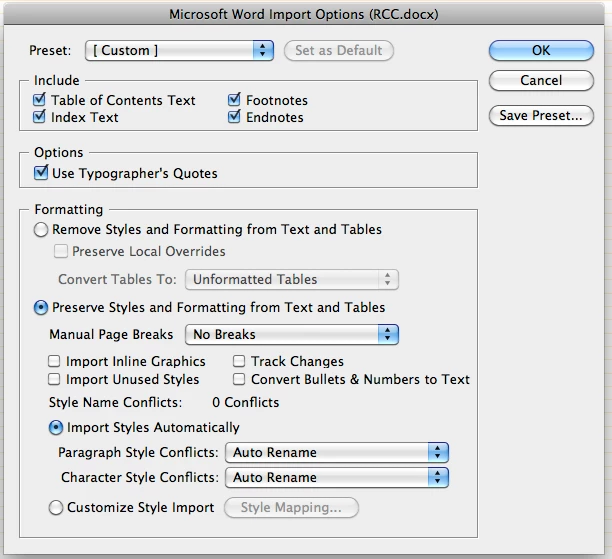
Then delete the Word styles one by one from the paragraph style panel, replacing with the desired ID style.

This has gone on for several months and we've now upgraded to Office 2011 but that hasn't solved the problem.

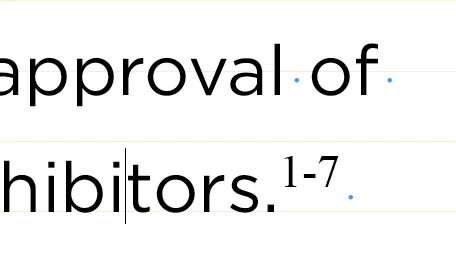
With Word 2011 docx files, the import works almost like it did in CS3, the styles almost come in cleanly: If the style in Word has NO local overrides, such as italics or superscripts, the InDesign style is correctly applied. The problem is those local overrides in Word--InDesign not only respects the italic or superscript, it also respects the font attribute. All the Word styles are Times New Roman so all superscripts in InDesign are coming in as superscript + TNR. (see screenshot)
Are we left with our original work-around? Importing styles then manually deleting and replacing them?

This is frustrating because it used to be smooth and seamless and while some new features of CS5 are great, it's annoying that it's broken this fundamental function!

I've tried saving the Word files as doc or rtf instead of docx but this doesn't make a difference in this problem.

Any help or advice would be much appreciated.

    This topic has been closed for replies.

    5 replies

    rudytheelder
    Participating Frequently
    February 10, 2015

    I'm an author / publisher.  I write in Word and I publish with InDesign. When I'm in the review stages, I like to edit my text in Word, so I export the text as an RTF.  When I import it back into InDeisgn I often find that some of the styles have annoying overrides from Word that break things.  (1) Paragraph style stuff about hyphenation and (2)  Characters style stuff about  Character direction: Left-to-Right style.

    * Easy global  fix:  select the whole text open the Window | Style | Paragraph window, and click the button on the bottom to remove all overrides. And do the same for the Window | Style | Character window. Before doing this, I like to check that I don’t have any italics that are in the file as overrides rather than being in there as part of a header style or as part of the Emphasis style that I try to use throughout the text instead of just an italic override. It makes me uneasy to remove all overrides, as I always worry there might be an important one I could have kept.

    * (1) Specific fix for the hyphenation overrides: Make sure the hyphenation settings in the individual InDesign paragraph styles match, so far as possible, the Word global hyphenation settings in the Page Layout | Hyphenation dialog of Word.    InDesign will import any Word hyphenation settings that don’t match the InDesign doc styles as overrides.

    Specifically,  set InDesign Hyphen Limit to ( say) 1 and set Word | Hyphenation | Hyphenation Options | Limit consecutive hyphens to the same number (say) 1. Also set InDesign Paragraph Style Hyphenation | Hyphenation Zone to (say) 0.5” and set Word | Hyphenation | Hyphenation Options | Hyphenation Zone to the same number (say) 0.5”.  And turn off all the InDesign optional hyphenation check boxes at the bottom of the dialog, and the turn off the two check boxes in the Word Hyphenation Options box as well.In Word you should also set Hyphenation | Automatic.  If you cautiously set Word Hyphenation | None the import will throw a “Hyphenation” override on the hyphenated paragraph styles, even though this maikes no sense.

    You may still pick up some hyphenation related overrides on your heder styles, if you have set the headers not to hyphenate.  You can either dump the overrides in InDesign or you can set your header styles to hyphenate…and be careful not have any headers actually be longer than one line.

    (2) I still haven't found the fix for the Left-to-Right text override.

    Peter Spier
    Community Expert
    Community Expert
    February 10, 2015

    Sounds like ID is an ME version, perhaps (or isn't and should be).

    May 10, 2014

    Just as an FYI, I was able to resolve formatting issues in InDesign by opening the word file and clicking Change Styles > Style Set > Reset to Quick Styles from template. Was having trouble with italics showing up in InDesign when imported. Hope this helps

    allisonblake
    Known Participant
    March 15, 2012

    After more digging and tinkering and importing lots and lots and lots of Word files, i think i have figured out the problem:

    The styles in WORD need to be based on (no style). If the styles are based on each other or on Normal, InDesign sees almost everything in the style as a local override.

    I rebuilt the Normal.dot with revised versions of my styles, basing them all on (no style) and now everything looks great in ID--superscripts and italics, etc. are retained as local overrides as desired; everything else* is ignored.

    *OK, not everything is ignored. Alignment is carried through as an override, so the WORD styles need to use the same alignment definitions (eg, left aligned, or justified, or centered) as the InDesign style you want to map to.

    *Numbered lists, such as references, need to have a list style defined in WORD. You can't use the regular bullet/numbering formatting, you have to use the outline numbering and define a custom list.

    I've spent the better part of the day rebuilding templates, fixing macros, etc. but I think it's worth it since I'm dealing with dozens of editors and designers.

    Joel Cherney
    Community Expert
    Community Expert
    March 15, 2012

    I should have been able to tell you about most of those things, but it's so long since I fixed the style-Based-On stuff in our .dot files that I forgot clean about it. Fortunately you don't have a significant percentage of contributors who have right-to-left keyboards turned on in Windows, or you'd have potentially unresolvable conflicts between alignment in text style and direction of text flow.

    Nice to know about the numbered list thing, though - I'd just been including "Convert all auto-bullets and auto-numbering to text before exporting RTF" in our workflow, I didn't know that automation in numbered lists could be preserved in any way. Thanks for posting that!

    allisonblake
    Known Participant
    March 15, 2012

    Interestingly (is that a word?), your mention of "Convert all auto-bullets and auto-numbering to text before exporting RTF" prompted me to check the button in the InDesign import options to convert bullets and numbers to text and that worked as well. I thought that it would make the auto bullets into actual bullets but it didn't. It let the auto bullets in the ID style shine through without bringing in the overrides it had previously been bringing in from Word!

    Joel Cherney
    Community Expert
    Community Expert
    March 12, 2012

    After importing text, all the styles in InDesign have local overrides assigned to them that don't make sense (hyphenation exceptions, tab settings).

    If you are confident that the overrides induced by Word import should not be included in the InDesign styles, then why not simply return to the style-mapping-import workflow? Include a new step: "Clear all overrides after placing Word document."  Or, alternately, I might run a script like  PrepText first, then clear all remaining overrides.

    This Word-file-import issue might be new to CS5 for English-language-only users, but I've been clearing all overrides (or, as above all remaining overrides) on Word documents in a wide variety of languages for some years now. I don't understand why

    importing the Word styles, using auto-renaming so that InDesign explicitly does NOT match styles.

    Then delete the Word styles one by one from the paragraph style panel, replacing with the desired ID style.

    is your only option. Sounds like a lot of manual work to me.

    allisonblake
    Known Participant
    March 12, 2012

    Joel, The problem is retaining some of the overrides, such as italics and superscripts, while clearing those I don't want, like the tab settings,  hyphenation, and fonts.

    I have written a script that sounds similar to PrepText that cycles through a variety of S&R functions in order to convert local italics/superscripts/etc. to character styles and then clears all overrides so it's not quite as manual as I made it out.

    Still, it's an extra step when this used to come in seamlessly, without clearing overrides or any other tinkering.

    It's frustrating when an upgrade breaks something that used to work so I was hoping someone would suggest something that would return it to its CS3 seamlessness.

    Thanks!

    Joel Cherney
    Community Expert
    Community Expert
    March 12, 2012

    Sorry, Allison, I should have sworn off posting on the Internet on a day when I've not had any caffiene at all. You made that completely clear in your original post, I just had a momentary lapse of reading comprehension.

    Another possiblity for resolving your difficulties: To what extent do you have control over the workstations used by the editors? I've smoothed out some Word-file-import issues in the past by examining the normal.dot of some contributors and found that they've acquired years' worth of cruft, which in some cases (trial installs of translation memory tools, for example) has induced all kinds of style-override nonsense. Clearning 'em out has helped a great deal in a a number of cases.  If your editors are inside your organization, or otherwise willing to submit to delousing of their Word templates, then it might reduce the frequency of spurious overrides being applied in InDesign upon placing your Word files, because you could ensure that the styles that were being altered by simply opening docs in Word and working on them actually had the same definitions in the Word document template as they did in InDesign.

    I am uncertain, but I suspect that both the Word file format and the Word import filter in ID's Place tool are moving targets for developers on both sides. When I have some spare time I will do some test imports to see if I can find something worth a bug report, but to be honest, CS3 Word placing was never as seamless for me as it was for you. Zero of my contributors are working in English, so I've always had the create-charstyles-and-clear-the-rest-of-the-overrides step in my workflow, because even in the days of "seamless" CS3 import there would still be a lot of divergence induced by the fact that e.g. a Korean font would be named Gulim on one computer and 굴림 on the other computer. That still counts as an override, of course. So, welcome to my world, I guess.

    BobLevine
    Community Expert
    Community Expert
    March 12, 2012

    Could be “based on” issues.

    Do you have any styles based on Basic Character Style? If so, change it to none.

    And make sure you don’t have any character, paragraph or object style chosen when placing.

    Bob

    allisonblake
    Known Participant
    March 12, 2012

    Thanks, but unfortunately that isn't the problem.

    All styles are based on either No Paragraph Style, or on one of the other styles (Text Bullet is based on Text, for instance).

    I'm placing the file into an existing text frame, so there is a paragraph style selected, but I get the same issues  if I let the place create its own text frame .