
Tunnelman
Participant
March 7, 2019
Answered

Improved Hello World script error?

  • March 7, 2019
  • 1 reply
  • 2119 views

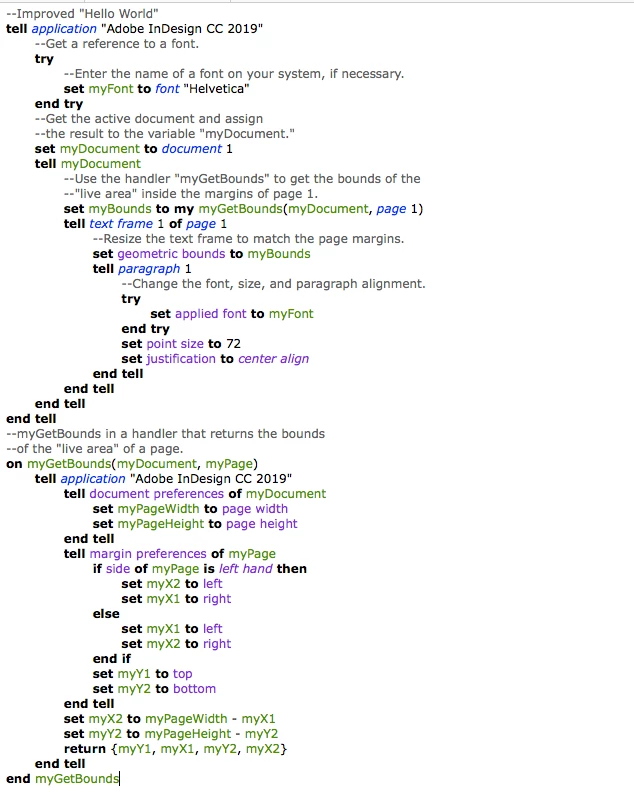
Hey all, was asked by my job to learn AppleScript for some automation and I've been butting my head against the wall with the tutorial Improved Hello World script.  I'm having difficulty identifying what exactly is incorrect in both the script I wrote following the tutorial as well as the script provided by Adobe as they both return the same error.  Any help would be appreciated.  The error is as follows:

Error Number: -10006

Error String: Adobe InDesign CC 019 got an error: Can't set geometric bounds of text frame 1 of page 1 of document id 1 to {0.5, 0.5, 10.5, 8.0}.

Here's the script:
This topic has been closed for replies.
Correct answer Manan Joshi

It looks that you are working on the open document, and try to set the geometric bounds of the textframe on the first page. Can you check if the page indeed has a textframe on it.

-Manan

1 reply

Manan JoshiCommunity ExpertCorrect answer
Community Expert
March 8, 2019

It looks that you are working on the open document, and try to set the geometric bounds of the textframe on the first page. Can you check if the page indeed has a textframe on it.

-Manan

-Manan
Inspiring
March 11, 2019

Hi,

In order for the script to work you need a text frame on page 1 of an open document that has text (a paragraph).

What you also need to be aware of is the measurement unit that is in effect when you are running the script.

If the current measurement unit is inches, trying to set point size to 72 won't work. Make sure the current measurement unit in effect for  setting font point size is points. For this, add the following for the first line after the tell application statement at the top of your script:

  set measurement unit of script preferences to points

Script preferences are persistent so you need to be aware of its settings.  If you prefer the script to work in another measurement system, you can use picas, inches, millimeters, centimeters, or inches decimal. But with any measurement setting other than points, your font point size will need to be specified as a string value:

  set point size to "72 pts"

Hope this helps,

rob day
Community Expert
Community Expert
April 23, 2021

Hello,

I was referring to the "Improved Hello World" script. A couple of things:
the pdf file is protected, so I wasn't able to just copy and paste from the
pdf file, so I used the files that came from the downloaded
file C:\Users\johnm\Downloads\scripting_sdk_16.1.0.020.zip\scripting\scripts\scripting_tutorial\indesign\javascript
that
I copied to the scripts folder and was able to run; with an error. I am
attaching copies of what happened on my windows computer.

I hope scripting is worth it, I'm getting off to bad start. If for
whatever reason your documentation is protected, the download files should
work. it could be that an experienced user could unlock the pdf file; the
best I could do was print the page to a pdf the convert it to Word, then
copy past it into notepad (bad start huh?),

If I continue to use InDesign, the last three hours with the product will
be forgotten, but my feedback on my last three hours should somehow creep
into your documentation and customer support. Lastly, in the title to my
query, I stated "Improved Hellow World" script. You wasted our time by
answering a question that wasn't asked.

This product is twenty years old, so I must be missing something, so clue
me in.

Thanks,
- John

[John. This is a public forum. Your personal contact inforamtion was removed for your protection.]


I copied to the scripts folder and was able to run; with an error. I am
attaching copies of what happened on my windows computer.


I think you forgot to add the screen capture of your error message—click the picture icon when you post to share a capture.


The HelloWorld script worked fine for me from ExtendScript Toolkit:


To compile scripts you will need a script editor like ExtendScript Toolkit or Visual Studio Code with the ExtendScript extention—Visual Studio is a 64 bit app, ExtendScript is 32-bit. You can also save JavaScripts with a .jsx extention from a plain text editor—if the code is not saved as plain text you will get an error running from the Scripts panel


You can find the entire InDesign API here:


https://www.indesignjs.de/extendscriptAPI/indesign-latest/#about.html