reproo2773183
Inspiring
July 18, 2022
Answered

in-camera JPG - Profile not seen by InDesign

  • July 18, 2022
  • 4 replies
  • 1230 views

Color Mis Management by Indesign

There was a thead similar about png s showing a different color profile in Apple's Finder compared to InDesign.


I've worked in Pre-Press for many years and consider I have a good grasp on Color Managment but I've only just figured this out.

I've created a photographic Calendar for the last few years just for freinds and family.


My workflow:I shoot CR2+JPG, (my Camera default is sRGB for the JPG)
I’ll put these either into LR (uses the CR2) or Apple Photos (usually uses the JPG)
I’ll Export from Lightroom to 8bit AdobeRGB .jpg
When I Export from Apple Photos it tends to be both CR2 JPG and an XMPsidecar, the prescense of the XMP appears to have no effect on InDesign’s PDF Export.

So the lower case jpg (from Lightroom) can help identify which is which.

Any of these (including the direct from camera JPGs) could be opened in Photoshop and usually I’d save as .psd or just overwite the jpg.

DNGs or CR2s could be opened in Photoshop via ACR and then saved out of Photoshop.

All the formats that are Saved from Photoshop retain the PROFILE when Placed into InDesign.

BUT THE JPGs direct from Camera or Phone DO NOT, instead they show as Document RGB in InDesign.

This is bad because My Calendar’s Indesign Document is set with AdobeRGB as its RGB Working Space,
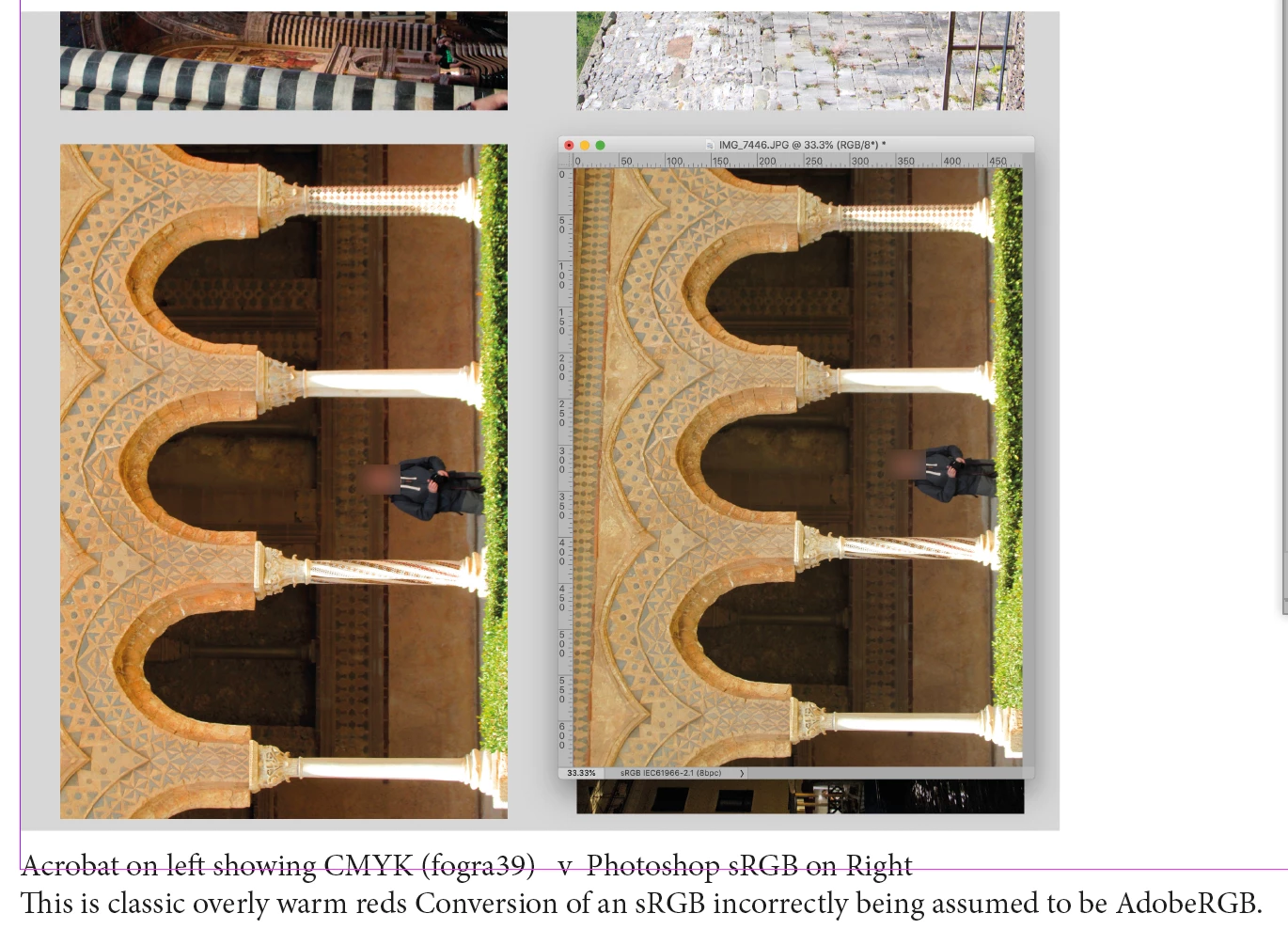
so the in-Camera JPG files no longer match the sRGB settings that Apple’s Finder and Adobe Photoshop see.

I usually Export from InDesign and let InDesign convert to FOGRA39.
I’ll check the colour in Acrobat is ok before printing, and again on an actual printed proof. If necessary I’ll round trip back through Photoshop to retouch or convert to cmyk and place the new image into InDesign then out to pdf again.
This issue has messed me up, I’m used to Photoshop not matching the print exactly so I’m looking at an overly saturated print and de-saturating BUT Photoshop is already de-saturating it because unlike InDesign its getting the sRGB profile correct. So I end up over retouching it and end up with the next print dull and lifeless. Now I’ve figured out its InDesign thats messing me up, I’ll be sure to check this Decembr
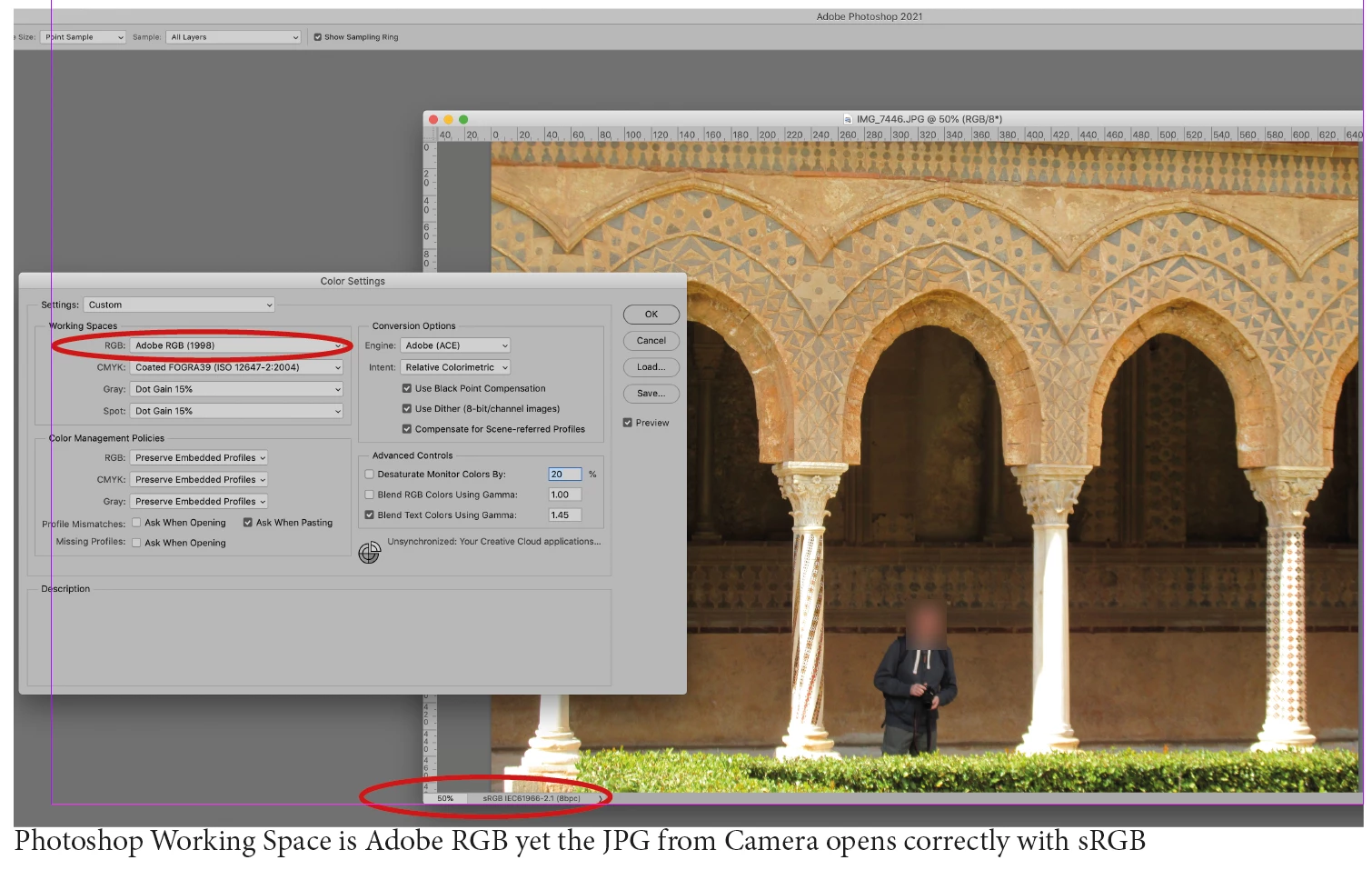
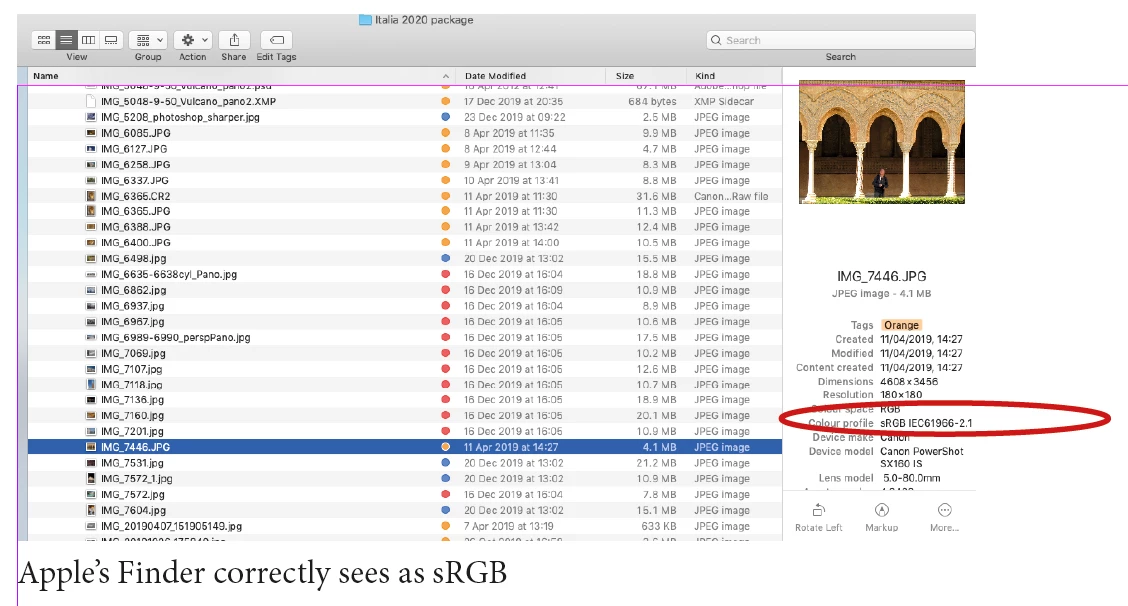
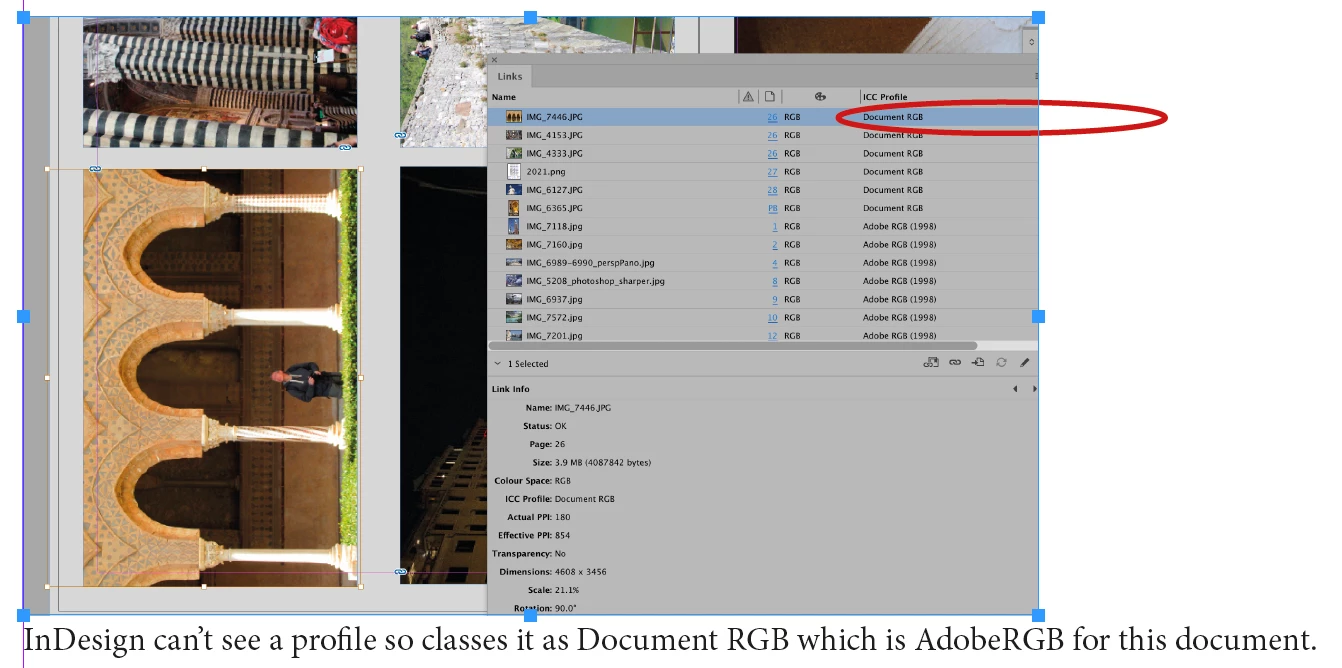
can anyone confirm this behaviour or offer an explanation as to why InDesign doesn't see the profile until its saved from Photoshop but Photoshop does see the profile.

This topic has been closed for replies.
Correct answer Laubender

Hi @reproo2773183 ,

just digged out a discussion from 2007 in a German InDesign forum where this issue was discussed.

If my memory serves right it all boils down to the situation below:


If you save the JPEG with PhotoShop you cannot[*] go wrong.

The profile data can be included so that InDesign can read the profile while saving.


[*]Well, you perhaps can go wrong, if you enable the following PhotoShop preference that is turned off by default.


Preferences > File Handling > File Compatibility >

[  ] Ignore EXIF Profile Tag


There are two ways (maybe more?) to tag an image with a color profile.

[1] You can set a comment, the actual profile data is not included, just the comment that the image is meant for sRGB.

[2] And you can include the profile data.


By default PhotoShop is able to read the EXIF comment or to see the actual profile data that is included.


PhotoShop can read the entry if Ignore EXIF Profile Tag is off. This preference is off by default.

InDesign cannot read that special EXIF comment about the sRGB profile. So it shows no profile data if the file is placed directly from the camera.


Regards,
Uwe Laubender
( Adobe Community Professional )

4 replies

Lukas Engqvist
Community Expert
Community Expert
July 18, 2022

There are several things we don't know. The InDeisgn application colour settings. The docuument colour settings (these may differ from the application settings and are as the application was set when the document was created)

I would say you want to use sRGB as RGB in InDesign, since the Document RGB is the RGB for unnassigned content and the only RGB content that should be unnassigned is sRGB (s = standard). If you have content with other ICC profiles these are normally preserved/respected. 


(Note that you can override an object setting both ICC profile and rendering intent on a specific placed file)

If you decide to CMYK content or send RGB to printer it will work well either way. 

reproo2773183
Inspiring
July 18, 2022

Hi Lukas,

My InDesign application color settings are sRGB.

My InDesign document was created when the setting was AdobeRGB

When I open this Document I get the Profiles Mismatch warning, but continue to work in the document space.

I had realsied that forcing the Document to sRGB would fix this.

In fact I would have never come across this issue if the Document's space was sRGB.


Maybe you are right that for InDesign "the only RGB content that should be unnassigned is sRGB".

Its hard to stop using Bridge to Sync color settings 😞


Lukas Engqvist
Community Expert
Community Expert
July 18, 2022

I never used the Bridge Sync, because it didn't make sense to me. If you only have one printer then you may want to sync… but in Photoshop I normally want to work media independent. In Illustrator and InDesign I will use CMYK safe where RGB is colour managed, but sRGB is default. One of reasons I think sRGB is more logical is that this is what Pantone Bridge assumes and untagged web first media will still give correct render. For the AdobeRGB missmatch in yellow this is why many European printers used ECI RGB which has more aligned Yellow with CMYK and has D50 as whitepoint. The whitepoint difference is a bigger issue than many realise. 

LaubenderCommunity ExpertCorrect answer
Community Expert
July 18, 2022

Hi @reproo2773183 ,

just digged out a discussion from 2007 in a German InDesign forum where this issue was discussed.

If my memory serves right it all boils down to the situation below:


If you save the JPEG with PhotoShop you cannot[*] go wrong.

The profile data can be included so that InDesign can read the profile while saving.


[*]Well, you perhaps can go wrong, if you enable the following PhotoShop preference that is turned off by default.


Preferences > File Handling > File Compatibility >

[  ] Ignore EXIF Profile Tag


There are two ways (maybe more?) to tag an image with a color profile.

[1] You can set a comment, the actual profile data is not included, just the comment that the image is meant for sRGB.

[2] And you can include the profile data.


By default PhotoShop is able to read the EXIF comment or to see the actual profile data that is included.


PhotoShop can read the entry if Ignore EXIF Profile Tag is off. This preference is off by default.

InDesign cannot read that special EXIF comment about the sRGB profile. So it shows no profile data if the file is placed directly from the camera.


Regards,
Uwe Laubender
( Adobe Community Professional )

reproo2773183
Inspiring
July 18, 2022

How difficult would it be to get

Preferences > File Handling > File Compatibility >

[  ] Ignore EXIF Profile Tag

Added to InDesign.

Community Expert
July 18, 2022

"How difficult would it be"

I'm asking this myself for about 15 years.


Regards,
Uwe Laubender
( Adobe Community Professional )

Derek Cross
Community Expert
Community Expert
July 18, 2022

Most color management authorities suggest keeping images in InDesign in RGB color mode and exporting the document to PDF/X-4.

No doubt the color management experts on this forum will contribute helpful comments about your workflow.

reproo2773183
Inspiring
July 18, 2022
quote

Most color management authorities suggest keeping images in InDesign in RGB color mode and exporting the document to PDF/X-4.

By @Derek Cross

Hi Derek to continue on from your quote... the conversion to CMYK should be handled by your Printer... That would be me

🙂

For difficult images, I maintain that the best place to do the conversion is Photoshop.

Just for the LOLs Exporting to PDF/x-4 dumps this image into the pdf Tagged as AdobeRGB, which is expected but not useful.

Willi Adelberger
Community Expert
Community Expert
July 18, 2022

It is not a problem of InDesign, it is a problem inheerited from the camera. I would never use any image directly from the camera in InDesign. I would recommend to use the DNG to make corrections and from there save a JPG in RGB with profile out from CR module to get the best quality.

reproo2773183
Inspiring
July 18, 2022
quote

It is not a problem of InDesign, it is a problem inheerited from the camera.


By @Willi Adelberger

Hi Willi,

can you expand on this, I'm guessing that the JPG from the Camera doesn't have an embedded profile but why do both Apple's Finder and Adobe Photoshop both report and treat it as if it does?