

Good Venture
Known Participant
November 1, 2024
Question

Inconsistent Footnote Formatting Across Pages in InDesign

  • November 1, 2024
  • 3 replies
  • 2763 views

Hi everyone, 


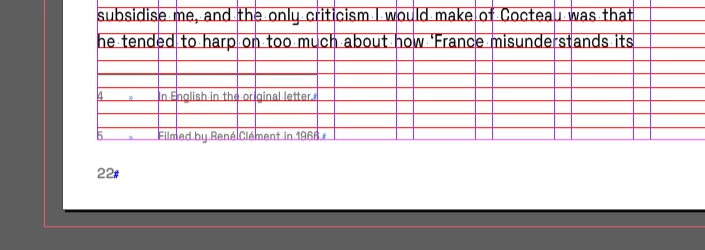
Any idea why the document footnotes, with a given set of rules and using the same Text Frame Options across all pages, are so wildly different on each page? 


<Title renamed by MOD>

This topic has been closed for replies.

3 replies

Good Venture
Known Participant
November 8, 2024

Still didn't manage to solve this. After a few changes, I've settled on the following settings because is the combination giving me the best output so far, but still far from perfect. 


James Gifford—NitroPress
Brainiac
November 8, 2024

You'd have to share a sample document for any of us to give any further useful advice. There is something odd going on here, and from experience, these frustrating problems boil down to one of two results: a bug or quirk or "feature" in ID triggered only by an unusual combination of layout choices, or a fairly simple matter of the OP using some collateral setting or overlooking a wonky setting because the right questions haven't been asked.


If you can create/share a sample doc with this fault, I'd bet it can be resolved in a short time, even if it involves working around an ID quirk. But we could play 274 Questions all day and never hit the right answer. 🙂

Robert at ID-Tasker
Brainiac
November 1, 2024

@Good Venture


As pointed out by @Abhishek Rao - you have pretty consistent extra spacing - either because of the Leading value or before / after spacing.


Abhishek Rao
Community Manager
Community Manager
November 1, 2024

Hello, Good Venture!


Thanks for sharing the screenshot; I can see how frustrating inconsistent footnote formatting can be, especially when you’ve set the same rules across pages. 

Could you please let me know the version of InDesign you're using and your operating system details? These can sometimes affect formatting consistency. 


In the meantime, you can confirm if you did follow the below steps in setting up the footnote: 
1. Ensure that your baseline grid settings are consistent across all text frames. A slight variations in these settings can cause discrepancies.
2. Go to 'Type > Document Footnote Options' and verify that the options for “Spacing” and “Position” are set uniformly. Adjusting the “Space Between Footnotes” and “Minimum Space Before First Footnote” might also help align them consistently.
3. If your footnotes use specific paragraph styles, make sure the styles are exactly the same across your document pages, as any small variation can impact alignment.


Let me know if this helps or if the issue persists. I’m here to assist further if needed!


Thanks, 

Abhishek Rao

Good Venture
Known Participant
November 1, 2024

Hi Abhishek, 

Thanks for your reply.  


1. Yes, I made sure all "Text Frames Options" are consistently formatted.  Every "Text Frame" shares the same "General", and "Baseline Options" settings throughout the article.


2. "verify that the options for “Spacing” and “Position” are set uniformly." uniformly between them? Or what do you mean?

"Adjusting the “Space Between Footnotes” and “Minimum Space Before First Footnote” might also help align them consistently." I am sorry but this is not very helpful. 

This is my current setting:


3. Yes, they are using paragraph styles, as you can see above, and yes, every note has the same style.


Thank you!

Robert at ID-Tasker
Brainiac
November 1, 2024

@Good Venture 


What are the Space Before / After options  - and Leading - in the Footnote's ParaStyle definition?