
Participant
May 11, 2021
Resuelto

InDesign 16.2.1 showing red bar on workspace

  • May 11, 2021
  • 32 respuestas
  • 27088 visualizaciones

Can't open more than one file in Indesign, get weird red or blue banner/line and when I scroll down the image lags and can't select certain files.

In my job, I have to get out multiple language files and it is easier to work in batches. How can I solve this as it is slowing down my work time!



{Renamed by MOD}
Este tema ha sido cerrado para respuestas.
Mejor respuesta de Srishti Bali

Hi all,


Sorry to hear that the issue is not yet fixed for some of you. We are still investigating this and need you help with a few more details. 


  • Please share system information file by following these steps. 
  • Exact version of InDesign in which you can replicate this behavior. 
  • Is this issue happening with both GPU preview and CPU mode?
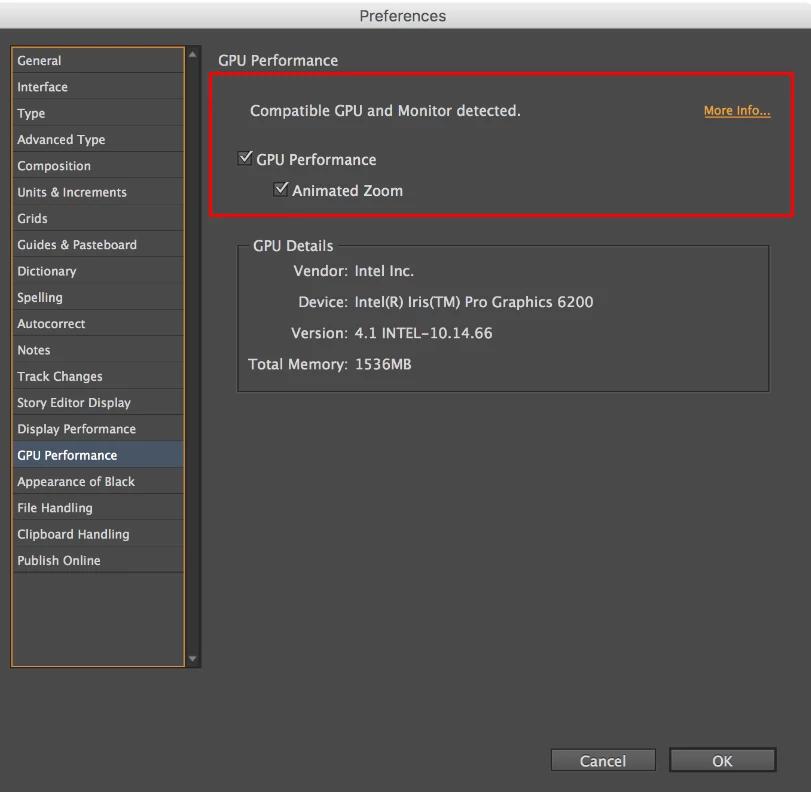
  • Screenshot of the “GPU Performance” from InDesign > Preferences >  GPU Performance like this:
  • Are you using external monitor(s)? If yes, with which port and cable combination it is connected.
  • During our investigation, we found that this is generally happening on the machines which are powered by eGPU. Do you have eGPU connected to your machine?
  • A small video demonstrating the issue could be really helpful.
  • Sample .indd document where the issue is reproducible.


All this information will help us replicate this issue and help you accordingly.


Regards!

32 respuestas

Participating Frequently
May 12, 2021

Have you had any luck resolving this problem. I have the same. I have reinstalled the programme. I have deleted all the preferences. Still nothing. All my documents lag and a red banner comes over the screen and I just cant work.

Participant
May 14, 2021

Latest update through creative cloud at the moment seems more stable... At the moment


juliehaas
Participant
May 11, 2021

Is anyone else getting giant red error blocks on your project? Something is wrong with this update.

Known Participant
May 19, 2021

Yes. But mine are blue. I'll work on a page and use a shortcut to Zoom and all of sudden my spread is covered in blue or gray. One time a strip of blue appeared across the top of the spread where the folio is. I've had phantom black rules appear and when I close a document dark rectangles. This is not surprising because in the past year or so, I've noticed a lot more instability in the program. For instance, I set my program to open with a workspace I created and I more often than not have to switch to it from Essentials. I've also set the workspace to default to the Eyedropper tool, not Color Theme but that also gets overridden. (Seriously, Adobe, who wants the Color Theme Tool to be the default in that button?)

Known Participant
May 19, 2021

Here's a screenshot of an example of my issue. It's been worse than that, sometimes filling the entire screen.