
Participant
August 23, 2022
Answered

inDesign 17.4 find/change does not find text in locked frames

  • August 23, 2022
  • 3 replies
  • 173 views

As of this morning, when I updated to v17.4 of inDesign, the find/change tool can no longer find anything that is in a locked frame.

I have been happily performing search/replaces throughout my documents -- including locked frames, for a  long time; never had a problem before today.
This topic has been closed for replies.
Correct answer Barb Binder

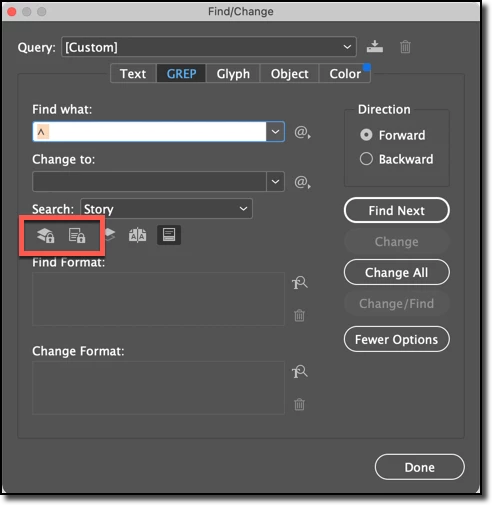
You can control this via the lock icons in the F/C dialog box.


~Barb

3 replies

Community Expert
August 24, 2022

Hi @mr.halfstep ,

just tested GREP Find on locked text frames and also on text frames in locked layers.

Still, this works with InDesign 2022 version 17.4 on my Windows 10 machine. Just click the left icon that is showing a locked layer. The other one for locked stories is needed for InCopy workflows where it can happen  that stories could be locked for editing by users with InCopy.


Regards,
Uwe Laubender
( Adobe Community Professional )

Community Expert
August 24, 2022

If @Barb Binder  suggestion is not working


Try resetting your preferences:
The easiest way to reset everything is to delete the InDesign preferences: as soon as InDesign starts to boot hold down Shift, Alt, Ctrl (and Apple/Cmd if working on a Macintosh). A dialog will appear asking to delete the InDesign Preferences, select 'Yes' on this dialog.
Further info and instructions here if needed:
https://helpx.adobe.com/in/indesign/kb/indesign-preferences-support-file-locations.html

Barb Binder
Community Expert
Barb BinderCommunity ExpertCorrect answer
Community Expert
August 24, 2022

You can control this via the lock icons in the F/C dialog box.


~Barb

~Barb at Rocky Mountain Training