Exit
  • Global community
    • Language:
      • Deutsch
      • English
      • Español
      • Français
      • Português
  • 日本語コミュニティ
  • 한국 커뮤니티
4

InDesign 19.1 TextWrap, Character, and Paragraph windows content

New Here ,
Feb 06, 2024 Feb 06, 2024

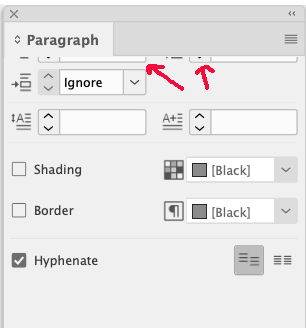
We recently updated to InDesign 2024 - v19.1. I have noticed after working in the software that the content on the TextWrap, Character and Paragraph windows disappears. For example, sometimes the options show up (such as which type of wrap you want to use), but the tab where you would type in a number disappears. Other times, all of the content on the window disappears. The Paragraph window has the content cut off at the top -- it won't scroll up or down to bring those tabs into view. The only thing I can do is restart InDesign. We did not have any issues like this with previous versions of InDesign. Anyone have any suggestions?

TOPICS
Bug , How to , Performance
249
Translate
Report
Community guidelines
Be kind and respectful, give credit to the original source of content, and search for duplicates before posting. Learn more
community guidelines
Community Expert ,
Feb 06, 2024 Feb 06, 2024
Translate
Report
Community guidelines
Be kind and respectful, give credit to the original source of content, and search for duplicates before posting. Learn more
community guidelines
Community Expert ,
Feb 06, 2024 Feb 06, 2024
LATEST

If resetting your preferences doesn't work as per @leo.r - then I would suggest


Reinstalling rarely fixes everything - you can do a complete reinstall using the
Creative Cloud Cleaner Tool https://helpx.adobe.com/creative-cloud/kb/cc-cleaner-tool-installation-problems.html


Translate
Report
Community guidelines
Be kind and respectful, give credit to the original source of content, and search for duplicates before posting. Learn more
community guidelines