
October 16, 2018
Answered

InDesign 2019 – Launch Error Freezing on start Screen

  • October 16, 2018
  • 3 replies
  • 6128 views

For me, I'll launch ID and get pass the splash screen and land on the recent documents screen then I get about 30sec of stutter with my mouse and the program completely freezes and cannot be closed unless I kill it in task manager. The program in task manager does not show the whole program as "not responding" but it does show on one of the sub-tasks in ID. It's eating all my cpu cycles and is literally unusable:
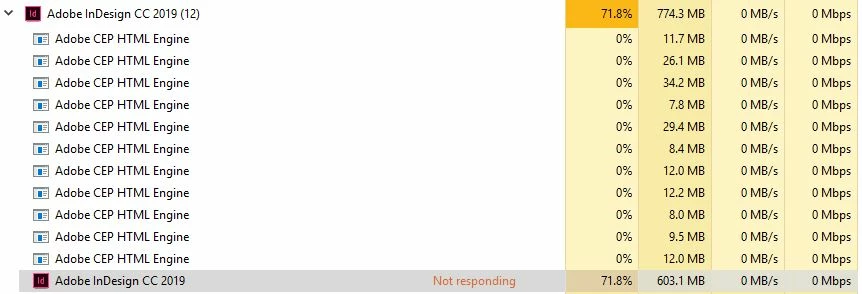
I've tried completely clearing my AppData, holding shift, alt, shift+alt during boot - nothing works! The update completely broke.

My hardware info:

Win10 Pro (64), fully updated

Intel i5-4690K

32GB RAM

GTX-970 (4GB) latest driver

    This topic has been closed for replies.
    Correct answer Srishti Bali

    Hi All,

    Please try these steps and share results:

    Try resetting preferences for InDesign:

    Close all Adobe applications.

    Go to Locations C:\Users\user\AppData\Roaming\Adobe and C:\Users\user\AppData\Local\Adobe.

    Rename InDesign folders to InDesign.old (Zip InDesign.old and upload to Creative Cloud/Google Drive/ Dropbox and share a direct download link)

    Launch InDesign from CC.

    Regards,

    Srishti

    3 replies

    Participant
    January 27, 2021

    For those who are having this issue, if renaming/deleting InDesign folders doesn't do the trick for you, try also thoroughly cleaning your Temp folder. Worked for me. 

    Participant
    February 24, 2021

    I faced hanging probloem all of above solutions did not work , finally when I contacted customer care they entered my laptop after long digging they found the problem with windows user when I created a new user it worked very well. But still I could not find the problem with windows yet.


    October 17, 2018

    Has anyone figured out an actual fix?

    Srishti Bali
    Community Manager
    Srishti BaliCommunity ManagerCorrect answer
    Community Manager
    October 17, 2018

    Hi All,

    Please try these steps and share results:

    Try resetting preferences for InDesign:

    Close all Adobe applications.

    Go to Locations C:\Users\user\AppData\Roaming\Adobe and C:\Users\user\AppData\Local\Adobe.

    Rename InDesign folders to InDesign.old (Zip InDesign.old and upload to Creative Cloud/Google Drive/ Dropbox and share a direct download link)

    Launch InDesign from CC.

    Regards,

    Srishti

    October 18, 2018

    renamed both with a .old append, uploaded via box, please use this link to download:

    InDesign.zip - Box

    also, for some reason, in the 'roaming' directory, there were somehow two adobe directories (with the exact same name), one contained everything while another had an 'After Effects' folder - I've since deleted the additional Adobe folder, hopefully this doesn't screw up AE.

    Klaas vT
    Inspiring
    October 16, 2018

    its_pronounced_fee  wrote

    For me, I'll launch ID and get pass the splash screen and land on the recent documents screen then I get about 30sec of stutter with my mouse and the program completely freezes and cannot be closed unless I kill it in task manager. The program in task manager does not show the whole program as "not responding" but it does show on one of the sub-tasks in ID. It's eating all my cpu cycles and is literally unusable:

    I've tried completely clearing my AppData, holding shift, alt, shift+alt during boot - nothing works! The update completely broke.

    My hardware info:

    Win10 Pro (64), fully updated

    Intel i5-4690K

    32GB RAM

    GTX-970 (4GB) latest driver

    This sounds like a similar problem I've had a few times, usually signing out (of Windows) and signing back in again resolves this for me...

    Also, it does seem like windows updates cause issues with the Nvidia graphics cards at times, I removed the latest windows update just a week ago as it caused this problem, now I've turned off auto updates for now...

    Good luck!

    October 16, 2018

    unfortunately our systems are managed by IT and rolling back updates is not currently an option but thanks for your insight

    Srishti Bali
    Community Manager
    Community Manager
    October 16, 2018

    Hi there,

    Please try these steps and share results.

    Launch InDesign and the Quit it and then relaunch it from Creative Cloud.

    Regards,

    Srishti