
Known Participant
July 29, 2020
Answered

InDesign 2020 Mac -- crashes on Macbook after waking from sleep

  • July 29, 2020
  • 3 replies
  • 1013 views

Running MacOS 10.5.6 / InDesign 15.5.1


If my MacBook goes to sleep, upong awakening, InDesign crashes.


Initially I thought that FontExplorer X Pro (7.1.1) was the culprit, but even with that plug-in removed, it still crashes.


InDesign 2019 does not exhibit this behaviour.


I have trashed preferences with no change in the behaviour.


This topic has been closed for replies.
Correct answer Srishti Bali

Hi there,


Apologies for the inconvenience caused to you due to this issue. We're currently investigating this. I would request that if you could upvote the issue here (https://indesign.uservoice.com/forums/601180-adobe-indesign-bugs/suggestions/40958992-self-closes-or-crashes-when-computer-sleeps) and submit the crash report by following these steps (https://helpx.adobe.com/in/indesign/kb/submit-crash-reports.html). 


While submitting the crash report, please use the same email address, with which you are signed in on this community. This will help us find the crash report and help accordingly.


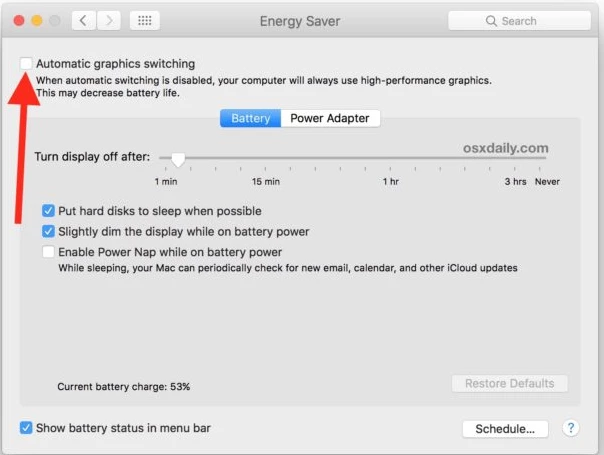
After sharing the crash report, please try turning off Automatic Graphics Switching. Go to Apple menu > System Preferences and click Energy Saver > Deselect the automatic graphics switching checkbox.


Let us know if this helps or if you have any further questions. 


Regards,

Srishti

3 replies

Srishti Bali
Community Manager
Srishti BaliCommunity ManagerCorrect answer
Community Manager
August 5, 2020

Hi there,


Apologies for the inconvenience caused to you due to this issue. We're currently investigating this. I would request that if you could upvote the issue here (https://indesign.uservoice.com/forums/601180-adobe-indesign-bugs/suggestions/40958992-self-closes-or-crashes-when-computer-sleeps) and submit the crash report by following these steps (https://helpx.adobe.com/in/indesign/kb/submit-crash-reports.html). 


While submitting the crash report, please use the same email address, with which you are signed in on this community. This will help us find the crash report and help accordingly.


After sharing the crash report, please try turning off Automatic Graphics Switching. Go to Apple menu > System Preferences and click Energy Saver > Deselect the automatic graphics switching checkbox.


Let us know if this helps or if you have any further questions. 


Regards,

Srishti

Participant
August 3, 2020

Hi,

This has also happened to me on a regular basis. 

Ian Sayers
Inspiring
August 2, 2020

Are you connected to a server ? Any documents open when it crashes or just indesign open ? Have you tried completely uninstalling it and then installing again ? (others reported issues with fonts were resolved when doing this)

mpvranaAuthor
Known Participant
August 2, 2020

Are you connected to a server?


Yes, actually two. One TimeMachine device connected to my router, and also to a NAS. However, I am not actively using any documents on the server. Any InDesign files are being loaded from my local SSD.


Any documents open or just InDesign open?


That's a good question. I believe it's only with documents open, but not absolutely certain. Will try with no documents and see if that changes.


Have you tried uninstall and reinstall?


Yes, I did try that early in the CC2020 release cycle, and that didn't change anything.