
theresas56160897
Participating Frequently
November 4, 2021
Answered

InDesign 2022 - Icons are generic White

  • November 4, 2021
  • 2 replies
  • 2172 views

I have tried restarting my computer and checking Creative Cloud.  InDesign 2022 was just updated a few days ago and that is when it started.  I also have to select the app everytime I open an icon to edit it.  Works okay, but really inconvenient.
This topic has been closed for replies.
Correct answer Anshul_Saini

Hi @Kristi C


Sorry about the trouble.  I would suggest you to try the following steps and let us know how it goes:

  • Press Window/ Start Button + R
  • Type - regedit > press enter
  • Go to the following location: HKEY_CURRENT_USER\Software\Microsoft\Windows\CurrentVersion\
    Explorer\FileExts\
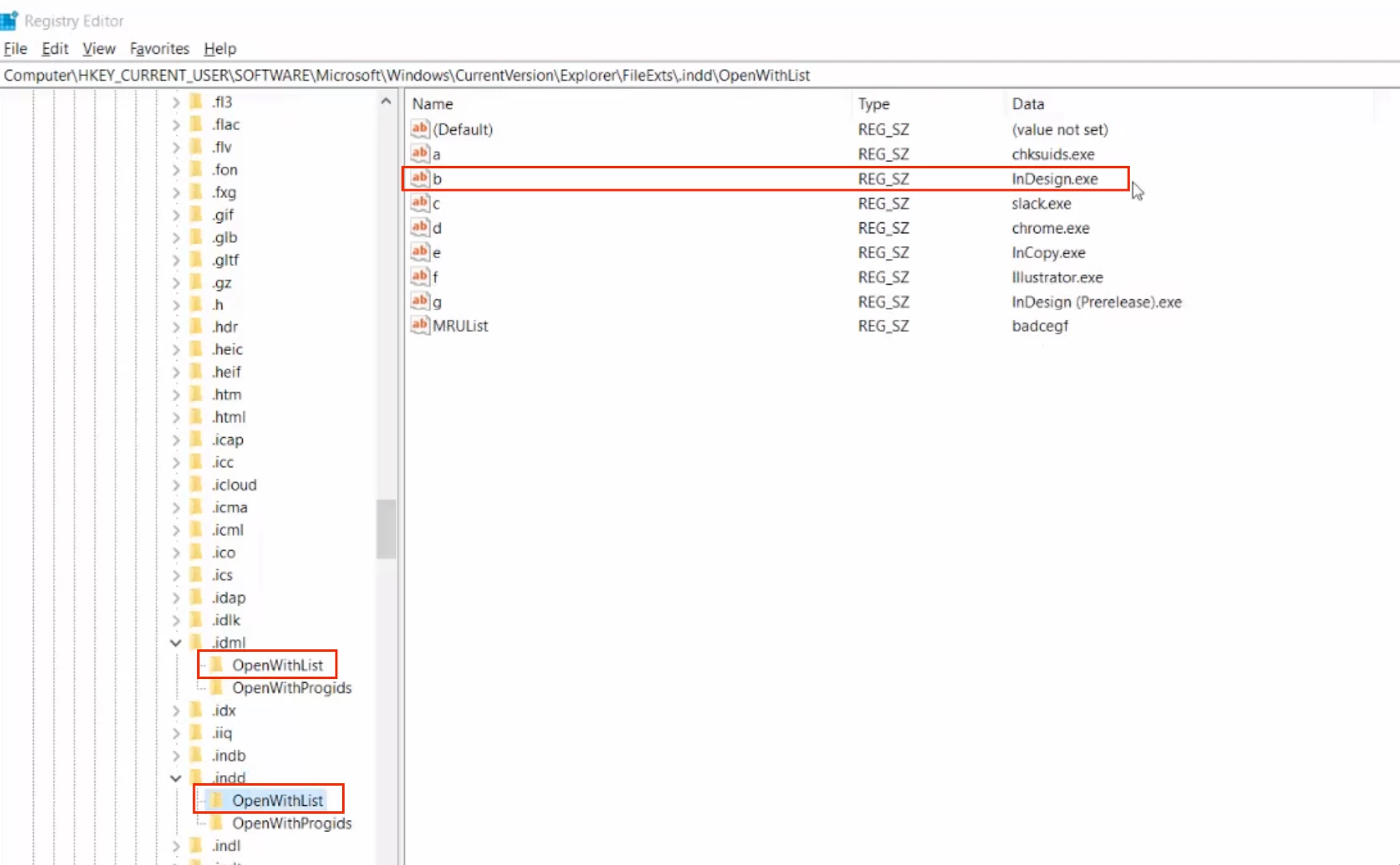
  • Locate .idml & .indd > OpenWithList
  • Make sure Name "b" & Data "InDesign.exe" values are correctly inserted in both the file extension registry settings.
  • Restart Windows


I hope it helps!


Regards,

Anshul Saini

2 replies

Participant
November 29, 2021

I have tried the suggestions of clicking on the icon, going to properties and that didn't work. I removed the application and reinstalled. That didn't work.  All my creative suite apps were upgraded to 2022 and only InDesign is having this issue.  


Anshul_Saini
Community Manager
Anshul_SainiCommunity ManagerCorrect answer
Community Manager
December 2, 2021

Hi @Kristi C


Sorry about the trouble.  I would suggest you to try the following steps and let us know how it goes:

  • Press Window/ Start Button + R
  • Type - regedit > press enter
  • Go to the following location: HKEY_CURRENT_USER\Software\Microsoft\Windows\CurrentVersion\
    Explorer\FileExts\
  • Locate .idml & .indd > OpenWithList
  • Make sure Name "b" & Data "InDesign.exe" values are correctly inserted in both the file extension registry settings.
  • Restart Windows


I hope it helps!


Regards,

Anshul Saini

theresas56160897
Participating Frequently
November 4, 2021

I think I found it in one of the conversations.


Right click on the blank white InDesign icon, go to Properties. Click on Change button, then select InDesign


It worked and changed all of the white icons to the familiar one.

Participant
November 29, 2021

Didn't work for me, unfortunately


Dave Creamer of IDEAS
Community Expert
Community Expert
November 29, 2021

On Windows:

  1. Right-click
  2. Go to Open With... (do NOT select program here)
  3. Go to Choose Another App (do NOT select the program yet)
  4. Click the Always use this app to open .xxxx files
  5. THEN select the program (if program is not listed, click More Apps...; sometimes, you may have to manually search for the program. 

You may have to restart computer to get icons to show up properly.


It's similar on Mac, but you Get Info (command-I)

David Creamer: Community Expert (ACI and ACE 1995-2023)