
New Participant
August 8, 2023
Answered

InDesign 2023 Won't Launch. I have to delete Cache every time.

  • August 8, 2023
  • 4 replies
  • 1490 views

InDesign 2023 Won't Launch. (Mac Studio 22)

I uninstalled/reinstalled. Launches once, then after closing app, it won't launch again.


I have discovered it has something to do with the Cache. If I delete the 'Adobe InDesign' folder in my 'Caches' folder, it will launch fine. (it creating a new cache'Adobe InDesign' folder in the 'Caches' folder).


But still. after closing app, it won't launch again. 

So, now I'm deleting cache folder every time to lauch. Please advise.
This topic has been closed for replies.
Correct answer leo.r

If you're running InDesign 18.5, then it appears that many users experience the same issue (judging by the amount of similar posts on the forum).


First, update to macOS 13.5. It solved the issue for some users.


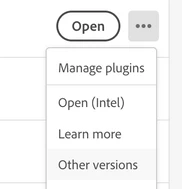
If it doesn't help, then users recommend to install an earlier version - preferably 18.3. You can do it from the Creative Cloud app:


4 replies

New Participant
August 21, 2023

I'm having this same issue too. The only way for me to get around it is to uninstall and reinstall every time I want to use it. Either that or never close the app. This is not a good solution. Not sure what is going on. Any resolution on your end?

leo.r
leo.rCorrect answer
Community Expert
August 21, 2023

If you're running InDesign 18.5, then it appears that many users experience the same issue (judging by the amount of similar posts on the forum).


First, update to macOS 13.5. It solved the issue for some users.


If it doesn't help, then users recommend to install an earlier version - preferably 18.3. You can do it from the Creative Cloud app:


New Participant
August 8, 2023

I'm having the same problem. Deleting cache and preferences is not helping.

New Participant
August 8, 2023

Having the same problem - started yesterd, 08/07/2023

New Participant
August 8, 2023

I have the same problem... I don't know wath to do. I uninstalled and reinstalled Indesign and after closing the app it won't lacuh again.

New Participant
August 8, 2023

Same problem here, and can't find a solution.

I have to uninstall and reinstall every time I want to use the Indesign. After closing once, it won't launch. 


Steve Werner
Community Expert
August 8, 2023

I'd suggest deleting both your preferences and your cache as a troubleshooting step. Here are some directions:


https://www.rockymountaintraining.com/adobe-indesign-rebuilding-preferences-cache/

New Participant
August 8, 2023

Thanks to the reply. 
I did that. Also, when I reinstalled, I had it delete all preferences. 
Problem continues.