

d1malien
Inspiring
September 12, 2024
Answered

InDesign 2024 Crashes on Close (Public.dll) and Freezes Without Active Work
  • September 12, 2024
  • 2 replies
  • 4816 views

Hi Adobe Community.

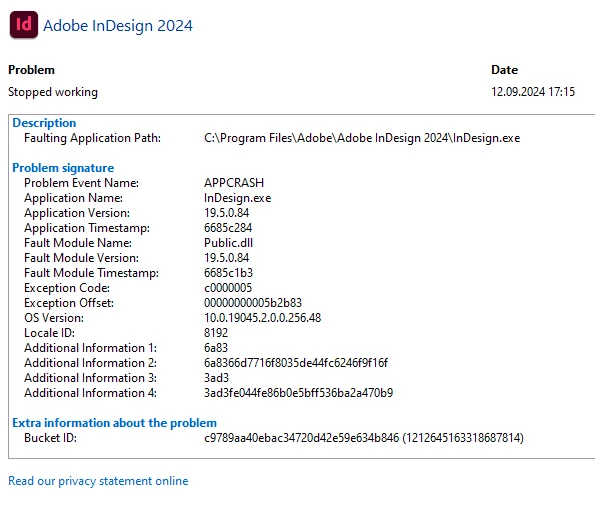
When I close InDesign, the computer freezes for a few seconds. In the maintenance report, this error occurs even when simply opening and closing the program without working in it.

Resetting the settings, running as administrator and reinstalling the program does not help. There are no such problems with other applications (Illustrator, After Effects, Photoshop, etc.). Video driver and updates for Windows 10 are the latest at the moment.

This problem existed before, on previous versions, but I thought it would be fixed with updates, but it didn't happen, so I decided to describe it here.

Any help would be greatly appreciated!

Thanks.


<Title renamed by MOD>

This topic has been closed for replies.
Correct answer Abhishek Rao

Thanks @Abhishek Rao This error occurs on two computers, a desktop and a laptop, where I have Creative Cloud installed, so I don't think the problem is in the windows admin accounts. Also, InDesign does not have any GPU related settings.


Hi @d1malien


Thank you for getting back with the details, and I’m sorry to hear the issue persists across both computers. Since this seems to be a more complex issue, it looks like we’ll need to troubleshoot this in a live session to get to the root cause. 


Please reach out to our support team by heading to: Contact Adobe support selecting the chat button in the lower-right corner. We’ll be able to assist you faster through a live troubleshooting session.


Thanks again for your patience, and I hope we can get this resolved soon!


Best,  
Abhishek Rao

2 replies

Olivier Beltrami
Legend
September 13, 2024

@d1malien Interesting; I often get an exception due to public.dll at the end of a debug session in Visual C++ on Windows, when InDesign is shutting down, but never outside of the debugger. Are you experiencing this using InDesign outside of any debugger ?

d1malien
d1malienAuthor
Inspiring
September 13, 2024

Hello @Olivier Beltrami

I didn't understand your question, do you mean that it is necessary to reinstall or restore Microsoft Visual C++?

Abhishek Rao
Community Manager
Community Manager
September 13, 2024

@Abhishek Rao reinstalling Visual C++


Hi @d1malien,


Thank you for trying the Visual C++ reinstall, and I’m sorry to hear the issue still persists. I know how frustrating this can be, especially since it’s affecting your workflow.


Along with checking for any third-party software conflicts, I also recommend trying to create a new admin user account and doing a fresh install of InDesign in that environment. This can sometimes resolve issues that may be tied to the current user profile. You can follow the steps in this guide: Manage User Accounts in Windows.


Let me know how it goes, and I’ll be here if you need further assistance!


Thank you, 

Abhishek Rao

Abhishek Rao
Community Manager
Community Manager
September 12, 2024

Hello @d1malien,


Thank you for reaching out and detailing the issues you've been experiencing with InDesign 2024. I'm sorry to hear about the persistent problems and we appreciate your patience. 

Since you've already tried several troubleshooting steps, it might be helpful to look specifically at the Public.dll as a potential cause. According to a recent help document we have, issues with this DLL file can sometimes be resolved by checking for any corrupt instances of the file and replacing them if necessary. You can find the detailed steps for this process here: Fix crash issues when launching InDesign (https://adobe.ly/3MFr0Tn)

Could you please confirm the exact version of Windows 10 you're using? Also, it would be helpful to know if the issue occurs only when closing a particular InDesign document or with all documents. Additionally, is this problem persistent, or does it happen intermittently?


Looking forward to your response.


Thank you, 

Abhishek Rao


d1malien
d1malienAuthor
Inspiring
September 12, 2024

Hello Abhishek.

Thanks for the link to the troubleshooting info. As I wrote this problem didn't occur today, I tried these solutions.

1) Edition Windows 10 Pro x64, Version 22H2, OS build 19045.4894. Microsoft Defender Antivirus.
2) This happens in all documents and even without opening documents, just launching and closing InDesign.

3) Problem persistent.

4) Third-party plugins - no


Abhishek Rao
Community Manager
Community Manager
September 12, 2024

Hello @d1malien,


Thank you for your response. 


Would you mind sharing a screen recording of the whole workflow till the issue? It will help us understand in a better way. 


Looking forward to your response.


Thank you,

Abhishek Rao