
Participant
August 5, 2025
Answered

InDesign adds a blue vertical line in the margin when I edit anything (text, paragraphs, etc.)

  • August 5, 2025
  • 2 replies
  • 221 views

On some documents, when I edit something, InDesign adds a blue vertical line to the left of the text frame. What is this, and how do I turn it off?  It does not seem to be associated with the Preferences > Composition settings. I have tried comparing a document that does not do this with one that does, but so far, I haven't seen any differences between the two. Here's what I'm talking about - the Screen Mode is Normal:
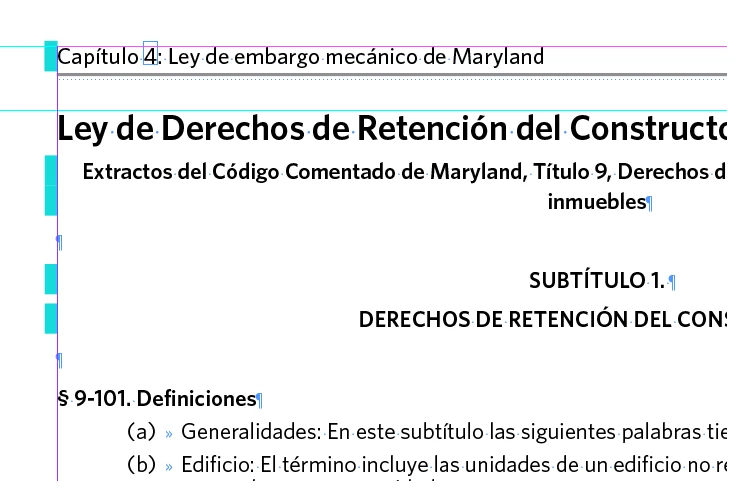
It's not a show-stopper; just really annoying. 🙂


Correct answer TurqAdillo

Aha!! I just found the answer. In the Paragraph Style panel drop-down menu, select Toggle Style Override Highlighter. Face-palm!!! 

2 replies

Participant
August 5, 2025

Thank you. I do not have Track Changes turned on, but that was a good idea. That's where I first looked when the lines appeared. 🙂


Sam Reed
TurqAdilloAuthorCorrect answer
Participant
August 5, 2025

Aha!! I just found the answer. In the Paragraph Style panel drop-down menu, select Toggle Style Override Highlighter. Face-palm!!! 

Sam Reed