Participant
December 21, 2022
Answered

InDesign and EPS icons changed to AI

  • December 21, 2022
  • 2 replies
  • 872 views

A few weeks ago, all my Adobe icons have changed to AI. So EPS and InDesign files, all have AI icon which makes it hard to find the correct file! Any reason why?

This topic has been closed for replies.
Correct answer Brad @ Roaring Mouse

Windows


"Windows"  *which version? 10? 11?

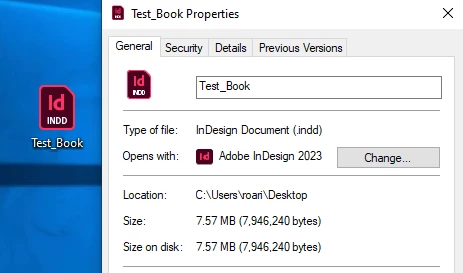
First thing is check your file associations. For example, right click on an InDesign file in File Explorer and make sure the default application is InDesign. If not, change it in Properties. If it is correctly set, then something else is at play,
2 replies

Willi Adelberger
Community Expert
Community Expert
December 21, 2022

The question is, why do you use EPS?

Participant
December 21, 2022

When exporting for mail merging in InDesign

Community Expert
December 22, 2022

Nothing wrong with using EPS files, especially if it's supplied that way. 

I work on a global network of designers and eps files were created many many years ago and are still used today. 


There's no need to change an entire file system to a different format - if it's EPS leave it as EPS.

If you're creating new assets then @Willi Adelberger gave good information.

And certainly if the EPS file is not behaving well, - and goes for all files -, then try saving to a different format. EPS would be best served as a .ai file with PDF compatibility.


But there's certainly no reason to start resaving all your EPS files to something else if all is working well. 

Brad @ Roaring Mouse
Community Expert
Community Expert
December 21, 2022

Icons are managed by the System, so something is awry there.

What OS/Platform are you running?

Participant
December 21, 2022

A PC

Participant
December 21, 2022

Windows