
Participant
September 14, 2022
Answered

Indesign appears on all displays

  • September 14, 2022
  • 5 replies
  • 609 views

I use MacBook and swipe between screens to have everything separated but everytime i have indesign open its opened on all the displays. If i close it on one display it closes then all, same with minimizing, it is the most inconvenient thing, and defeats the purpose of using multiple dispalys.
This topic has been closed for replies.
Correct answer Conrad_C

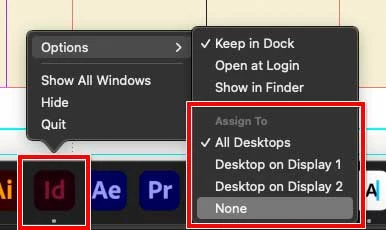
When you right-click (Control-click) the app’s icon in the Dock, which macOS virtual desktop option is currently selected under Assign To? All Desktops, None, or something else?


Normally, the behavior you described when switching virtual desktops would happen if All Desktops is selected (it makes the application appear on all virtual desktops). Mac apps default to None, so if you find that All Desktops was selected and choosing another option fixes the problem, then somehow All Desktops got selected at some point, intentionally or accidentally.

5 replies

Participant
January 23, 2024

This was just driving me mad. Thanks for the fix!

Conrad_C
Community Expert
Conrad_CCommunity ExpertCorrect answer
Community Expert
September 23, 2022

When you right-click (Control-click) the app’s icon in the Dock, which macOS virtual desktop option is currently selected under Assign To? All Desktops, None, or something else?


Normally, the behavior you described when switching virtual desktops would happen if All Desktops is selected (it makes the application appear on all virtual desktops). Mac apps default to None, so if you find that All Desktops was selected and choosing another option fixes the problem, then somehow All Desktops got selected at some point, intentionally or accidentally.

Participant
September 23, 2022

Hi, 

The exact same thing is happening to me and was wondering if you found a solution?


James Gifford—NitroPress
Legend
September 14, 2022

Are you familiar with using multiple displays? Do other apps work as intended (on one screen, with the others available for other apps or palettes or menus etc.)?


Do you have the system set up to "extend desktop" using the second monitors, or to "mirror desktop" (show the same display on all screens)?


Participant
September 14, 2022

I use multiple adobe software and they all work fine but for some reason indesign is the only app that will pop up on all screens. i dont have any external displays i dont know the name for it but i also dont see any settings related to them. i have deleted all of them and reopened them and nothing has changed. i have also uninstalled and reinstalled indesign.

James Gifford—NitroPress
Legend
September 14, 2022

If you don't have any external displays, what "screens" are ID opening on?