
InDesign applies attributes to the line not highlighted
I've been having an issue with typesetting in InDesign for months now and have manually worked around it, but I'm hoping to find the source of the problem. It's difficult to explain, but when I apply text attributes with paragraph styles, the eyedropper, or Space Above, Space Below, and other similar functions, the changes apply to the line above or the line below the intended line. Sometimes it applies to the line I want as well, but it will also apply to the line above or below.
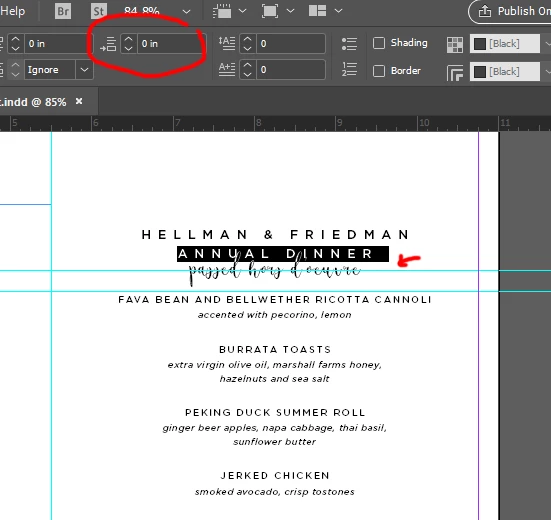
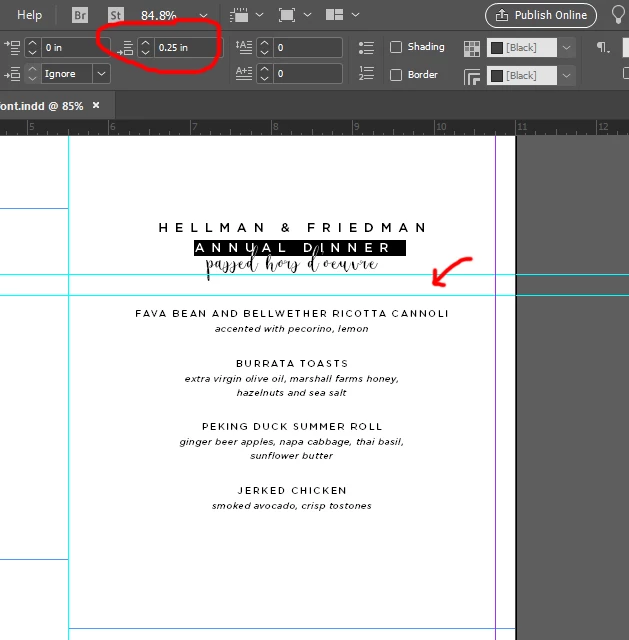
I've attached screen shots demonstrating this with the Space Below paragraph adjustment tool.
In the first image I'm about to apply Space Below. You'll see in the second image I increase Space Below with "Annual Dinner" still highlighted, but it does not move the script font line "passed hors d'ouevre" down, and instead increases the space below passed hors d'ouevre. And ideas?
I end up going in multiple times to each line in a body of text and manually fixing each line until it matches my employer's guidelines, instead of relying on the eyedropper and similar tools to speed up the process like I used to do. I usually end up using a hard enter to "break apart" the lines in order to apply different text attributes, and then go back later and delete the spaces once the attributes are applied. It takes a long time and it's a convoluted process to train to a new person coming on.
There are no character styles applied and I've tried setting everything to Adobe Single-line Composer. My coworker started having this problem too when she opened one of my documents to edit on her computer.
Thank you!
 AdChoices