
Copy link to clipboard
Copied
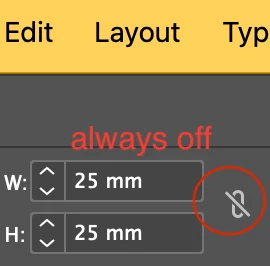
why is the aspect ratio in indesign always off? i have to turn it on everytime i have to resize an object.
it used to retain its last position used.
is this a bug or is there a way around making default the proportionate resizing?
mac os 15.1.1
indesign 20.0
Hi @Mattias_K12,
Thanks for reaching out. This was a known bug, and the product team has resolved it in InDesign 20.1 and later. Updating should fix the issue for you.
In the meantime, you can check out this discussion for more details: Solved: Issue with Constrain Proportions in InDesign 2025 ... - Adobe Community - 14933789. Let me know if you need any help!
^
Abhishek
Copy link to clipboard
Copied
Hi @Mattias_K12,
Thanks for reaching out. This was a known bug, and the product team has resolved it in InDesign 20.1 and later. Updating should fix the issue for you.
In the meantime, you can check out this discussion for more details: Solved: Issue with Constrain Proportions in InDesign 2025 ... - Adobe Community - 14933789. Let me know if you need any help!
^
Abhishek
Copy link to clipboard
Copied
thank you. the update helps. strange that i didn't get a notification that indesing had an update.
Copy link to clipboard
Copied
Hi Villov,
Many don't realize that it is better to use the 2 fields just right of the W and H fields. Scale X and Scale Y has the aspect ratio chainlink, too, and it is defaulted to ON. Many don't realize that you can ignore and override the percent value and type in absolute size values (be sure to denote p, pt, mm, cm, in) when you want to resize something. Best of all, these two fields resize the graphic with the resize of the frame, whereas W/H does not do that.
Get ready! An upgraded Adobe Community experience is coming in January.
Learn more