
Participant
November 13, 2023
Question

Indesign bug 19.01.1 with square brackets in Hebrew text.

  • November 13, 2023
  • 1 reply
  • 376 views

Hi all,

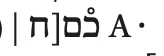
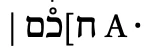
There is a major inversion problem with the square brackets in the Hebrew text on version 19.01.1 that makes a rather random mess of my entire edition at the last stage of its production.

Wrong form when I open it with indesign 19.0.1
 

Right form, when I'm opening it with indesign 18.5.1
Would it ibe possible to fix it ?

Thank you very much for your help!
Frédérique


This topic has been closed for replies.

1 reply

TᴀW
Legend
November 13, 2023

There are several bugs reported with Hebrew and InDesign 2024. I would definitely finish your project in 18.5 and wait for the v. 19 bugs to be ironed out before upgrading!

Participant
November 13, 2023

Thanks for your response.
I've already saved all my book files in Indesign 2024 format for several days and made a lot of changes before I noticed the problems. Now I can't open the files with Indesign 18.5 without having to do a risky ? conversion... Do you think that if I do the conversion I risk corrupting my files or losing data? Or is it better to go back to a backup from a few weeks ago and lose my recent work?

TᴀW
Legend
November 14, 2023

My instinct is that if you save as IDML you're unlikely to actually lose data. But if there's a nasty bug with IDML export from 2024, even losing data is a possibility. I haven't heard of such a bug yet.

What I would probably do is: (1) Make sure to keep backups of your 2024 files. (2) Export a complete PDF from 2024. (3) Export IDML from 2024. (4) Open the IDML in 2023. (5) Export a PDF from 2023. (6) Compare the 2 PDFs to see if any data was lost. Acrobat has a function to compare 2 PDFs, but it may be simpler and easier to open both PDFs (the 2024 and 2023) in Acrobat, and Ctrl+Tab to flip between them. Flipping between them makes it fairly easy to spot differences in the pages (maybe because our brain is attuned to identifying slight movement, like a scorpion crawling up the leg. Who knows? In any case, small typos are similar to scorpions.) Even for several hundred pages, it shouldn't take too long to do this, a few minutes (from personal experience).

At this point, you'll know how many errors the IDML export created and whether the 2023 files are good enough to keep working on. If they are, that's what I would do.