

karienvdw
Known Participant
June 14, 2024
Question

InDesign can't find a color tint in the cell when searching for a specific tint percentage on macOS

  • June 14, 2024
  • 4 replies
  • 701 views

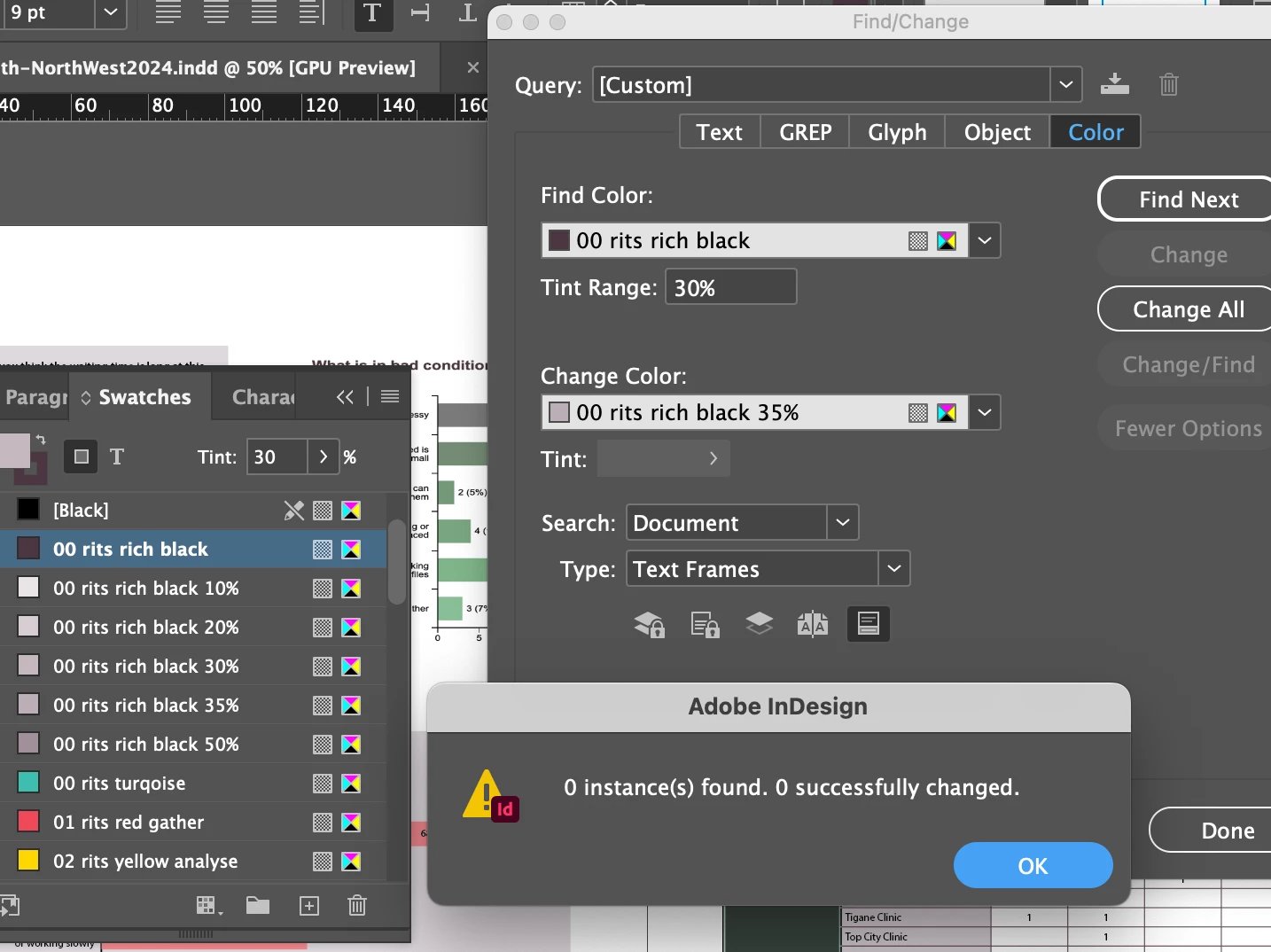
Hello, cannot figure out why find-and-replace colour tint is not working? These colour tints are applied only to tables inside this document, could that be a problem?
 

<Title renamed by moderator>

This topic has been closed for replies.

4 replies

Barb Binder
Community Expert
Community Expert
June 14, 2024

Hi @HARSHIKA_VERMA:


On 19.4 and 18.5.2 I am getting the same result. (macOS 14.4.1). I see @karienvdw is also on macOS.


It matches when I don't specify a tint percentage, but not when I do. 


~Barb

~Barb at Rocky Mountain Training
Harshika Verma
Community Manager
Community Manager
June 17, 2024

Thanks, Barb. We are able to reproduce the issue on macOS. I have logged a bug for the product team to investigate further. I will keep everyone posted with updates on the bug. 

Thank you so much for sharing the video and describing the issue so well. Appreciate your help in the community.

However, @karienvdw, could you please submit the bug on the uservoice page for tracking purposes and share the link with us here? This will allow our customers who might be experiencing a similar issue to upvote the request for better visibility.


Thanks,

Harshika

Community Expert
June 14, 2024

Just tried with tint swatches and it works for me on Windows 10 - inDesign 19.4


Barb Binder
Community Expert
Community Expert
June 14, 2024

Yes, that seems to be the issue. InDesign can find color used in a cell, and it can find tints used as a frame background, but it can't seem to target a tint used as a cell background. You can file a bug report here: https://indesign.uservoice.com/forums/601180-adobe-indesign-bugs


InDesign 19.4


~Barb


~Barb at Rocky Mountain Training
Harshika Verma
Community Manager
Community Manager
June 14, 2024

Thank you, @Barb Binder, for sharing the video. Let us try to investigate the issue at our end and escalate it to the product team. Could you please tell us your operating system? Please also confirm if it's happening on the previous version as well. 

Let me check with the team and get back to this post shortly.


Thanks,

Harshika

Community Expert
June 14, 2024

You have it set to 

Type:
Text Frames


Try change it to All Frames

If the colour is no longer required

Delete the Swatch and you will be prompted with an option to replace the swatch


If you want to keep it in the swatch panel

Copy the instance of the colour

Delete the Swatch
Pick replacement swatch

Paste your element back in - then delete it

the swatch should be back.


karienvdw
karienvdwAuthor
Known Participant
June 14, 2024

Thanks for your effort, but already tried All frames, doesn't work. It isn't a tint swatch, so cannot do your second suggestion either