

psumi
Participant
January 29, 2020
Answered

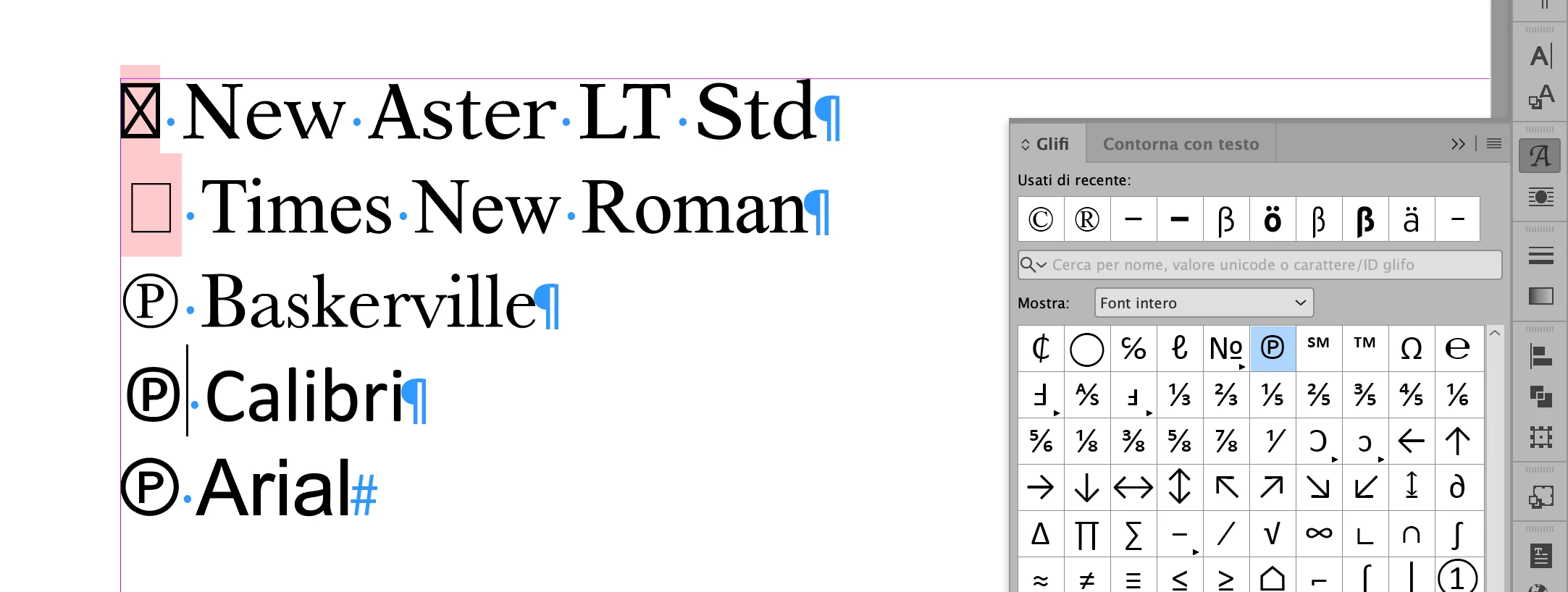
Indesign cannot show the sound recording symbol ℗

  • January 29, 2020
  • 3 replies
  • 2255 views

All other Adobe products have no problem showing the "P" in a circle (Unicode 2117), but in InDesign I cannot find this symbol in glyphs (no unicode 2117 showing up) and copying it from any other application into InDesign it will show up as an unrecognised symbol (rectangle).
This topic has been closed for replies.
Correct answer vladan saveljic

many fonts don't have this symbol

3 replies

psumi
psumiAuthor
Participant
January 29, 2020

Thanks Manan and Vladan!!

vladan saveljic
vladan saveljicCorrect answer
Inspiring
January 29, 2020

many fonts don't have this symbol

Community Expert
January 29, 2020

Availability of glyph depends upon the Font used, change the font to something like Arial Unicode MS(this has many of the glyphs) and you shall see the glyph rendered correctly


-Manan

-Manan
Community Expert
January 29, 2020

See the screenshot when Arial Unicode MS is selected


-Manan

-Manan