


- Home
- InDesign
- Discussions
- Re: Indesign CC'14 Script for randomising Baseline...
- Re: Indesign CC'14 Script for randomising Baseline...

Copy link to clipboard
Copied
Hi Guys and Gals,
Please could someone write a short script and/or point me in the direction of where I can find one for the following:
I need a script that will randomly adjust the baseline shift and rotation of individual characters within certain certain parameters (e.g +10 baseline shift, 2deg to -10 baseline shift, -2deg)
Many thanks in advance
Matt


 1 Correct answer


@MattCass87 – do you mean something like that?
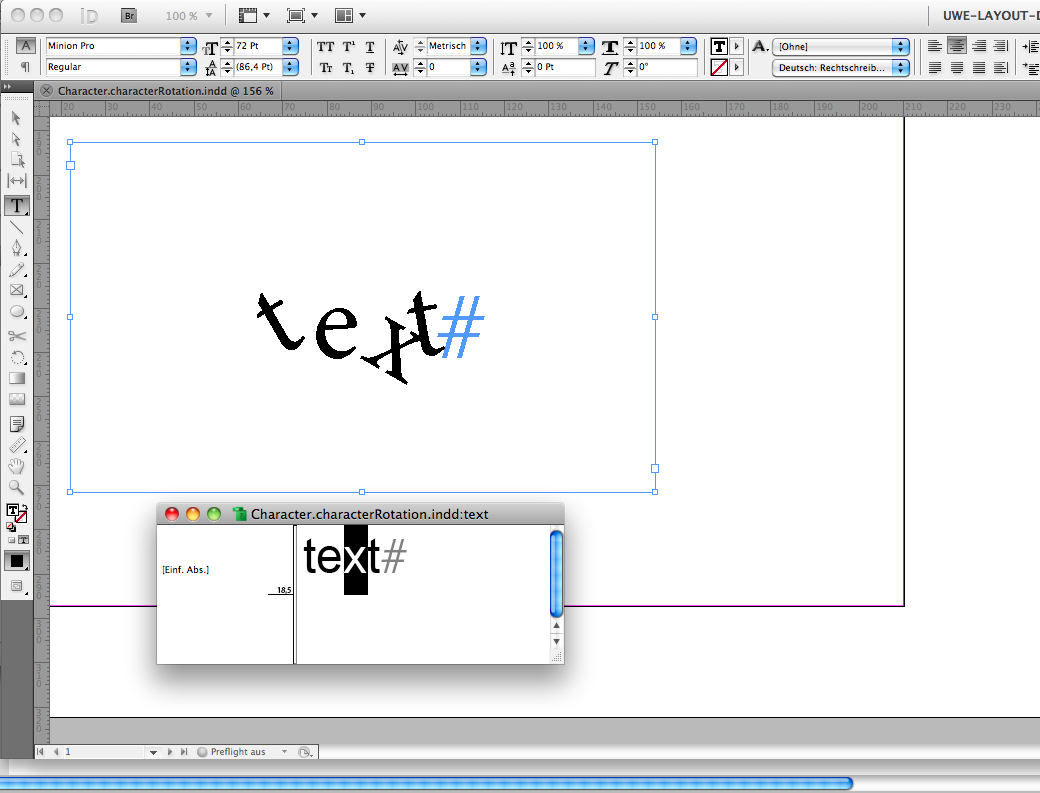
Uwe

 13
Replies
13
13
Replies
13


Copy link to clipboard
Copied
Moved to the scripting forum....
Copy link to clipboard
Copied
bump

Copy link to clipboard
Copied
There isn't really a simple way of rotating character in InDesign. You'd have to convert each one to outlines and then rotate. But then the text would be no longer editable.
Copy link to clipboard
Copied
Thanks Ariel,
There are options for baseline script and character rotation in the text palette. I know there is a script to randomise it as i've seen it in previous versions of Indesign however they no longer work in the new CC.
So if anyone can point me in the direction of some script writers I can email that would be a huge help.
Thanks

Copy link to clipboard
Copied
Loic Aigon made one ages ago called text shaker: http://www.scriptopedia.org/en/js-indesign/28-textshaker-en.html
It randomly shifts the baseline up and down. Doesn't skew the text though.
Need more information? Contact Loic directly: www.ozalto.com
Colin

Copy link to clipboard
Copied
Still working in 2023 (v 18.4). This was exactly what I needed to make some body text in a handwriting font look more handwritten. Thank you!
Copy link to clipboard
Copied
@MattCass87 – do you mean something like that?

Uwe
Copy link to clipboard
Copied
Thanks Colin, thats definitely along the correct lines..
Laubender, thats is exactly!!.. albeit i'd be using it to a less dramatic extent. Does that have the ability to set maximum and minimum parameters?
Thanks
Matt
Copy link to clipboard
Copied
It's no full-blown script yet…
Just one line of code without any features but rotating a selected character by a free value of degree.
Hint: There is a characterRotation property for the Character Class in the DOM.
Uwe
Copy link to clipboard
Copied
This feature, never exposed to InDesign's user interface, seems a little bit buggy.
It's with us since InDesign CS5.
A word of caution here: I don't know, if any of the modern export methods like Fixed Layout ePUB will support it.
(I strongly doubt that, but did not test yet)
Uwe

Copy link to clipboard
Copied
Hi Uwe,
I'm very curious to read your script! 
Marc Autret has written the amazing Wordalizer! Indiscripts :: Wordalizer 1.5 | Create Word Clouds in InDesign CS4-CC!

Another way to say "HELLO!"! 
Copy link to clipboard
Copied
@Uwe
Text altering features such as skewing, emboldening, or rotating text don't work with epub export... at least at the time of writing this.
Copy link to clipboard
Copied
@Colin – Thank you for commenting on this.
You are right. Tested this with InDesign CC-2014…
Uwe


Get ready! An upgraded Adobe Community experience is coming in January.
Learn more
 AdChoices