

woodleigh
Known Participant
June 25, 2015
Answered

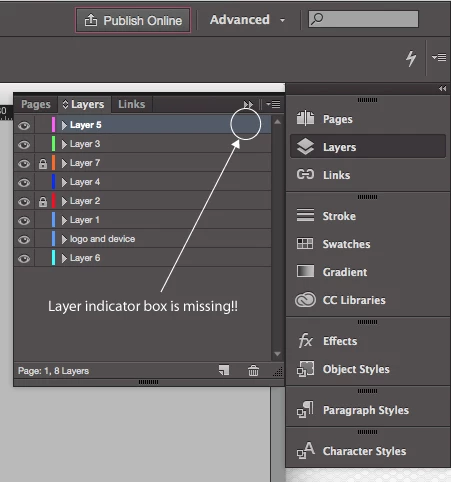
InDesign CC 2015 - Layers indicator missing

  • June 25, 2015
  • 9 replies
  • 14704 views

Hi there

I've just opened up an Indesign file in the latest version of Adobe InDesign and for some reason, on my layers panel have lost the little square layer indicator on the right (see below)

This is really frustrating me, I'm sure it's just a setting somewhere, but I cant find it.

Any help will be greatly appreciated, so thanks in advance.

Kind regards

Adam
    This topic has been closed for replies.
    Correct answer Steve Werner

    Restore your InDesign preferences:

    Trash, Replace, Reset, or Restore the application Preferences

    9 replies

    Known Participant
    May 24, 2018

    It‘s halfway 2018 and I‘m still ‘resetting my prefs’ and this [expletive removed by moderator] still isn‘t fixed.

    I‘m getting so sick of paying € 60 a month for this [expletive removed by moderator].

    Steve Werner
    Community Expert
    Community Expert
    May 24, 2018

    Try opening InDesign in a new user space on your computer. As I said above, it could be caused by conflicting software or possible problems in your current user.

    Legend
    August 10, 2018

    Hello Steve Werner I was just at a clollegues mac to do that…What about Adobe giving InDesign a Tool for its Preferences-hassle? Im throwing out some ideas here:
    I could imagine a basic script RebuildPreferences.jsx in the Samples-folder, that does exactly that (kill InD, restart with reguild parameter or delete prefs and restart).
    A more suffisticated version in the program-menu would be better, which also in a submenuitem could save backup states. Top that with an creative cloud connection, to import these settings when changing workstations, or just to have a backup in a could.

    Known Participant
    April 13, 2016

    This kind of behaviour of professional software is unacceptable! [unacceptable language edited by moderator] I pay for this software every month and I depend on it for my lively hood. Expecting users to put up with this is atricious!

    Inspiring
    February 16, 2017

    I'am so very sik of this behavior!! It's a shame that this problem isn't solved after such a period... And every time the answers of restoring the preferences, Jezus, really really BAD!!

    Steve Werner
    Community Expert
    Community Expert
    February 16, 2017

    If you have to restore your preferences that often, it's usually a symptom of something else outside of InDesign. You have a third-party utility which is interfering, or there is corruption in your system. You might try launching InDesign from a new user on your computer to test that out.

    Participating Frequently
    February 29, 2016

    True is that this happens to me in to different computers, so I really think that this is a bug, and I really hope Abode has fix it, like Tony says.

    I'm crossing my finger, today I had to trash my preferences again...

    Peter Spier
    Community Expert
    Community Expert
    February 29, 2016

    If you find you need to trash prefs on a regular basis you need to check your system configuration for software conflicts or out of date drivers.

    Participant
    February 29, 2016

    Adobe, fix this! Trashing prefs is NEVER the right answer. There are a number of forum topics related to this bug. Move it up the list to be fixed SOON.

    Participating Frequently
    February 17, 2016

    Is there a better solution to this problem?? It happen to me very ofter and it is very very annoying. I don't want to restore my application preferences every day, that's really not what I'm paying for... Adobe CC (specially CC 2015) is VERY disappointing... problems all the time with Indesign and Photoshop, panels don't open, really slow performance, etc...

    Please Adobe, fix this huge BUG!

    BobLevine
    Community Expert
    Community Expert
    February 17, 2016

    If it’s happening all that often I would be looking into issues with your system.

    Something could be causing the corruption of the preferences.

    Steve Werner
    Community Expert
    Community Expert
    February 17, 2016

    I'd agree with Bob. Having to restore you preferences frequently either means there is some system problem or third-party conflict that is corrupting the preferences.

    Try creating a new system user on your computer, and test InDesign before launching any third-party software.

    Participating Frequently
    December 16, 2015

    The same is happening to me. Application crashes, layers indicator missing... very frustrating

    jeffreyjamessyrop
    Known Participant
    October 16, 2015

    Steve,

    Your solution works, but I just had to do it 2 days ago, and it took me a long time to set up my Preferences again. This has never happened before. Isn't there some other way to turn this feature (selection indicator box)?!! Please help me!

    Thanks!

    Peter Spier
    Community Expert
    Community Expert
    October 16, 2015

    If you back up the prefs set and use the manual method of replacing them, it's pretty painless. Just copy the good set to a safe location, and copy it back when you need to.

    Participant
    September 29, 2015

    Thanks for your accurate answer, an annoying thing in my life in just gone!

    Steve Werner
    Community Expert
    Steve WernerCommunity ExpertCorrect answer
    Community Expert
    June 25, 2015
    woodleigh
    woodleighAuthor
    Known Participant
    June 25, 2015

    A big virtual kiss on the cheek, thanks mate.

    This was really frustrating me.

    Kind regards

    Adam