
Inspiring
May 27, 2017
Question

Indesign CC 2017 panels not opening when collapsed

  • May 27, 2017
  • 4 replies
  • 2006 views

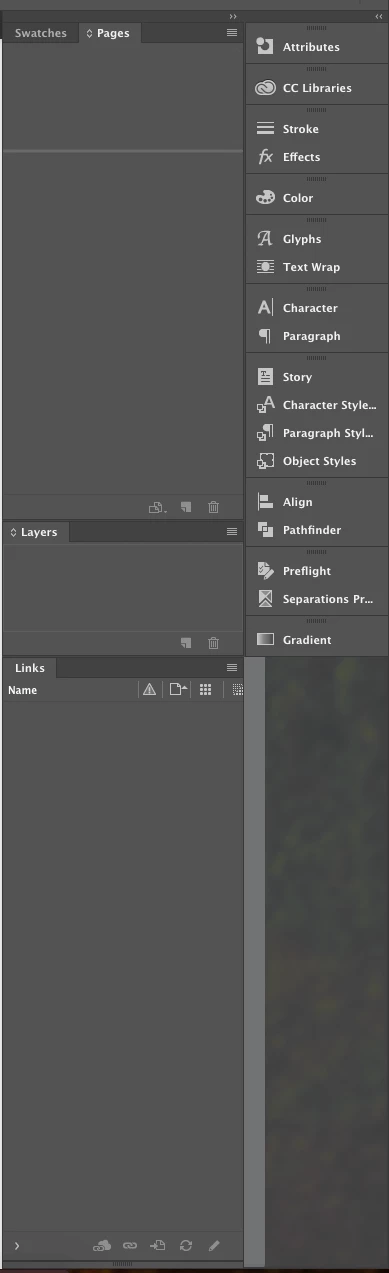
I've had this problem for the last couple of versions of Indesign now. When not using the Application Frame (which is my preferred layout), I have collapsed panels on the far right side showing just the name of each panel. I also have a second column of docked panels open attached just to the left of the collapsed panels. After several hours of use of Indesign or sometimes when i come back to it the next day after leaving it open, the collapsed panels no longer open when the name is clicked. I have to "expand" the panels with the little double arrow icon in the top right to reveal ALL my stacked panels which is a nuisance because I then have to hunt for the one I want and click to open it as an extra step. The only solution is to restart Indesign. I'm on macOS Sierra with the latest version of Indesign CC.
This topic has been closed for replies.

4 replies

Inspiring
June 29, 2017

This has been happening to me for years and it really pisses me off. I am currently on the most recent Sierra on a late 2015 27" Retina iMac, and a late 2014 15" Retina MBP. It happened on my previous desktop and laptops, too. When I start InDesign, if I hold my mouse over where the panels will be (right side) and wave it over the panels after they appear, I notice a little "stutter step"... if that happens I know everything is OK and the panels will work as they are supposed to. If I don't see that little stutter step, they don't work. FYI, I have a custom panel setup saved as a workspace.

The panels don't work, almost 100% of the time if I accidentally start InDesign by double clicking on an INDD file. Same thing goes for Photoshop, too.

Participant
May 30, 2017

I have a similar problem. Also with the last couple of versions. I too am running up to date Sierra.

When I start InDesign the docked palettes are not there.

Sometimes i turn on Application Frame and then turn it off again. But if this works, the palettes sometimes won't open when I select them. If I try opening them in Application Frame, 90% of the time InDesign will crash when I turn Application Frame off.

Often it takes about three goes reopening InDesign until my palettes are back and working properly.

Srishti Bali
Community Manager
Community Manager
July 4, 2017

Hi steve and rcoda,

Please try these steps and share results.

1) Boot system to safe boot with same account and check how it works, if it works fine close all third party running services. For details click here Use safe mode to isolate issues with your Mac - Apple Support

2) Log in to root account  For details check here How to enable the root user on your Mac - Apple Support

Check how application works there, If it works fine

  • Go to Location ~/Library/Preferences
  • Right click preferences folder and click get info
  • Click the lock icon to unlock it, then enter an administrator name and password.
  • Change permissions to read and write.
  • Click the Action pop-up menu , then choose “Apply to enclosed items.”
  • If you do not see your account there click on plus symbol on bottom left corner and add account and follow same steps

Follow same steps for

~/Library/Caches

~/Library/Application support

/Library/Preferences

/Library/Caches

/Library/Application support

  Note: If you are on office system ,these (/Library/Application support and/Library/Preferences) folders may or may not allow you to add user , that is completely fine.

Restart system and login to your user account and check performance.

Regards

Srishti

Srishti Bali
Community Manager
Community Manager
May 29, 2017

Hi BTA-1138,

I addition to above mentioned suggestion , have you tried resetting preferences for InDesign?

Set preferences in Adobe InDesign

Regards

Srishti

Barb Binder
Community Expert
Community Expert
May 27, 2017

I haven't experienced this, nor I have I seen it happen on a student's computer, but most of us keep the Application Frame on. If you think it's a bug, you can report it here (pick Bug Report):

Wishform - Adobe InDesign

~Barb at Rocky Mountain Training