
denjimen
Participant
November 12, 2018
Answered

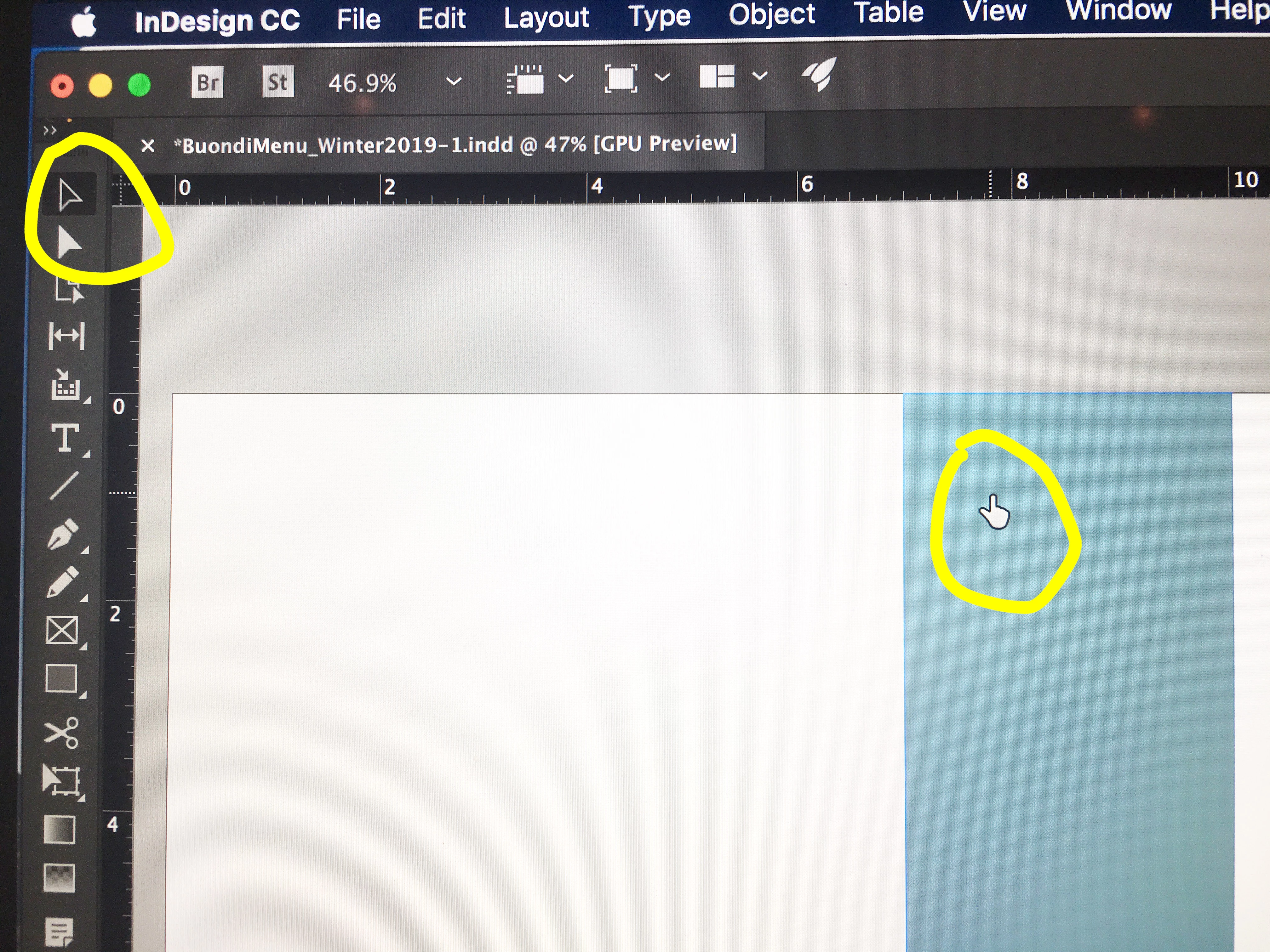
Indesign CC 2019 Pointer stuck in hand icon

  • November 12, 2018
  • 23 replies
  • 83241 views

Hello all,

I recently updated to Indesign CC 2019. I immediately noticed that the pointer (selection tool) is now a hand icon. I've searched and searched forums to no avail. So, is this a new feature? If so, can it be changed? Or is this a bug? I don't like it at all.

I am running Mojave on a MBP Retina.

Thanks.
Correct answer Ellie_Norton

I had this issue today. I just restarted InDesign and it's gone back to normal

If in doubt, restart.

23 replies

joseph3banks
Participant
December 19, 2023

Another thing you can do if restarting the program or computer doesn't work......hit the spacebar. I had this issue and a coworker helped. When I hit the spacebar the cursor returned to normal.

Rishabh_Tiwari
Community Manager
Community Manager
December 20, 2023

Hi @joseph3banks,


Thank you for reaching out and sharing the solution that worked for you. I am sure it will help other community members. 


Thanks

Rishabh

Participant
January 17, 2025

The spacebar trick works. Thanks joseph3banks and others (notably not a suggestion from Adobe). But this has been going on for many many years, and many versions of InDesign, since at least 2018. Could the Adobe employees please push for someone to solve the problem instead of only thanking people for sharing their problem/solution? Having to frequently restart, or try multiple solutions is not acceptable beyond the short-term. Maybe asking for a year's refund might prompt some attention to the problem? 

jherbertartist
Participant
August 12, 2023

I am a new Yorker and it SO HARD not to start tossing F-bombs all over. Four years later and still no solution. Happening on both my fully loaded iMac Pro and on my fully loaded Macbook Pro 2021. Nothing helps and then somehow it resolves. I have damn deadlines to meet.

Participant
August 14, 2023

Agree. I upvoted your comment. Before breaking anything, I tried again and this time I just tapped the spacebar and that did the trick. 


Best of luck!

jherbertartist
Participant
August 14, 2023

And now it has not happended for a couple of days. I will try that should it re-occur. I did notice a degree and randomness to the fixes. Sometimes yes other times no...

We shall see.

Participant
February 1, 2022

Having the same issue, in 2022, on Windows.

I guess ill just wait until Indd crashes again and I have to restart anyway.

suslive
Participant
July 27, 2023

It's 2023 / Monterey and still happening. Had to restart InDesign - it seems to be working again witht the normal pointer...

Participant
June 3, 2021

I have the same issue today.. Ive uninstalled InDesign and installed it again.. but it didnt help...

Is it possible to solve it?


I have mac 11.2.3 (Big Sur)

thanks!

Participant
June 3, 2021

ok, I solved it by restarting a computer.. 🙂 


Participant
March 19, 2021

It just happened to me. OUsing Big Sur. I restarted INDD and nothing changed; still had the Hand. Then, I did a Spellcheck (command+I), and all reset after that. Certainly not a 'fix' but a quick workaround.


FYI- as soon as you commenters can build a hugely popular layout app that is an industry standard - and make it completely flawless, try and cut the admins some slack.

Participant
April 28, 2021

I just experienced that same problem. Spellcheck did the trick for me.

Inspiring
December 9, 2020

I just started having this problem too. I am currently using version 15.1.3 because my business doesn't want to update to 2021 just yet. Anyway, I tried restarting it and that fixed it for a little while, but then it keeps coming back again. Restarting it everytime it happens is getting a little old.

Participant
October 29, 2020

This problem has just happened to me also,  I have just started using the latest version InDesign 2021.

Is this a new bug with this new version? How do I fix this?

Participant
January 16, 2020

For me, the issue occured while I was copying (holding option and click-drag) an object across a page break. The app kinda glitched and went black for a half second and my cursor was stuck on hand tool even though selection tool was selected and highlighted. Closing and restarting the app didn't help. Only when I clicked on another tool (text tool) and then clicked on selection tool did my cursor work correctly. So, that's what worked for me. 

Participant
May 14, 2020

This problem happened to me on my office computer every so often these past couple of years (machine: iMac, OS: High Sierra, Adobe version: Adobe CC 2019-2020), and restarting the computer was usually the only method that worked. Now I am working from home and using my MacBook Pro (OS Mojave, Adobe CC 2020) and it just happened to me again, in InDesign. My point is that the problem has happened for me on two different computers


However, just now (on my MacBook Pro), after quitting and restarting InDesign didn't work, I made a point of trying to select other tools (such as the text tool) and then going back to the selection tool to see if that would clear it up. It did not. The selection tool kept showing up and acting as a hand tool that could only move around and grip. 


I didn't want to reboot the computer — it takes a lot of time to set everything up again. So I searched the problem online looked at this conversation. Then, I tried again selecting the text tool and then going back to the selection tool... For some reason, it worked this time! Could it be that it needed a "break" of a few minutes? 

Inspiring
January 14, 2020

I find it funny that this is marked as the solution as most the people posting here have said that restarting doesn't work. Restarting inDesign also does not work for me. I am using InDesign 2020 15.0.1 on High Sierra. Keeps happening and I can't seem to get it to go away and it is super annoying!

Participant
January 14, 2020

I'm on Mac OS High Sierra, InDesign CC 2020. Just had the same issue, and fixed it with the following steps. 


1. Quit InDesign

2. Restart computer

3. Hold down SHIFT CTRL OPT CMD as I right-click with the mouse on the ID icon in the dock bar (to start ID) - then click yes when a popup appears asking you if you want to delete preferences. 

4. Create a new document to see if it worked (it did!).


Participating Frequently
December 19, 2019

I have the same problem, and restarting does NOT solve the problem. I have tried doing so multiple times to no effect; the hand tool has totally replaced the cursor for InDesign on my computer. I will try reverting to an older version of InDesign; this version apparently should still be in development.

For the devs, here's what I'm working with:


MacBookPro (Retina, 15-inch, Mid-2015)

Processor: 2.2GHz INtel Core i7

Memory: 16GB 1600MHz DDR3

Graphics Intel IrisPro 1536MB


Operating System:

macOS Sierra version 10.12.6


Adobe InDesign 

version 14.0.3


As-is, InDesign 14.0.3 is literally unusable for me.

Harold Christ
Participant
July 15, 2020

I have the same issue with the hand tool replacing the selection tool. Restarting or uninstalling/reinstalling does not help. I have this problem in Indesign and Illustrator. It just started today but kept me from finishing multiple jobs. 

I spend 90% of my workday in these programs - which I would agree are completely unusable at this point.


For devs, heres another case for you based on what I'm working with:

MacBookPro (15 inch, 2018)

Processor : 2.2 GHz Intel Core i7

Memory : 16 GB 2400 MHz DDR4

Graphics : Radeon Pro 555X 4 GB, Intel UHD Graphics 630 1536 MB

Operating System : macOS Mojave version 10.14.6

Adobe Indesign : version 15.1.1.103

Adobe Illustrator : version 24.2.1


Please help!