FFRomee
Participant
November 4, 2016
Answered

Indesign CC auto fit button missing
  • November 4, 2016
  • 5 replies
  • 20619 views


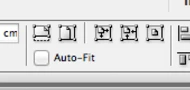
I can not seem to find these buttons in Indesign CC anywhere.
Does anyone know where to get them back?

This topic has been closed for replies.
Correct answer vinny38

Hi

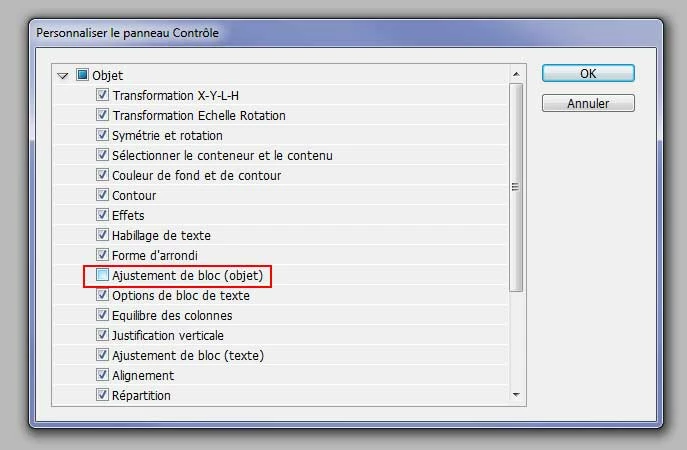
have you checked your control panel preferences? (click on the menu bar at the very right of your control panel)

Check if the fitting options are ticked (object)

This is french version, but you might figure it out:
regards

5 replies

Participant
June 27, 2017

Hi I have checked my control panel presences and the frame fit option is checked but I still can't see the autofit and other fitting buttons.... any other clues?

Barb Binder
Community Expert
Community Expert
June 28, 2017

You need to hide some of other buttons in front of Frame Fitting, to make room for them (i.e., Effects, Text Wrap and Corner Shape).

Adobe InDesign: Where are the Frame Fitting Buttons? - Rocky Mountain Training

~Barb at Rocky Mountain Training
Participant
June 28, 2017

Thanks so much, worked perfectly!

Sent from my iPhone

Participant
May 25, 2017

I also had this issue, but I wanted to see all of the options. having spoken with the tech support team, we also found that my UI Scaling had to be set to 'Scale to Lower'

To do this

  • Open Indesign
  • Select Edit from along the top menu bar
  • From the drop down menu, Select Preferences > Interface
  • Select UI Scaling from the left hand menu
  • Select Scale to Lower
  • Click OK

Close and reopen Indesign. You'll note you can now see all of the options / features / functionality

AnneMarie Concepcion
Community Expert
Community Expert
June 28, 2017

Can you add a screen shot? I'm not seeing that option in InDesign's Prefs > Interface. I do see it in Photoshop's.

Participant
July 12, 2017

stillamal
Participant
February 1, 2017

thank you very much

vinny38
vinny38Correct answer
Legend
November 4, 2016

Hi

have you checked your control panel preferences? (click on the menu bar at the very right of your control panel)

Check if the fitting options are ticked (object)

This is french version, but you might figure it out:

regards

FFRomee
FFRomeeAuthor
Participant
November 4, 2016

Thank you!

The button was on, but because all the options where on, it disappeared ><

Anasuiya Gupta
Adobe Employee
Adobe Employee
November 4, 2016

Hi Romee

You can now customize the menu according to your needs, what you use most and what you do not need at all. But I am glad, the issue is solved for you.

Regards

Anasuiya Gupta

InDesign Team

Anasuiya Gupta
Adobe Employee
Adobe Employee
November 4, 2016

Hi Romee

Please let us know which version of InDesign you are using?

Regards

Anasuiya Gupta

InDesign Team

FFRomee
FFRomeeAuthor
Participant
November 4, 2016

Adobe Indesign CC 2017

Anasuiya Gupta
Adobe Employee
Adobe Employee
November 4, 2016

Hi Romee

When you select any graphic frame, what is the last option you see in the control strip?

Please attach a screenshot for our reference.

Regards

Anasuiya Gupta

InDesign Team