Exit
  • Global community
    • Language:
      • Deutsch
      • English
      • Español
      • Français
      • Português
  • 日本語コミュニティ
  • 한국 커뮤니티
0

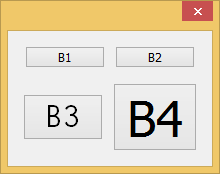
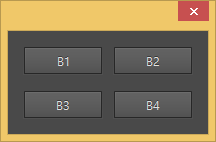
InDesign CC button font size change.

Contributor ,
Oct 02, 2015 Oct 02, 2015


                    InDesign 5.5                                                            InDesign CC

main();
function main()
{
    var w = new Window ("dialog");
    var group1 = w.add ("group");
    var button1 = group1.add ("button", undefined, "B1");
    var button2 = group1.add ("button", undefined, "B2");
    var group2 = w.add ("group");
    var button1 = group2.add ("button", undefined, "B3");
    var button2 = group2.add ("button", undefined, "B4");
    set_font (group2, "Tahoma:50");
    button1.graphics.font = ScriptUI.newFont ("Letter Gothic Std", "Bold", 30);
    w.show();
}

function set_font (control, font)
{
    for (var i = 0; i < control.children.length; i++)
    {
    if ("GroupPanel".indexOf (control.children.constructor.name) > -1)
        set_font (control.children, font);
    else
        control.children.graphics.font = font;
    }
}

How do I change the button font size from CC version?

TOPICS
Scripting
540
Translate
Report
Community guidelines
Be kind and respectful, give credit to the original source of content, and search for duplicates before posting. Learn more
community guidelines

correct answers 1 Correct answer

Enthusiast , Oct 02, 2015 Oct 02, 2015

Hi,

Perhaps part of the answer

(CC 2014) ScriptUI font do not change?

Translate
Enthusiast ,
Oct 02, 2015 Oct 02, 2015
LATEST

Hi,

Perhaps part of the answer

(CC 2014) ScriptUI font do not change?

Translate
Report
Community guidelines
Be kind and respectful, give credit to the original source of content, and search for duplicates before posting. Learn more
community guidelines

