


- Home
- InDesign
- Discussions
- Indesign CC June 2015 update is seriously slow - H...
- Indesign CC June 2015 update is seriously slow - H...
Indesign CC June 2015 update is seriously slow - HELP!

Copy link to clipboard
Copied
Updated Indesign last week, and it's really really slow.
Lots of lagging - very sluggish in moving things around, menus slow to respond etc. Very frustrating.
Colleague has the same issue both at work and on personal Mac.
Using Mac fully spec'd up to meet requirements.
Help!


 348
Replies
348
348
Replies
348


Copy link to clipboard
Copied
Adobe seems bent on making things as confusing and hard to find as they can lately.

Copy link to clipboard
Copied
I am having the same problems with InDesign and in fact Muse and Illustrator take ages to load. Adobe needs to address this problem with InDesign I am loosing production time. maybe they need to fix it via an update? Maybe instead of promoting their new stock image service which I think is way overpriced they should listen to the people using and paying for their products and fix the issues.

Copy link to clipboard
Copied
I've been searching for old versions install, thank you!!
My new update to inDesign is impossible to work with, even with deleted prefs. I hope an older version will be different. Everything else on the PC works fine.

Copy link to clipboard
Copied

This is what I have, only 2 apps have previous version.
Copy link to clipboard
Copied
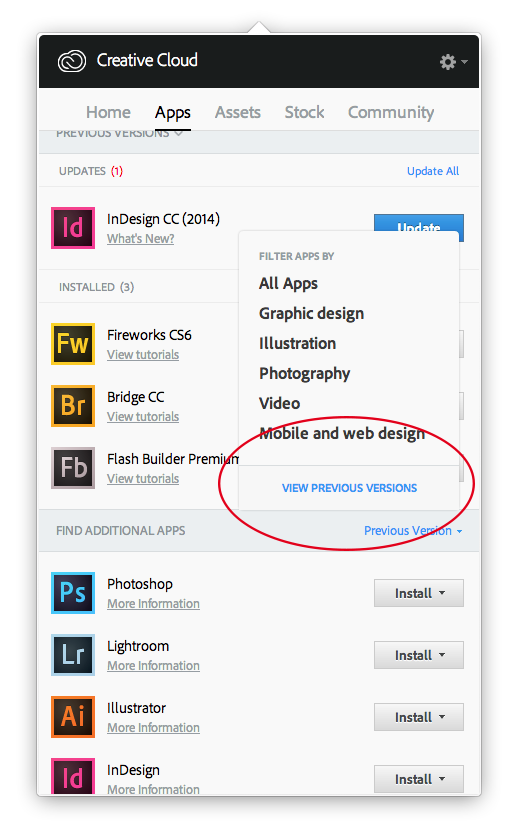
Did you click the circled bit (below)?
Copy link to clipboard
Copied
Yes and the screen shot is what I have when I clicked "View previous versions" 

Copy link to clipboard
Copied
I had to use Adobe's online chat to get my 2014 reinstalled. Basically (on
a PC) I uninstalled all the programs through the Control Panel first, then
I had to sign out of the main creative cloud app snd get it completely
restarted . Then it would show me the old apps.
Use previous version section which is a horizontal bar across the app. It
should give you the opportunity to install the different programs,
including InDesign. The install button itself has a small arrow drop-down
on the button, and that drop-down was the place I could find the 2014
version of the program to reinstall.

Copy link to clipboard
Copied
Have you checked the language settings the CC app is set to? I had a problem where no apps were available but the CC app had gone to UK english but all the apps were listed under US english. This might be similar?
Copy link to clipboard
Copied
Are you sure you uninstalled the previous version (I don't have CC on this machine, so I can't look at what I see)? Try quitting and re-launching the CC App.

Copy link to clipboard
Copied
I'm getting much less but I still get "lag" 1 out of every 4 times you click on a dialog like Rotation angle.
The only pref I changed which had immediate results was...
InDesign CC 2015 Preferences:
Interface, Options: Live Screen Drawing: Changed from Delayed to Immediate
I realise this was the opposite for you jennbenn which makes it even more frustrating, but at least I'm getting back a more normal workflow.
For adobes sake, I'm surprised how bad it is especially on my new maxxed out imac. For what its worth here are the specs...
OS X 10.10.3 (14D136)
Indesign CC 2015 11.0.0.72
iMac (Retina 5K, 27-inch, Late 2014)
4 GHz Intel Core i7
32 GB 1600 MHz DDR3
AMD Radeon R9 M295X 4096 MB
Copy link to clipboard
Copied
Looking forward to update Indesign CC2015 today to get rid of the slow speed.
Very disappointed cause it runs still very slow. Changed the prefs recommended but makes no difference.

Copy link to clipboard
Copied
I am having issues with multiple programs. Illustrator, Dreamweaver, After Effects and InDesign. Wish I would have never upgraded.

Copy link to clipboard
Copied
One option: You can can re-download the CC 2014 versions of your apps:
How to Find and Install Previous Version of Adobe Apps in CC 2015 | Adobe Customer Care Team
But I'd bet the problem is in your computer system and not the new apps. Try running the 2015 versions from a new user on your computer and see if it makes a difference first.
Copy link to clipboard
Copied
Not the computer. Just upgraded a few months ago. Plenty of power for the little things that I am trying to do.
I may just have to revert back. I can't believe there are so many problems with this new version.
Copy link to clipboard
Copied
Perhaps not hardware, but could easily be a software problem. Start up with the Shift key down to start your Mac with extensions and background utilities disabled and see if it makes a difference.
Copy link to clipboard
Copied
No, the problem is too widespread to be our computers.
Copy link to clipboard
Copied
Downgrading completely solves the problem. We're just going to wait it out.
Copy link to clipboard
Copied
Same, I downgraded InDesign back to 2014 and everything is almost back to normal.
Is everyone on 10.10.4? I wonder if the latest update has done something? I know the latest update (12.2.1.16) isn't the most solid thing either.

Copy link to clipboard
Copied
Same here. Very slow and seems to be getting slower.
Ironic as the big feature sell for InDesign 2015 is improved performance. Very very disappointing.

Copy link to clipboard
Copied
I agree, i see lots of slightly different specs on here but the problem is basically the same, MASSIVE PERFORMANCE DROP in indesign especially, sporadic photoshop trying to complete the simplest of tasks, the lag is unbearable, having a noticeable effect on production and workflow, ive used adobe software since photoshop version 1 and im disappointed, to say the least.
Copy link to clipboard
Copied
Hey all, still no joy, just updated to Indesign CC 2015 11.0.1.105, still doing the same weird delays.


Copy link to clipboard
Copied
Hello Volcanicc,
I have sent you a private message. can you please reply to that.
Thanks
Avanish
Copy link to clipboard
Copied
Thanks I sent you the screen capture, your thoughts?
I did try the solution by Marcelo (post #55) but sadly it hasn't made any difference to my particular issue.
Again, specifically my slowdown issues seem to be isolated to the palettes themselves (i.e. when you click into a measurement box and type over it, it actually is unresponsive until you click somewhere else on the screen, then after a few seconds it kicks in and seems to behave normally for a while before it loops back to being unresponsive.

Copy link to clipboard
Copied
I just updated to 11.1.0.122 this morning and still no performance fixes. Back to 2014 for me.

Copy link to clipboard
Copied
Late on the update band wagon. Just did it a couple of days ago. Yikes! InDesign chug chug chug to modify text. Anyone find a way to notify Adobe of this? I'm scared to see what these updates'll do with chunky files like PhotoShop and Illustrator. I'm going to install the previous InDesign, too. Blast Adobe with emails. Use this link on the top Community forum page, Report a bug.


Find more inspiration, events, and resources on the new Adobe Community
Explore Now
 AdChoices