
Participant
August 27, 2016
Answered

InDesign Control Panel missing

  • August 27, 2016
  • 7 replies
  • 37045 views

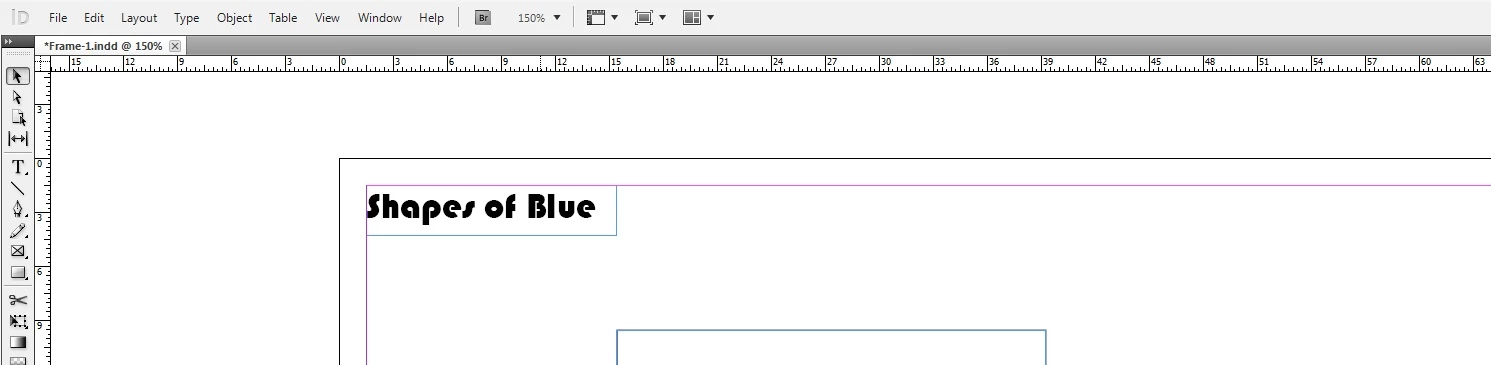
My InDesign control panel does not appear and I can find no help with this. I have a greyed out Show All Menus as well. I have del prefs, started a new user account and still can't find an answer on the internet. Anyone got a suggestion?  Thanks
This topic has been closed for replies.
Correct answer djbushby

Thanks for all your great suggestions, (workspaces weren't working properly, resetting didn't work, and there was no control option on window), there was only one thing that worked, re-installing Windows, and EVERYTHING else (what a job!). But, it all works wonderfully now.  I suspect registry problems, corrupt 'stuff'. It's the realm of 'techno-geeks', and way beyond me, but it works now.

7 replies

Participant
April 17, 2021

I know this is an old post but hopefully this comment will still help someone. I had a similar problem, my top control bar wasn't showing up like it normally would and I didn't remember changing any settings. I tried resetting "essentials" but it didn't do anything. 

Finally, after messing with the settings for a while, I figured out that clicking on windows>control brings it back! 

gueadobe
Participant
February 3, 2019

Maybe this help to someone.

I had the problem that my Control went missing when I unplug the second monitor. The resolution kind of mess up everything and Control went missing. What I realized is, when clicking on Control menu at the right and choosing "Dock at bottom or top" I got the Control back and now I could choose "Float" and set it anywhere. No need for clicking or unclicking in Window panel or resetting the program.

Cheers

Participating Frequently
January 19, 2022

That hamburger button to bring up the menu you are showing is on the control strip. How in the world are you getting to these settings if the control strip is missing to start with?

djbushbyAuthorCorrect answer
Participant
September 1, 2016

Thanks for all your great suggestions, (workspaces weren't working properly, resetting didn't work, and there was no control option on window), there was only one thing that worked, re-installing Windows, and EVERYTHING else (what a job!). But, it all works wonderfully now.  I suspect registry problems, corrupt 'stuff'. It's the realm of 'techno-geeks', and way beyond me, but it works now.

Barb Binder
Community Expert
Community Expert
September 1, 2016

Glad you are back on track.

~Barb at Rocky Mountain Training
Kevin Stohlmeyer
Community Expert
Community Expert
August 29, 2016

Is your workspace set to Start? I've seen this same thing happen when the workspace switches while you are in a document.

Participant
November 10, 2018

My Start option is not highlighted so I can't put it back on that option

Barb Binder
Community Expert
Community Expert
August 27, 2016

What happens when you choose Window > Control?

Or, Window > Workspace > Essentials, then Window > Workspace > Reset Essentials?

~Barb at Rocky Mountain Training
Participant
August 12, 2017

Thank you.This worked

Skemicle
Inspiring
August 27, 2016

With nothing selected hold shift and press tab.

correction: Shift-Tab goes for the workspace panels.. just Tab with nothing selected will activate/deactivate the control panel and tools menu.

Salah Fadlabi
Inspiring
August 27, 2016

See: CC Cleaner Tool for installation problems | CCM, CS6, CS5.5, CS5, CS4, CS3

  http://helpx.adobe.com/creative-suite/kb/cs5-cleaner-tool-installation-problems.html

djbushbyAuthor
Participant
September 2, 2016

Thanks for helping, but, this didn't work. Total malfunction.