
Participant
December 11, 2019
Answered

InDesign copy Superscript not showing

  • December 11, 2019
  • 1 reply
  • 1894 views

Hi Anyone who can help, 

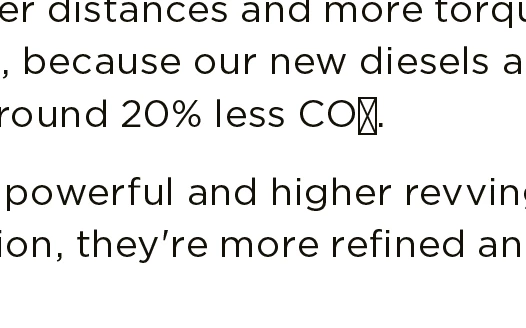
We have received files from our global office in UK and its a brochure that has superscripts and subscripts in the copy.  Below is the screenshot of the issue, we have to manually type 2 for it to show as CO₂. No fonts are missing and we have updated our InDesign to 2020. Please help:


This topic has been closed for replies.
Correct answer Jongware

The font used by the office in the UK contains Unicode subscript characters. Your font -- even though its name is the same -- does not; therefore, your font is a different version. (Probably older but it also might be newer, if hardcoded subscripts were replaced by the OpenType feature.)


Ask your global office for a legal copy of the font -- which will solve this once and for all --, or manually replace these missing characters with InDesign's fake super- and subscripts.

1 reply

Jongware
Community Expert
JongwareCommunity ExpertCorrect answer
Community Expert
December 11, 2019

The font used by the office in the UK contains Unicode subscript characters. Your font -- even though its name is the same -- does not; therefore, your font is a different version. (Probably older but it also might be newer, if hardcoded subscripts were replaced by the OpenType feature.)


Ask your global office for a legal copy of the font -- which will solve this once and for all --, or manually replace these missing characters with InDesign's fake super- and subscripts.

KaminatorAuthor
Participant
December 11, 2019

Thank you so much Mate.

It worked!!!