
Participant
January 1, 2018
Answered

InDesign crash at launch : Font Capture InDesign.exe entry point not found

  • January 1, 2018
  • 1 reply
  • 1719 views

Hello.

I can't open InDesign. I get an error message "Font Capture InDesign.exe entry point not found" ( see picture below) and after filling the crash report page, I'm back on the desktop. The error message says (transleted from French to English) : Could not locate the entry point _crtCreateSymbolicLinkW procedure in the dynamic link library MSVCR110.dll"

I installed the last version CC 2018, also installed versions 2017, 2015 but always have the same crash when launching ID for any version.

I use the French version of ID. I already used CC2015 on this computer last year and it worked perfectly but no more now. I searched on the forum but I'm unable to find any solution to this issue. I sent a crash report to Adobe. If someone could give me an help, thanks!
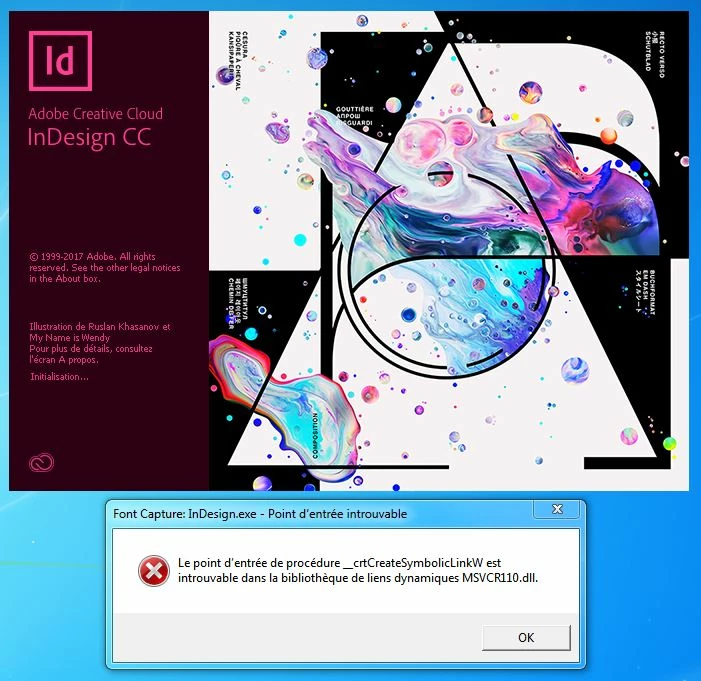
Crash report

Here are the first lines of the crash report that give the version of ID and info about my computer :

<!DOCTYPE AdobeCrashReport SYSTEM "AdobeCrashReporter.dtd">

<crashreport serviceVersion="1.6.2" clientVersion="1.6.2" applicationName="Adobe InDesign(64 bit)" applicationVersion="13010" build="13.0.1.207">

system platform="Windows 7 Home Premium" osversion="6.1" osbuild="7601" applicationlanguage="en-us" userlanguage="fr-FR" oslanguage="fr-FR" ram="16328" machine="Intel(R) Core(TM) i5-4670K CPU @ 3.40GHz" model="Intel64 Family 6 Model 60 Stepping 3" cpuCount="4" cpuType="8664" cpuFreq="3400 MHz"/>

<crash exception="EXCEPTION_ACCESS_VIOLATION" instruction="0x000007FED2C14AE8">

.........

    This topic has been closed for replies.
    Correct answer SanyamTalwar

    The error is specific to VC runtime of Visual studio 2012. If you are still facing the issue. Please drop a mail to santalwa@adobe.com

    1 reply

    SanyamTalwar
    Participating Frequently
    January 2, 2018

    Please follow the steps as mentioned below:

    1. Download the MSVCR repair files from this link : https://www.microsoft.com/en-in/download/details.aspx?id=30679

    2. Download the first two EXE files ( x86 & x64 )

    3. Run both of them one by one, choose the Repair option.

    4. Download the MSVCR repair files from this link : https://www.microsoft.com/en-in/download/details.aspx?id=40784

    5. Download the first two EXE files ( x86 & x64 )

    6. Download the MSVCR repair files from this link : https://www.microsoft.com/en-in/download/details.aspx?id=48145

    7. Download the first two EXE files ( x86 & x64 )

    8. Run both of them one by one, choose the Repair option.

    9. Restart the computer after you complete both execution.

    10. Do not launch InDesign immediately after the restart, instead..

    Ø Click on start and type %Appdata% and

    Ø open Roaming.

    Ø Go to Adobe >InDesign rename InDesign to InDesign.old

    Ø Now click on Appdata and open local

    Ø Go to Adobe >InDesign rename InDesign to InDesign.old

    chrisFR01Author
    Participant
    January 2, 2018

    Thank you for your message. I did exactly as you suggested but it still does not work, always the same crash and error message when launching InDesign.

    Just note that on the steps 2 and 5, I have not downloaded the vcredist_arm.exe file.

    On my computer I have many older Microsoft Visual ++versions 2005, 2008, 2010 as on the screen below. Should I uninstall them?

    SanyamTalwar
    SanyamTalwarCorrect answer
    Participating Frequently
    January 2, 2018

    The error is specific to VC runtime of Visual studio 2012. If you are still facing the issue. Please drop a mail to santalwa@adobe.com