

Susan Culligan
Inspiring
April 23, 2025
Answered

InDesign crashing during export to Reflowable Epub

  • April 23, 2025
  • 2 replies
  • 994 views

I'm turning a 300+ page book with over 700 Endnotes into a Reflowable Epub. After having ID crash repeatedly during export, I found an extensive list of posts on this board pointing to Endnotes as the problem.


Unfortunately, I had already converted all 700+ footnotes to endnotes because the footnotes weren't superscripting all the numbers correctly during export—leaving some of them not superscripted, which looked pretty messy. However, the only real solution that folks came up with was to convert the endnotes back to footnotes.


Rather than convert all my endnotes back to footnotes, I exported each chapter to Reflowable Epub separately, finding that Chapter 4 was the only one that caused InDesign to freeze. I converted that chapter back to footnotes and it exported fine, even though the numbers were messy, so I left that one chapter as footnotes (changed to endnotes during export) and the whole book exported correctly.


I hope this helps others to troubleshoot ID books crashing during export to Reflowable Epub, and perhaps Adobe will figure out how to fix this if they ever want to be a popular source for reflowable epubs—either making all the superscripted footnote numbers export correctly, or figuring out why endnotes cause ID to crash.


Correct answer Robert at ID-Tasker

@Susan Culligan 


It took my like 2h - but I finally found it 😄


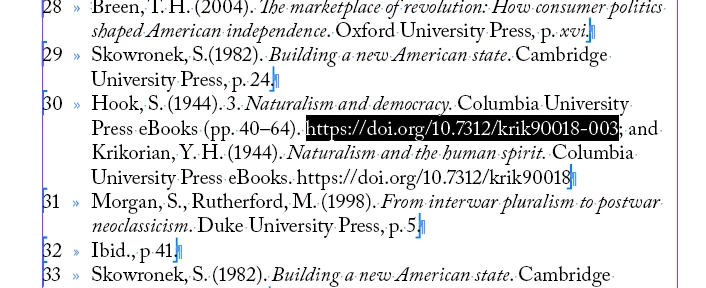
This is the problem with your file:


If you delete it - using Hyperlinks panel - your file will export perfectly fine as ePUB 😄


Re-adding it as Hyperlink - will lock InDesign during ePUB export again...


I'll send you private message in a moment.


2 replies

Robert at ID-Tasker
Legend
April 24, 2025

@Susan Culligan 


Can you share with me - privately - this Chapter 4 - but with the Endnotes that are crashing InDesgin?


Susan Culligan
Inspiring
April 24, 2025

I'm not sure how to share this with you privately, so I'm attaching it here. It's not proprietary.

Robert at ID-Tasker
Legend
April 24, 2025

@Susan Culligan


Thanks. I'll download and check it later. 


In order to share file privately - you need to click my nickname - and then you can send me a message - but you'll have to upload file somewhere first and send me link as it's not possible to send attachments with private messages.


Abhishek Rao
Community Manager
Community Manager
April 24, 2025

Hi @Susan Culligan,


Thanks so much for sharing your experience and the steps you tried to get the EPUB export to work. That’s really helpful, and I'm sure others in the community will appreciate your insights.

It’s good to hear that exporting by chapter helped you isolate the issue, and that converting Chapter 4’s endnotes back to footnotes allowed the export to go through, even though the superscript formatting wasn’t ideal.

I did check, but couldn’t locate a crash report under your community email address. When you get a moment, could you please submit a crash report using the steps in the link below and share the email address you enter while submitting via DM on the community? That’ll help me check the logs and escalate it further if needed:
https://adobe.ly/4cPmhuv

Also, just to better understand your workflow, could you confirm the exact version of InDesign you're using (e.g., 20.2, 20.3, etc.) and your operating system? 


Looking forward to your update.

Abhishek