


Participant
April 8, 2020
Answered

InDesign CS4 subscript to subscript

  • April 8, 2020
  • 1 reply
  • 2129 views

I need to make a symbol representing pressure of carbon dioxide i ID CS4. Thus it is 

P(subscript(COsubscript(2)). When I use the button for subscripts once and type CO it is nicely located where it belongs. Then to add '2' as a subscript to 'CO' it makes in numeral in the main line of text. 

I cannot find how to do it.


Please help, thank you, Jan
This topic has been closed for replies.
Correct answer Migintosh

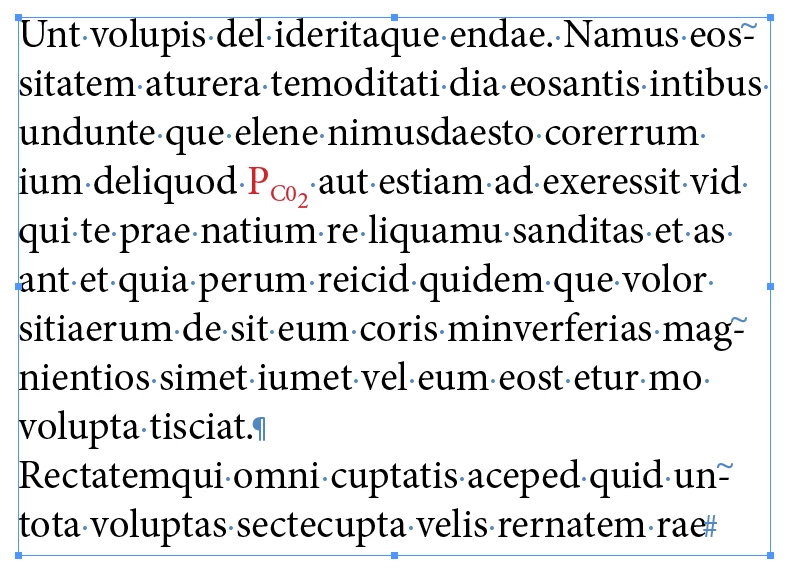
How's this? If it's OK, set C02 as subscript, then raise C0 with baseline shift, leaving 2 without baseline shift.

1 reply

Legend
April 8, 2020

Is this what you want, and if not, can you post a screen shot?

jcz7Author
Participant
April 8, 2020

Unfortunately not. Below is the text in question. The equation is done with MathType. The last term in the equation contains the term with double subscript. I need to correct the corresponding term in the first line of text below:


thank you, Jan


MigintoshCorrect answer
Legend
April 8, 2020

How's this? If it's OK, set C02 as subscript, then raise C0 with baseline shift, leaving 2 without baseline shift.