
Participant
April 8, 2020
Answered

InDesign CS4 subscript to subscript

  • April 8, 2020
  • 1 reply
  • 2129 views

I need to make a symbol representing pressure of carbon dioxide i ID CS4. Thus it is 

P(subscript(COsubscript(2)). When I use the button for subscripts once and type CO it is nicely located where it belongs. Then to add '2' as a subscript to 'CO' it makes in numeral in the main line of text. 

I cannot find how to do it.


Please help, thank you, Jan
This topic has been closed for replies.
Correct answer Migintosh

How's this? If it's OK, set C02 as subscript, then raise C0 with baseline shift, leaving 2 without baseline shift.

1 reply

Legend
April 8, 2020

Is this what you want, and if not, can you post a screen shot?

jcz7Author
Participant
April 8, 2020

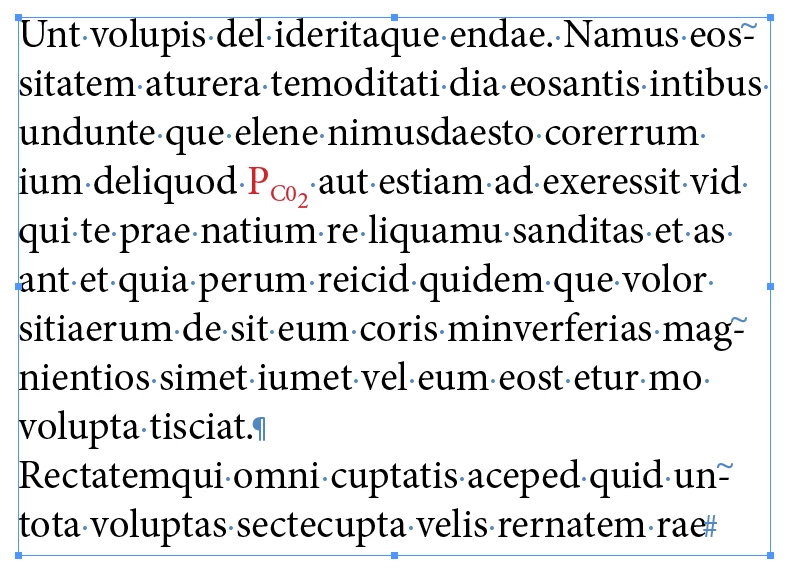
Unfortunately not. Below is the text in question. The equation is done with MathType. The last term in the equation contains the term with double subscript. I need to correct the corresponding term in the first line of text below:


thank you, Jan


Legend
April 9, 2020

Thank you so much. It worked! 

I have actually moved base line for CO one point up and for 2 one point down and made the size of 2 a little smaller. 

But, for a technical text it would be very handy if this can be done with subscript tool somehow. Of course I could have made the glyph in MathType and insert it into the text as an inline object. Although it would be perhaps better as far as the sizes and positions of all elements are concerned, but editing if required would be much complex. So perhaps Adobe can consider extending the subscript and superscript functions to two levels. 

Thanks again, Jan


Outside of math, I'm not sure when you would need two levels of subscript, so I wouldn't hold your breath on Adobe getting that done, but you never know. By the way, if you need to adjust the size or position of the subscript on a global scale, you can do that in Preferences>Advanced Type.