Participant
January 27, 2012
Answered

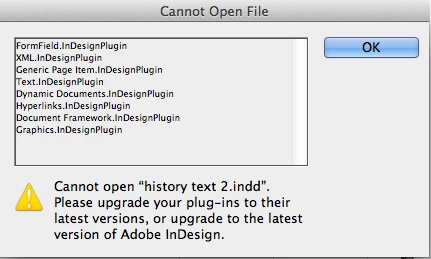
InDesign CS5 - Cannot open File. Please upgrade your plug-ins to their latest version, or ....

  • January 27, 2012
  • 3 replies
  • 27851 views

InDesign CS5 - Impossible to open a lot of indd. file. You can see exactly what happen in the fallow screenshot. Updates and upgrades done.

What can I do for open those indd. ??? tx

This topic has been closed for replies.
Correct answer Peter Spier

These are CS5.5 files and cannot be opened directly in CS5. They must be exported from CS5.5 to .idml, and those files should open in CS5.

3 replies

jettero75Author
Participant
January 28, 2012

Ok, thanks guys, now is clear. I didn't realize the version number. I thought CS3 > CS4 > CS5 > CS6 (why CS5.5 ??).

Participant
January 17, 2013

I'm getting the same error (with slightly different plugins). I am opening a template. I Am POSITIVELY using CS5.5 to attempt to open it. I can open the included .idml file. Frustrating.

Peter Spier
Community Expert
Community Expert
January 17, 2013

Your template was probably saved from CS6. you can check using this script: Adobe Forums: [Ann] Identify Your InDesign File

Joel Cherney
Community Expert
Community Expert
January 27, 2012

The error message here is misleading; these files were saved with InDesign CS5.5.  You either need to upgrade to CS5.5, or open these files up with CS5.5 and export an IDML file which can be opened up in CS5.0.

Peter Spier
Community Expert
Peter SpierCommunity ExpertCorrect answer
Community Expert
January 27, 2012

These are CS5.5 files and cannot be opened directly in CS5. They must be exported from CS5.5 to .idml, and those files should open in CS5.