


Participant
November 15, 2019
Question

InDesign - CSV to Tables Scripting

  • November 15, 2019
  • 3 replies
  • 4053 views

Hello, 


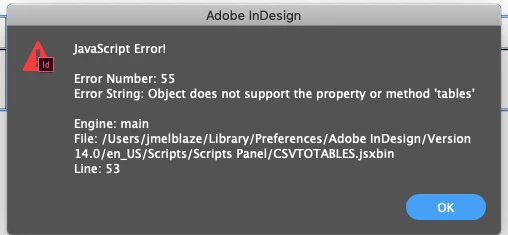
I'm trying to use Data Merge with a script to get my spreadsheets into a table. I'm using InDesign CC v14.0.02. And I found CSV2Tables script from Loic Aigon. Do you know of any newer scripts, or have script code I can create myself?
 

This topic has been closed for replies.

3 replies

Colin Flashman
Community Expert
Community Expert
November 16, 2019

Try this version available from Scriptopedia rather than Loic's Ozalto site: https://www.scriptopedia.org/en/js-indesign/126-csvtotable-en.html

If the answer wasn't in my post, perhaps it might be on my blog at colecandoo!
Participant
November 17, 2019

I'll try this! Thanks. 

Jongware
Community Expert
Community Expert
November 16, 2019

It's odd – over the years there have been lots of additions to InDesign, but pretty much no real changes. I cannot recall anything recent concerning tables. As it's a jsxbin, this is probably a commercial script (and I won't ask how you "found" it) and so it's not open to tinker with.

But you can try if this ol' trick still works: instead of plunging it into the general Scripts Panel folder, create a sub-folder in there with a specific version number. See https://community.adobe.com/t5/indesign/script-not-working-in-indesign/td-p/9863219 for the exact instructions.

As I cannot find any reference to when this mysterious change in table handling happened, I can't advise on a version number to use. Hopefully the script came with a readme.txt that clarifies for which version it originally was written.

Participant
November 17, 2019

Thank you very much. I will try that link!

brian_p_dts
Community Expert
Community Expert
November 15, 2019

You don't need to use a script with DataMerge. Just set up the fields in the table based on the header and flow from DataMerge. 

Participant
November 17, 2019

I got it working. Thank you.

Participant
September 28, 2023

How?