
Participant
September 3, 2020
Answered

Indesign do not recognize typo

  • September 3, 2020
  • 2 replies
  • 287 views

Good evening! I'm having a problem with my indesign when I make a package to  save all items.

When I open the file, the typo mess everything inside, making it unreadble. See the exemple: Could someone tell me what is it and how can I solve it? I never sw this happen before. I already uninstall the indesign and install again, and also the typo.
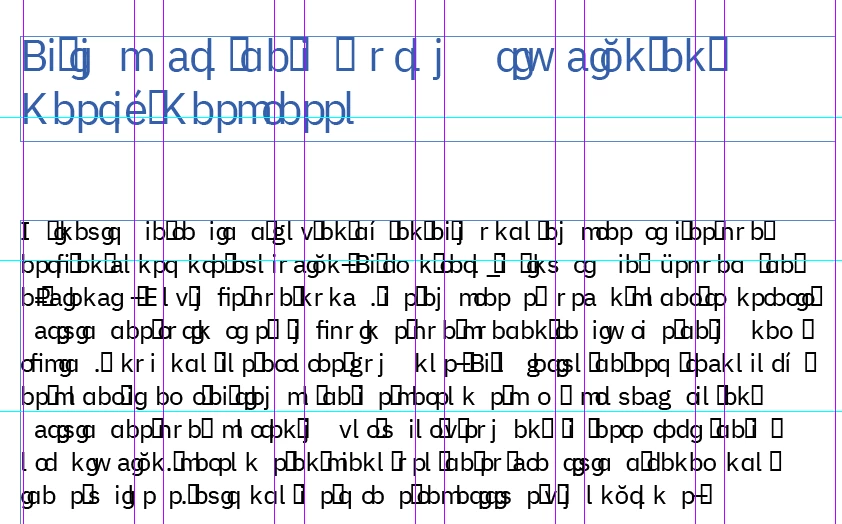
 

Thanks.

This topic has been closed for replies.
Correct answer Rellamonteiro

Hello!! Thanks for your help! But actually I solved it.

I compared the old packages that I made before in another laptop and I noticed that the font file was different. I was using .ttf and in this new laptop, extension .otf. 

Somehow the indesign do not recognize it when the package is done, but I changed it and everything went back to normal.  However, the files that I made using the extension .otf continues with this problem, but when I paste the extension .ttf inside the Document Fonts of the package, it also changes. Pretty weird, but useful.


Thank you!!

2 replies

Bill Silbert
Community Expert
Community Expert
September 4, 2020

You say that this happened when you packaged a file. Does that mean that you are seeing this issue when you open the copy of the InDesign file that you created for the package and that everything was alright when you viewed the original version of the InDesign file? When you packaged the file did you make sure to have "Copy Fonts" checked in the dialog window that appears during the package process? If you did then there should be a folder within the packaged folder that says "Document Fonts". If that folder is there then the InDesign file will recognize any fonts in that folder and your type should read correctly. If it is not there or if you move the InDesign file or the Document Fonts folder outside of the packaged folder then the fonts will no longer read correctly.

Randy Hagan
Community Expert
Community Expert
September 4, 2020

It looks like a conflict with your copy and/or font used in the text frame.


Try this:


  1. Get your Text tool. Highlight all the blue text in the header and use the Edit>Copy menu command to copy it to your clipboard.
  2. Open your word processor application, then place your cursor and use the Edit>Paste menu command to paste the text from the header into your word processing file.
  3. If you can read the type just fine, it's likely a font problem. Go back to the InDesign document and change the font. Hopefully you'll see whatever that text is supposed to be just fine.
  4. If the type is just as messed up/jumbled in the word processing file, you've got a problem with the copy. You can still try changing the font in the InDesign file, but you've probably got a problem with the copy.


Give this a try and let us know how things turned out. If you don't get a fix with this, sound the alarm again. We'll do our best to help.


Hope this helps,


Randy

RellamonteiroAuthorCorrect answer
Participant
September 4, 2020

Hello!! Thanks for your help! But actually I solved it.

I compared the old packages that I made before in another laptop and I noticed that the font file was different. I was using .ttf and in this new laptop, extension .otf. 

Somehow the indesign do not recognize it when the package is done, but I changed it and everything went back to normal.  However, the files that I made using the extension .otf continues with this problem, but when I paste the extension .ttf inside the Document Fonts of the package, it also changes. Pretty weird, but useful.


Thank you!!