

raphaelar15619474
Participating Frequently
August 7, 2021
Answered

InDesign doesn't replace missing glyphs but Photoshop does..

  • August 7, 2021
  • 5 replies
  • 1231 views

Hello!

I am using a font that apparently doesn't have German umlauts (äöü). In Photoshop I guess they were automatically replaced with another font and looked normal. In InDesign they are just dots. Is there a way to replace them the same way Photoshop does it? That would save me sooo much time. Or maybe someone here knows how Photoshop does it and how I can figure out which font it uses for the replacement?
Thank you!
This topic has been closed for replies.
Correct answer Laubender

Hi Raphael,

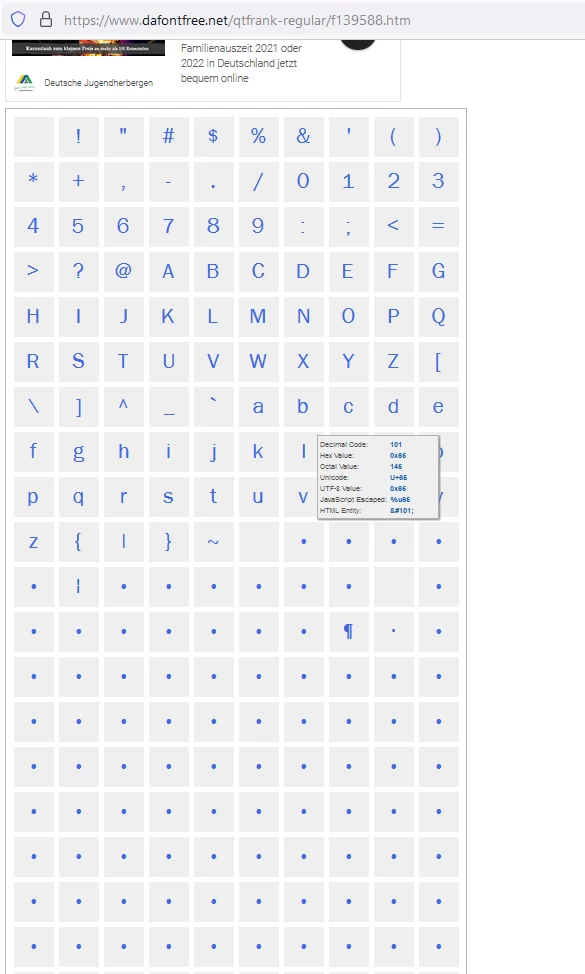
did you download the font file from Dafont?

If you check the character map there you see that a lot of glyphs are missing:


Contact the font maker to get a full version.


Regards,
Uwe Laubender

( ACP )

5 replies

LaubenderCommunity ExpertCorrect answer
Community Expert
August 9, 2021

Hi Raphael,

did you download the font file from Dafont?

If you check the character map there you see that a lot of glyphs are missing:


Contact the font maker to get a full version.


Regards,
Uwe Laubender

( ACP )

jane-e
Community Expert
Community Expert
August 8, 2021

Can you show PS and ID with an insertion point in the text and the Character panel (Window menu) showing in both applications so we can see the typeface actually used? You might also select one of the glyphs in both applications with the Glyphs panel showing so we can see if it's the same glyph.


@raphaelar15619474 wrote:

Is there a way to replace them the same way Photoshop does it?


Photoshop does not have Find/Change for glyphs like InDesign does, but you may not need to use that here. We don't know yet.


~ Jane


raphaelar15619474
Participating Frequently
August 9, 2021

Hello Jane!
Did you mean it like that? English is not my first language.

In Photoshop all the glyphs of the font are there. In InDesign there are just dots.
Thanks for helping!

-Raphi

Community Expert
August 9, 2021

In InDesign


The font is named QTFrank - with the weight inserted as [Medium]

When there are square brackets around a word like [Medium] for the fonts - that means the font is not installed.

Photoshop has substituted the font - so you're not seeing QTFrank Medium - I don't think so anyway.


I posted as screen shot of the preferences in the very first reply - have you tried these settings?

Legend
August 8, 2021

You may wonder why people say "missing font" with such certainty. See https://haizdesign.com/indesign/indesign-color-highlighting/

raphaelar15619474
Participating Frequently
August 9, 2021

Ah thanks. Yeah I guess it shows that the umlauts are missing. But in Photoshop they are there.

Peter Spier
Community Expert
Community Expert
August 7, 2021

In the screen shot it looks as if the feont is missing, not just the umlauts. Are you sure it's installed?

Diane Burns
Inspiring
August 8, 2021

Agree with Peter, likely a missing font. Check the font or simply switch to another font and see if the umlats show up. Minion, for example, is installed with ID, I think, and has a pretty full set of glyphs.

raphaelar15619474
Participating Frequently
August 9, 2021

When I change to another font all the umlauts are there.

Community Expert
August 7, 2021

Check the InDesign preferences for missing glphy protection